Home
» AI Video Generator
»
How to Storyboard a 15-Second Halloween Video With AI Without Misleading Viewers
How to Storyboard a 15-Second Halloween Video With AI Without Misleading Viewers
A 15-second Halloween video has room for only one small idea: a setup, a visual surprise, and a clear ending. AI tools can help draft frames or generate short clips, but a realistic-looking scene can also be mistaken for evidence of something that happened. The safest workflow is to storyboard first, make the fictional setting obvious, and label the finished video clearly when platform rules call for it.
Illustrative example: Imagine a fictional neighborhood creator planning “Maple Street’s Midnight Treat.” This is a made-up scenario for explaining the process, not a real event, a real street, or a test of a particular AI product. The video shows a decorated porch, a person in a skeleton costume setting out candy, a playful ghost-shaped wisp, and a friendly wave. It avoids a fake emergency, real address, or identifiable person.
Start with a four-beat story, not a long prompt
Before opening a video generator or editor, write down what viewers should understand after one watch. For this example, the message is simply “a playful Halloween porch is ready for trick-or-treaters.” A storyboard turns that idea into four shots with one job each. The seconds below add up to 15; they are an editing plan, not a promise that an AI tool can generate clips at those exact lengths.
Beat 1 — 0–3 seconds: establish the scene
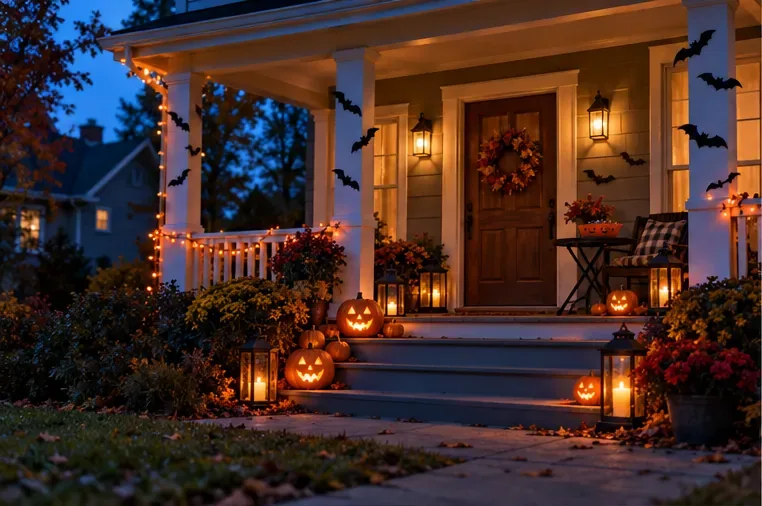
Opening frame: a decorated porch establishes a playful Halloween setting before any character appears.
Use a wide view of the porch, pumpkins, lanterns, and paper bats. Keep the camera steady and let the viewer read the scene quickly. For a vertical social post, compose the important details near the center so they remain visible after platform cropping. A prompt can specify the shot size, dusk lighting, decorations, and “fictional staged Halloween scene.” Do not add a real street sign, house number, school logo, or business name to make the setting look authentic.
Beat 2 — 3–6 seconds: show one simple action
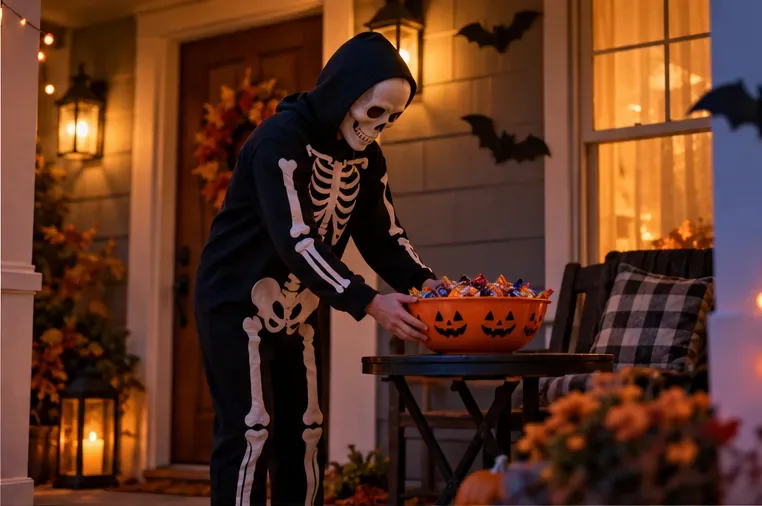
Second frame: a costumed host places a candy bowl on the porch table, giving the story a simple action.
Move to a medium shot of a costumed host placing a candy bowl on a table. Keep the action readable and avoid asking for several movements at once; short AI-generated clips can vary in motion and continuity. If the selected tool supports reference images or character references, reuse the same approved reference for the costume and porch. If it does not, generate a still for each shot and create continuity in the edit with matching color, sound, and cut timing. Avoid copying a real person’s face or voice unless you have the appropriate permission.
Beat 3 — 6–10 seconds: make the surprise clearly fantastical
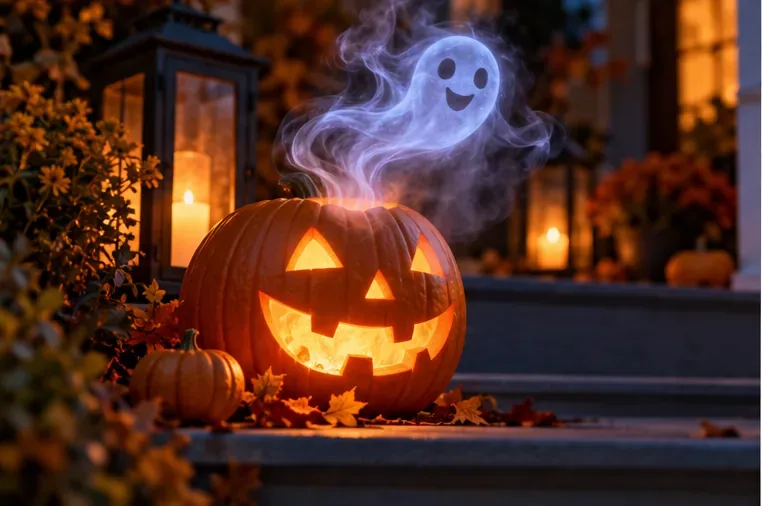
Third frame: a friendly ghost-shaped wisp rises from a jack-o’-lantern, signaling a playful fantasy effect.
Use a closer shot of a glowing jack-o’-lantern as a small ghost-shaped wisp curls above it. Keep the effect playful rather than resembling smoke from a fire, a break-in, or an emergency at a real home. A useful prompt describes the object, motion, framing, and tone: “close-up of a carved pumpkin; a small, friendly ghost-shaped mist rises slowly; whimsical Halloween fantasy; no damage, no emergency, no text.” If the result looks like credible footage of a real incident, revise the scene so its fictional nature is unmistakable.
Beat 4 — 10–15 seconds: resolve the moment
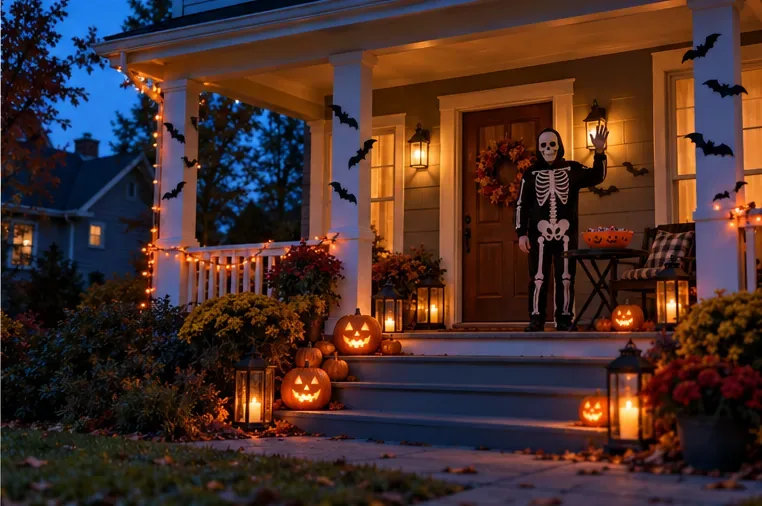
Closing frame: the costumed host waves beside the candy bowl, ending the scene on a friendly note.
Return to a wider porch view and let the costumed host wave. Leave room for a brief closing line such as “A fictional Halloween scene” or “Have a playful Halloween.” Add that text in the editor rather than asking the generator to render small lettering, which can come out garbled. Keep the final beat calm and clear so the video does not end on a moment that viewers might mistake for a real warning.
How do you make the video without implying it is real?
Choose a fictional setting that does not point to a real address or identifiable local business. Do not imitate a doorbell camera, police body-camera clip, local-news segment, emergency alert, or security recording if the footage was generated. Timestamps, location labels, sirens, and “breaking” graphics can make invented events feel documented. In this example, warm porch lights, paper bats, the costume, and a smiling ghost establish the genre before anything uncanny happens.
Be especially careful with faces, voices, and real places. Do not make a neighbor, public figure, child, or local official appear to do or say something they did not. Do not fabricate footage of a real house being vandalized or a real street experiencing a frightening event. If a real location matters to the story, use footage you have permission to use and make any AI additions clear; changing a real place can still mislead viewers even when the added detail is meant as a joke.
Which disclosure should you use?
Platform requirements can change, so check the upload screen and current help page before posting. As of September 28, 2026, YouTube says creators must disclose AI-generated or meaningfully altered content when it appears photorealistic, including a realistic scene that did not happen. YouTube’s help page says the disclosure is made in the upload workflow and a label is added for viewers. TikTok’s help page says creators must label AI-generated content containing realistic images, audio, or video. A clearly fantastical, non-realistic effect may be treated differently by a platform, but do not assume a realistic-looking generated porch scene is exempt.
For this hypothetical video, a concise caption such as “Fictional AI-created Halloween scene” gives viewers context, while the platform’s own disclosure control addresses its specific policy. The caption does not replace an upload disclosure when one is required. Conversely, a platform label is not a reason to package the video as authentic security footage. Read the current platform guidance directly: YouTube’s guidance on disclosing generative AI content and TikTok’s AI-generated content guidance.
Check the finished 15 seconds before sharing
Preview the export on a phone, with sound on and off. Confirm that the four shots tell the same small story, the costumed host and porch look consistent enough for the edit, the ghost reads as fantasy, and any text is legible without covering the main action. Watch for errors that can accidentally change the meaning: a strange hand near the candy bowl, a distorted house number, a real-looking news banner, or a sound effect that suggests danger.
Does the opening establish Halloween before the supernatural moment appears?
Could any frame be mistaken for evidence of a real event or location?
Are faces, voices, logos, signs, and property used with permission and in context?
Does the caption explain that the scene is fictional, and have you used the platform’s required AI disclosure?
Does the final cut actually run 15 seconds, with a readable ending rather than a misleading cliffhanger?
If a frame fails one of these checks, replace it or make the fictional treatment clearer before publishing. A short Halloween video can still feel polished without pretending to document a real scare: give every shot one purpose, keep the supernatural moment playful, and let viewers know what they are watching.