Home
» AI Agents
»
Claude System Prompts: How to Set Tone Boundaries for Technical Documentation
Claude System Prompts: How to Set Tone Boundaries for Technical Documentation
Technical documentation often fails in subtle ways before it fails factually. A draft can be accurate yet too casual, too promotional, too verbose, too vague about uncertainty, or inconsistent with the rest of a documentation set. If you use Claude to produce API guides, troubleshooting articles, release notes, internal runbooks, or developer documentation, the system prompt is one of the best places to define those persistent writing boundaries.
There is also a current model-behavior change worth noting. As of September 2026, Anthropic’s deprecation documentation says temperature, top_p, and top_k are deprecated for Claude Opus 4.7 and later and Claude Mythos Preview, with prompting recommended instead for behavior control. That makes explicit system-level style instructions more important than older recipes that tried to shape tone mainly through sampling parameters. See Anthropic’s model and API deprecation guidance.
What should a “tone boundary” actually control?
A tone boundary should define the communication behavior that stays stable across many documentation requests. It is not just “sound professional.” A useful boundary usually covers five things: audience, voice, level of detail, acceptable uncertainty language, and formatting habits.
For example, a developer-facing documentation assistant might be told to write in a professional and neutral tone, explain unfamiliar terms on first use, prefer direct sentences over marketing language, distinguish confirmed facts from assumptions, and use headings and code blocks only when they improve navigation.
Anthropic’s current prompting guidance explicitly recommends clear and direct instructions, context about why a behavior matters, examples for tone and structure, and XML tags when a prompt mixes different kinds of information. It also says that giving Claude a role in the system prompt helps focus behavior and tone. See Anthropic’s prompting best practices.
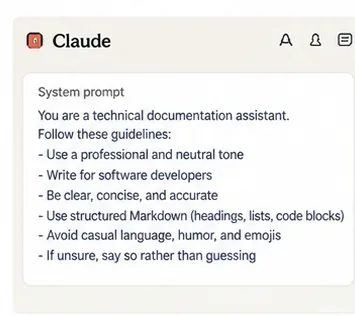
AI-generated illustration of a tone-and-style block for technical documentation. It is a conceptual example, not a screenshot of the Claude interface.
Should tone rules live in the system prompt or the user prompt?
Put durable rules in the system prompt and task-specific instructions in the user prompt. The system prompt is the right home for rules such as “write for software developers,” “avoid marketing claims,” “state uncertainty instead of guessing,” and “use concise technical prose.” The user message should describe the current job: for example, “Write a migration guide from version 4 to version 5 using these release notes.”
This separation reduces repetition and makes your documentation pipeline easier to test. It also prevents a single task request from redefining your entire editorial voice.
A simple system-prompt pattern
<role>
You are a technical documentation writer.
</role>

<audience>
Write for software developers and system administrators.
Assume general technical literacy, but explain product-specific terms on first use.
</audience>

<tone>
Use a professional, neutral, direct tone.
Prefer concrete language over hype or promotional claims.
Avoid slang, filler, emojis, and exaggerated certainty.
Keep sentences reasonably short and paragraphs focused.
</tone>

<accuracy>
Do not invent commands, features, versions, benchmarks, or behavior.
Distinguish verified facts from assumptions or recommendations.
If required information is missing, say what is unknown.
</accuracy>

<format>
Use descriptive headings.
Use lists only for genuinely discrete steps or checks.
Use code blocks for commands and code.
Do not add a conclusion that merely repeats the article.
</format>
This works because each section has one job. Anthropic specifically recommends consistent, descriptive XML tags for complex prompts so the model can distinguish instructions, context, examples, and inputs more reliably.
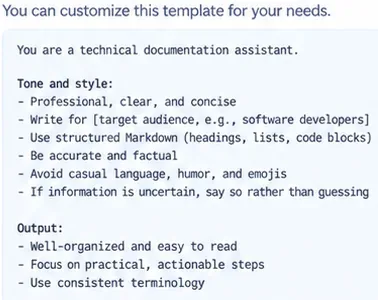
AI-generated illustration of a reusable technical-documentation system prompt with separate tone, audience, accuracy, and output expectations.
How specific should the tone rules be?
Specific enough that another writer could follow them without asking what you meant. “Be professional” is weak because professional API documentation, executive architecture notes, and end-user setup instructions can all sound different.
A stronger rule describes observable behavior:
Vague instruction
Better boundary
Be professional
Use neutral, direct language; avoid slang, hype, jokes, and self-congratulatory phrasing.
Be concise
Lead with the answer, keep paragraphs focused, and omit background that does not affect the user’s next action.
Be technical
Use precise product terminology, commands, and examples, but define uncommon terms on first use.
Be confident
State verified facts directly, but label assumptions, estimates, and unknowns explicitly.
Use good formatting
Use headings for navigation, code blocks for executable text, and lists only when the items are meaningfully discrete.
Positive instructions are usually easier to operationalize than prohibition-only rules. Instead of only saying “do not sound promotional,” add the desired alternative: “Describe benefits in concrete terms tied to user outcomes.”
How do you keep tone rules from harming technical accuracy?
Do not let style override evidence. A common mistake is to ask for “confident, authoritative writing” without also defining what the model should do when source material is incomplete. That can encourage polished uncertainty rather than useful documentation.
Add an accuracy boundary such as:
When documentation sources do not establish a fact:
- Do not infer a product capability from naming or UI appearance.
- State that the behavior could not be verified.
- Ask for the missing source when the fact is required to complete the task.
- Do not turn assumptions into definitive instructions.
For technical documentation, this rule is often more valuable than a generic instruction to “avoid hallucinations,” because it defines the expected behavior when evidence is missing.
Should you specify verbosity in the system prompt?
Yes, if document length and density matter. Anthropic’s current prompting guidance notes that recent Claude models differ in default communication style and verbosity. The documentation specifically advises prompting explicitly for conciseness when needed rather than assuming effort or other model settings will control visible answer length consistently.
A practical documentation boundary can define density instead of a fixed word count:
Lead with the information needed to act.
Use enough explanation to make the instruction safe and unambiguous.
Do not repeat the same recommendation in the introduction, body, and conclusion.
For simple fixes, prefer short sections.
For architecture or migration topics, explain trade-offs and prerequisites in more depth.
This scales better than a blanket “always write 1,000 words” instruction.
How many examples should you include?
Use examples when prose rules still leave room for interpretation. Anthropic calls examples one of the most reliable ways to steer format, tone, and structure, and its current guidance recommends using roughly three to five relevant, diverse examples when you rely on few-shot prompting.
For documentation, examples should cover different cases rather than repeating one voice sample. A useful set might include a short troubleshooting answer, an API-reference paragraph, a warning about data loss, a version-dependent note, and an example where the model must say that something is not verified.
Do not make the examples so long that they become the prompt. Their purpose is to show the pattern, not to provide a hidden template that every article copies mechanically.
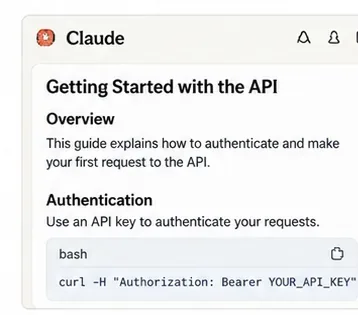
AI-generated illustration of a concise technical documentation output. The layout demonstrates structure and tone rather than an actual Claude response.
What tone boundaries are useful for common documentation types?
Calm, diagnostic, action-first; distinguish likely causes from confirmed causes.
Release notes
Factual and version-specific; separate new features, fixes, deprecations, and breaking changes.
Internal runbook
Operational and unambiguous; prioritize preconditions, commands, rollback steps, and escalation points.
End-user setup guide
Plain language, minimal jargon, short steps, clear signs that each step succeeded.
Architecture documentation
Analytical and neutral; explain trade-offs, assumptions, constraints, and alternatives.
What should not be encoded as “tone”?
Do not bury business logic, security policy, or factual constraints inside a vague style section. “Never reveal credentials,” “only use information from approved sources,” and “do not execute commands” are behavioral or security rules, not tone preferences. Give them separate sections so they remain visible and testable.
The same applies to output schemas. If an application needs valid JSON, exact keys, or machine-readable fields, specify that as an output contract rather than describing it as a stylistic preference.
How should you test a documentation system prompt?
Do not judge it from one successful example. Build a small evaluation set that includes normal tasks and edge cases. A useful test pack might contain:
A simple “how do I install this?” request.
A migration guide with breaking changes.
A source document containing marketing-heavy language that should not leak into the final tone.
A prompt with incomplete version information.
A technical question whose answer is not established by the supplied source.
A request for a long explanation where conciseness should still be preserved.
A user instruction that asks for a style conflicting with your organization’s documentation policy.
Review outputs against explicit criteria: correct audience, neutral tone, no unsupported claims, appropriate detail, consistent terminology, clear uncertainty, and usable structure. Anthropic’s prompt guidance also recommends defining clear success criteria and verifying results rather than relying on intuition alone.
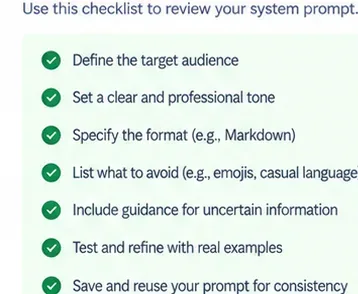
AI-generated illustration of a prompt-review checklist covering audience, tone, format, uncertainty, examples, and reuse.
How do you prevent the system prompt from becoming bloated?
Keep rules at the level of stable editorial policy. If one sentence handles several cases, do not replace it with twelve narrow prohibitions. Current Anthropic guidance for recent models also warns against over-prompting: stronger instruction following can make aggressive legacy wording such as repeated “CRITICAL” or “MUST” rules over-trigger behavior that newer models would already follow with normal phrasing.
A good maintenance rule is to add a system-prompt instruction only after you can name the recurring failure it prevents. If a rule exists only for one article, put it in the user prompt for that article.
Reusable technical documentation system prompt
<role>
You are a senior technical documentation writer.
</role>

<audience>
Write for the audience specified in the user request.
If no audience is given, assume technically literate practitioners.
Explain uncommon product-specific terminology on first use.
</audience>

<tone>
Use clear, professional, neutral American English.
Lead with the information needed to act.
Avoid hype, casual filler, jokes, emojis, exaggerated certainty,
and phrases that sound like marketing copy.
Use direct statements when facts are verified.
</tone>

<accuracy>
Never invent product behavior, commands, UI labels, versions,
benchmarks, limitations, or test results.
Separate verified facts, conditional behavior, recommendations,
and unknowns.
If evidence is insufficient, say so explicitly.
</accuracy>

<structure>
Use descriptive headings that help navigation.
Prefer short, focused paragraphs.
Use numbered steps only for ordered procedures.
Use bullets for genuinely discrete checks or options.
Use code blocks for commands and code.
Avoid repetitive summaries.
</structure>

<examples>
Provide 3–5 task-relevant examples in the production prompt
when tone or format remains ambiguous.
</examples>

<quality_check>
Before finalizing, verify that the response matches the requested
audience, uses consistent terminology, avoids unsupported claims,
and follows the requested output format.
</quality_check>
The goal is not to make every document sound identical. The goal is to make the boundaries stable: accuracy does not become enthusiasm, uncertainty does not become guesswork, technical depth does not become unnecessary jargon, and conciseness does not remove prerequisites or safety information.
A well-designed Claude system prompt works best as an editorial policy layer. Keep the permanent voice and quality boundaries there, keep article-specific requirements in the user prompt, and use a small evaluation set to verify that both layers continue to produce documentation that your readers can trust.