Grok AI, developed by xAI, has quickly become one of the most practical AI assistants for programmers and learners. This guide explores the best real-world use cases and provides clear, actionable instructions to help you get maximum value from Grok whether you code professionally or study full-time.

What is Grok AI?
Grok is an advanced AI language model created by xAI. It stands out because of its balance between helpfulness, technical accuracy, and a touch of humor inspired by the Hitchhiker’s Guide to the Galaxy and JARVIS from Iron Man.
Unlike many other AI tools, Grok is designed to provide clear explanations, refuse unhelpful answers less often, and stay updated with current information. For coders and students, this translates into an assistant that can explain complex concepts without unnecessary corporate guardrails while maintaining strong technical capabilities.
Why Grok Works Well for Coders and Students
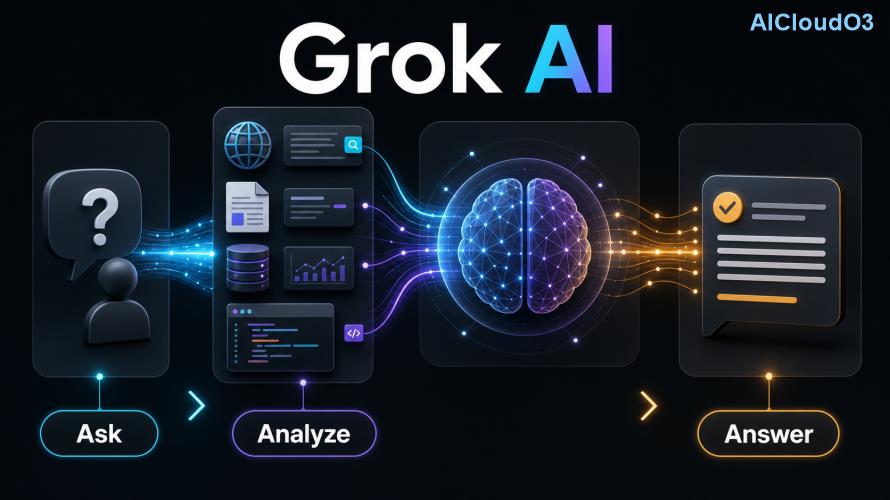
Grok excels in two areas critical for both programmers and learners: breaking down technical topics and generating practical, working solutions. Its training emphasizes reasoning, which makes it particularly strong at following multi-step logic — essential for debugging code or understanding academic theories.
Current features allow it to handle multiple programming languages, explain algorithms visually through text, and adapt explanations to different knowledge levels. Students benefit from patient tutoring, while developers save time on repetitive tasks.
Best Use Cases for Coding
Here are the highest-value ways developers and coding enthusiasts are using Grok today:
1. Debugging and Error Resolution
Instead of staring at stack traces for hours, you can paste the error and relevant code. Grok identifies the root cause, explains why it happened, and suggests multiple fixes ranked by practicality.
2. Code Generation with Context
Grok can generate functions, classes, or entire small applications when given clear requirements. It excels at writing clean, commented code that follows modern best practices.
3. Learning New Frameworks and Languages
Whether you want to learn Rust, React hooks, or data science libraries, Grok can create structured learning paths with practical mini-projects.
4. Code Review and Refactoring
Upload your code and ask Grok to review for performance issues, security vulnerabilities, readability, and suggest improvements. Many developers report catching bugs they would have missed.
5. Algorithm Explanation and Implementation
Grok can explain Dijkstra’s algorithm, dynamic programming, or binary trees in plain English, then show optimized implementations in your preferred language.
| Use Case |
Time Saved (Estimate) |
Best Prompt Strategy |
| Debugging |
30–90 minutes per bug |
Provide error message + relevant code + expected behavior |
| Learning new language |
Significant acceleration |
Ask for “project-based learning roadmap” |
| Code review |
20–40 minutes per module |
Specify focus areas: security, performance, readability |
Best Use Cases for Students
Grok serves as a 24/7 tutor that adapts to your learning style. Responsible students use it to deepen understanding rather than shortcut learning.
1. Concept Simplification
Struggling with pointers in C++, recursion, or calculus? Grok can explain the same concept using different analogies until one clicks.
2. Step-by-Step Problem Solving
Instead of just giving answers, Grok walks through mathematical proofs, physics problems, or chemistry equations step by step.
3. Study Planning and Organization
Ask Grok to create revision timetables, break down large syllabi, or generate practice questions tailored to your weak areas.
4. Writing Assistance with Integrity
Grok can help brainstorm essay structures, improve thesis statements, or check arguments for logical gaps — while reminding you to cite sources properly.
5. Exam Preparation
Create mock exams, generate flashcards, or practice explaining topics as if teaching someone else — one of the most effective learning techniques.
Step-by-Step How-To Guide
Getting started with Grok is straightforward. Here’s exactly how to use it effectively:
- Access: Visit grok.x.ai or use the integrated version on X (formerly Twitter) with appropriate access.
- Start a new conversation for each major project to maintain context clarity.
- Use role prompting — for example: “Act as a senior Python developer teaching a university student.”
- Provide context — share your current knowledge level, preferred learning style, and specific goals.
- Iterate — treat the first response as a draft and refine with follow-up questions.
Example Coding Prompt
“I’m a beginner learning JavaScript. Create a todo list application using only vanilla JS. Include add, delete, and mark complete functions. Add comments explaining each section and suggest two ways to improve it afterward.”
Example Student Prompt
“Explain how transformers work in machine learning like I’m a high school student who only knows basic algebra. Use an everyday analogy and then show the simplest possible diagram using text.”
Prompt Engineering Tips for Better Results
💡 The quality of Grok’s output depends heavily on your input. Follow this checklist:
- Specify your experience level (beginner, intermediate, advanced)
- Define the desired output format (table, bullet points, code block, step-by-step)
- Ask for reasoning before final answer when solving problems
- Request multiple approaches for the same problem
- Use “think step by step” for complex reasoning tasks
- Ask Grok to rate its confidence in technical answers
Limitations and Responsible Use
While powerful, Grok is not perfect. It can occasionally produce incorrect code or outdated information. Always test generated code in your environment and verify academic facts from primary sources.
Important: Students should use Grok to understand concepts, not to complete assignments they don’t comprehend. Developers should treat AI-generated code as a starting point that requires review.
Check the latest official documentation and terms of use from xAI for current capabilities and policies.
Frequently Asked Questions
Is Grok better than ChatGPT for coding?
Grok often performs strongly in logical reasoning and provides more concise explanations. Many developers use both tools depending on the task. Results vary by specific use case.
Can Grok help with homework without getting me in trouble?
Yes, when used responsibly. Ask for explanations and learning strategies rather than complete answers. Always cite AI assistance where required by your institution.
Does Grok support all programming languages?
Grok handles all major languages and many niche ones. It performs especially well with Python, JavaScript, Java, C++, SQL, and Rust.
How much does Grok cost for students?
Check current pricing on the official Grok website. Various access tiers exist, and educational use may qualify for special considerations depending on current offerings.
Can Grok debug mobile development code?
Yes. It can help with React Native, Flutter, Swift, and Kotlin. Provide the specific framework, error messages, and what you’ve already tried.
Conclusion
Grok represents a significant step forward for both coding productivity and personalized learning. By mastering the use cases and prompting techniques in this guide, you can accelerate your programming skills and academic performance while developing deeper understanding.
The key is consistent, responsible use combined with critical thinking. Start small — pick one specific project or subject you’re struggling with today and experiment with the prompting strategies above.
🚀 Ready to level up your coding and learning?
Start using Grok today at the official platform and apply the techniques from this guide. The more you practice, the better your results will become.
Bookmark this guide and return as you tackle new languages, frameworks, or academic challenges.
This guide was written to help coders and students maximize their use of current Grok AI capabilities. Always verify important code and academic work through testing and primary sources.