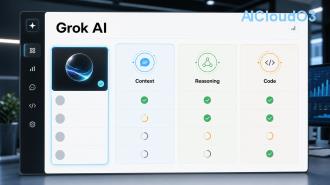
Grok is one of the most capable and conversational AI assistants available today. Built by xAI, it combines real-time knowledge, creative thinking, and practical tools to help users work smarter. This beginner-friendly guide walks you through exactly how to use Grok in 2026 — from signing up to mastering advanced features and integrating it into your daily workflow.
🤖 What is Grok AI?
Grok is an advanced large language model developed by xAI with a focus on being maximally truthful, helpful, and witty. Unlike many other AI tools, Grok is designed to answer questions other models might avoid and includes real-time web access, image understanding, and powerful reasoning capabilities.
Current versions offer enhanced context windows, improved accuracy, and seamless integration with productivity tools. Whether you want to automate tasks, generate ideas, analyze data, or learn new skills, Grok can significantly boost your efficiency.

How to Access Grok in 2026
Grok is available through multiple official channels including the dedicated Grok website, the X platform, and mobile applications. The latest information shows that basic access is free with usage limits, while higher quotas and advanced features require a subscription plan. Always check the official pricing page for current details.
Step 1: Create Your Account
✅ Getting Started
- Visit grok.x.ai
- Sign in with your X account or create a new one
- Complete the quick verification process
- Choose your subscription tier based on expected usage (free tier available for beginners)
Tip: Start with the free plan to test how Grok fits your needs before upgrading.
Step 2: Navigate the Interface
Once logged in, you'll see a clean, modern chat interface. On the left sidebar are your conversation history, new chat button, and feature toggles. The main area is where you type prompts and view responses.
Key elements include:
- Prompt box with attachment options for images and files
- Model selector (switch between different Grok versions based on task)
- Tools menu for web search, code interpreter, and image generation
- Response controls to regenerate, edit, or copy output
Step 3: Master Prompting
The quality of Grok's answers depends heavily on how you ask. Here's a simple framework for beginners:
| Prompt Type |
Example |
Best Used For |
| Basic |
"Explain quantum computing simply" |
Quick explanations |
| Role-based |
"Act as a senior marketing strategist and create a 2026 campaign plan for..." |
Professional tasks |
| Step-by-step |
"Break down this task into 7 clear steps:" |
Complex projects |
| Chain of thought |
"Think step by step before answering..." |
Reasoning tasks |
Always be specific, provide context, and tell Grok exactly what format you want the answer in (bullet points, table, email, code, etc.).

Step 4: Explore Advanced Features
Beyond text chat, current Grok versions include several powerful tools:
- 🔍 Real-time Web Search — Ask Grok to fetch latest information from the internet
- 🖼️ Image Analysis & Generation — Upload images for description or generate new visuals
- 📊 Data Analysis — Upload spreadsheets and ask for insights
- 💻 Code Generation & Debugging — Get help with programming in any language
- 🗣️ Voice Mode — Available in the mobile app for hands-free conversation
Step 5: Build Real Workflows
Turn one-off chats into repeatable systems:
- Create a dedicated chat for each major project
- Use custom instructions to set consistent tone and expertise level
- Save useful prompt templates in a personal note
- Combine Grok with automation tools like Zapier for even more efficiency
Best Practices and Pro Tips ⚡
Follow these guidelines to get the most value:
- Start conversations with clear goals: "Help me achieve X by doing Y"
- Iterate on responses — ask Grok to refine, expand, or simplify previous outputs
- Use the "Continue" or "Expand" commands to develop ideas further
- Double-check important facts, legal advice, or financial calculations with official sources
- Keep prompts under 4000 characters for best performance
Common Beginner Mistakes to Avoid
- Being too vague in prompts
- Expecting perfect answers on first try
- Not using the built-in tools when needed
- Forgetting to set custom instructions for recurring tasks
Practical Use Cases for Work, Learning & Business
For Students: Summarize research papers, create study plans, explain difficult concepts.
For Professionals: Draft emails, analyze competitors, brainstorm strategies, write reports.
For Content Creators: Generate outlines, improve headlines, create social media captions, develop content calendars.
For Business Owners: Research markets, develop product ideas, prepare presentations, automate customer support replies.
❓ Frequently Asked Questions
1. Is Grok free to use in 2026?
Yes, there is a free tier with usage limits. Paid plans offer higher limits, faster responses, and priority access to newer models. Check the official site for current pricing.
2. How does Grok compare to ChatGPT or Claude?
Grok excels in real-time information, humor, and less restrictive responses. Each model has strengths — many users test the same prompt across tools and choose the best output.
3. Can Grok access my personal files?
You can upload files during conversations for analysis, but Grok does not have permanent memory of your documents between different chats unless you use project folders (where available).
4. How accurate is Grok?
While Grok is highly capable, all AI models can make mistakes. Always verify critical information from primary sources. Results vary based on prompt quality and complexity.
5. Does Grok support image generation?
Yes, the latest versions include image generation and analysis capabilities. Simply describe what you want or upload an image and ask questions about it.
6. How do I keep my data private when using Grok?
Review the official privacy policy. Avoid sharing sensitive personal or business information. xAI continues to update its data handling practices — always check the latest terms.
Conclusion
Learning how to use Grok effectively can dramatically improve your productivity, creativity, and problem-solving ability. The key is practice. Start simple, experiment with different prompting styles, and gradually build more sophisticated workflows.
Ready to Start Using Grok?
Open Grok today at the official platform and begin with one simple task. The more you use it, the more valuable it becomes. Bookmark this guide and return as you progress from beginner to power user.
Pro tip: Come back each month to discover new features as the platform evolves rapidly.
This guide reflects the latest available features and best practices. AI tools evolve quickly — always refer to official documentation for the most current guidance.