Startseite
» Domänen
»
Ollama vs LM Studio: Which Is Better for Local AI Agent Development in 2026?
Ollama vs LM Studio: Which Is Better for Local AI Agent Development in 2026?
The answer changed in 2026. Ollama is no longer just a small command-line model runner, and LM Studio is no longer just a desktop GUI for chatting with local models. Ollama added Anthropic-compatible APIs and a one-command ollama launch workflow for coding tools such as Claude Code, Codex, and OpenCode. LM Studio 0.4.0 introduced llmster for true headless deployment, a stateful REST API, parallel serving, and MCP access through the API. For local AI agent development, both are now serious developer platforms.
Short answer: choose Ollama when you want the shortest path from terminal to local model server, already have your own agent framework, or want easy integration with coding agents and automation scripts. Choose LM Studio when you want built-in model discovery plus a developer server with stateful chats, MCP integrations, first-party Python/TypeScript SDKs, and an automatic multi-round agent API. Neither is universally better; the right choice depends on which layer of the agent stack you want the runtime to manage.
This comparison was checked against current Ollama and LM Studio documentation on September 13, 2026.
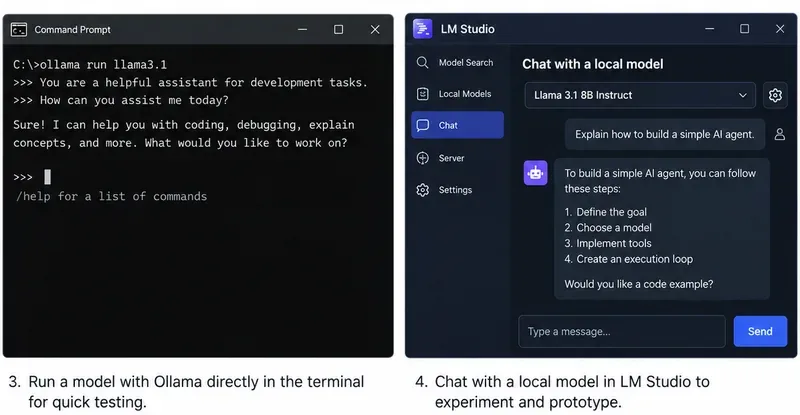
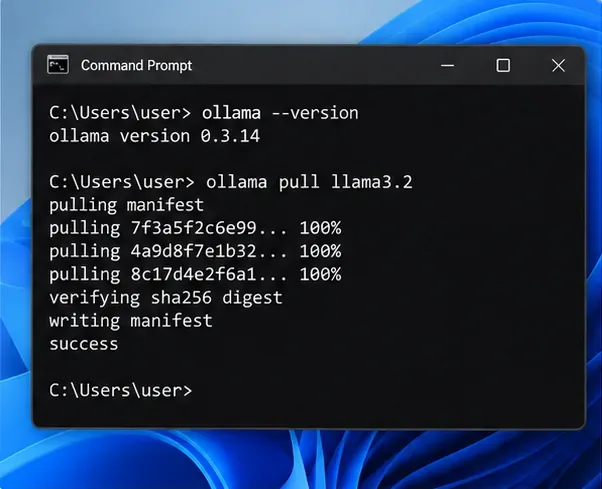
Ollama remains naturally terminal-first, while LM Studio combines a desktop workflow with a full developer server. The image is a workflow illustration rather than a version-specific benchmark.
What changed enough in 2026 to affect the decision?
Two updates narrowed the gap substantially.
First, Ollama added Anthropic Messages API compatibility in January 2026 and then introduced ollama launch, which can configure and start supported coding tools with Ollama models without manually editing environment variables or configuration files. Ollama’s current integrations documentation includes Claude Code, Codex, OpenCode, Copilot CLI, Cline, Roo Code, JetBrains, VS Code, n8n, and other tools. See Ollama’s announcement of ollama launch, Ollama’s Anthropic compatibility documentation, and Ollama integrations.
Second, LM Studio 0.4.0 separated the core runtime from the desktop app through llmster, making headless use on servers and CI a first-class option. Its native v1 REST API now supports stateful conversations, authentication, model download/load/unload operations, and MCP integrations. LM Studio also exposes OpenAI-compatible and Anthropic-compatible endpoints. See LM Studio 0.4.0 release notes and LM Studio v1 REST API documentation.
Practical consequence: “CLI versus GUI” is no longer an adequate comparison. The more useful question is whether you want a lean inference runtime that plugs into an existing agent stack, or a local AI development environment that also provides agent-oriented orchestration features.
Which is easier if you already have an agent framework?
Ollama usually wins for simplicity. Its native API runs at http://localhost:11434, and it also implements OpenAI-compatible and Anthropic-compatible endpoints. If your code already uses an OpenAI client, a framework that accepts a configurable base URL, or a coding tool supported by Ollama, switching the backend can be a small configuration change.
Ollama’s tool-calling API supports single tool calls, parallel tool calls, streaming tool calls, and multi-turn tool-calling loops. The documentation shows an agent loop where your Python or JavaScript code executes the requested function, returns the result to the model, and repeats until the model stops asking for tools. See Ollama tool-calling documentation.
A minimal OpenAI-compatible connection looks like this:
from openai import OpenAI

client = OpenAI(
    base_url="http://localhost:11434/v1",
    api_key="ollama"
)
Best fit: LangChain-style applications, your own Python agent loop, coding assistants, CI jobs, shell automation, or any project where you mainly need a dependable local model endpoint and prefer to own the orchestration logic yourself.
Which is better if you want agent orchestration built into the local stack?
LM Studio has the clearer advantage here. Its Python and TypeScript SDKs include an .act() API specifically designed for multi-round tool use. You give the model a task and tools; the SDK can execute requested tools, pass results back to the model, and continue for additional rounds until the model returns a final response or the process ends.
LM Studio’s documentation describes this as an automatic multi-round tool-calling API and provides hooks for progress, invalid tool requests, and parallel tool execution. The Python SDK can also accept ordinary type-annotated Python functions as tool definitions. See LM Studio .act() documentation.
That does not automatically make an LM Studio agent more capable. Tool-use quality still depends heavily on the model, tool descriptions, context length, and your safety controls. It does reduce the amount of agent-loop plumbing you have to write yourself.
Best fit: prototypes where you want to define Python or TypeScript functions and immediately test autonomous multi-step behavior without bringing in a separate agent framework.
Do you need MCP as a first-class part of the agent architecture?
If Model Context Protocol is central to your project, LM Studio is currently the stronger native choice. LM Studio can act as an MCP host in the app, and its API supports both configured MCP servers and per-request remote MCP servers. Its current v1 REST API and OpenAI-compatible Responses endpoint can expose MCP integrations to calling applications.
For example, LM Studio can define an ephemeral remote MCP server in a request or call MCP servers configured in mcp.json. The server settings include explicit permissions for per-request MCPs and locally configured MCP servers. See LM Studio MCP via API.
Ollama has extensive integrations with agent applications that may themselves support MCP, but Ollama’s current core documentation emphasizes function/tool calling and external integrations rather than presenting Ollama itself as an MCP host equivalent to LM Studio.
Choose LM Studio if: you want your local inference server to be the place where MCP tools are configured and exposed to agent requests.
Choose Ollama if: your higher-level agent application already owns the MCP layer and you only need Ollama to supply inference and tool-call outputs.
Which has the better API surface for stateful agents?
LM Studio currently offers more built-in state management. Its native /api/v1/chat endpoint can store a response and continue the conversation with a previous_response_id. Its OpenAI-compatible Responses API also supports stateful continuation. That can reduce how much conversation history your application has to resend for long-running workflows.
Ollama supports the OpenAI Responses API, but its current compatibility documentation states that only the non-stateful flavor is supported and that previous_response_id and conversation-based state are not supported. Your application can still maintain state by keeping the message history and sending it with later requests.
Recommendation: if server-managed conversational state is important to your architecture, LM Studio has an edge. If you already persist agent memory in your own database, message store, or framework, Ollama’s stateless approach is not a major disadvantage.
Which is better for coding agents such as Claude Code or Codex?
Ollama is especially convenient if your main goal is running existing coding agents. The current quickstart exposes ollama launch shortcuts for supported tools, and Ollama has dedicated integration documentation for Claude Code, Codex, OpenCode, Cline, Roo Code, and others. Its Anthropic-compatible Messages API supports streaming, tools, tool results, vision, and thinking-related fields for supported models.
LM Studio unterstützt außerdem Claude Code über seinen Anthropic-kompatiblen /v1/messagesEndpunkt und Codex über seinen OpenAI-kompatiblen Responses-Endpunkt. Im Januar 2026 wurde mit LM Studio 0.4.1 der Anthropic-kompatible Endpunkt speziell für die Verwendung lokaler Modelle mit Claude Code eingeführt.
Brauchen
Bessere Standardeinstellung
Grund
Einrichtung mehrerer Codierungsagenten mit einem einzigen Befehl
Ollama
ollama launchist auf die Integration unterstützter Agenten ausgelegt.
Claude Code mit einem lokalen Backend
Entweder
Beide bieten Anthropic-kompatible Messages-APIs.
Codex mit einem lokalen Backend
Entweder
Beide unterstützen OpenAI-kompatible APIs, die für Codex-Workflows geeignet sind.
Agent plus MCP-Tools werden vom lokalen Server verwaltet
LM Studio
MCP ist in die aktuelle Server-/API-Architektur von LM Studio integriert.
Welches Modell eignet sich besser zum Finden, Testen und Austauschen?
LM Studio eignet sich besser für die visuelle Erkundung. Die Desktop-Anwendung bietet eine Modellerkennung und kann unterstützte Modelle von Hugging Face suchen. Die Befehlszeilenschnittstelle (CLI) ermöglicht ebenfalls das Suchen und Herunterladen von Modellen lms get, einschließlich der unterstützten Formate GGUF und MLX. Sie können Quantisierungen auswählen, lokale Modelle untersuchen, den Speicherbedarf vor dem Laden abschätzen und die Ladeeinstellungen für jedes Modell konfigurieren, z. B. Kontextlänge, GPU-Offloading und Flash Attention.
Dies ist nützlich, wenn Sie mehrere kleine Agentenmodelle testen und diese interaktiv vergleichen möchten, bevor Sie eines davon im Code festlegen.
Ollamas Modell-Workflow ist stärker vordefiniert und skriptfähig: Verwenden Sie Befehle wie ollama pull``, ollama list`, ollama run`, ` und ollama create. Ein Modell Modelfilekann ein Basismodell und Einstellungen für wiederverwendbare Varianten definieren. Dies ist praktisch für Infrastructure-as-Code-Setups, da die Modellvorbereitung in Shell-Skripten, Docker-Workflows oder der Bereitstellungsautomatisierung erfolgen kann.
Empfehlung: LM Studio zum Durchsuchen und interaktiven Experimentieren; Ollama für einen reproduzierbaren, terminalgesteuerten Modellworkflow.
Können beide im Headless-Modus auf einem Server oder in einer CI-Umgebung ausgeführt werden?
Ja. Früher war dies ein klarerer Vorteil für Ollama, aber LM Studio 0.4.0 hat den Vergleich verändert.
Ollama ist von Natur aus serviceorientiert. Unter Linux empfiehlt die offizielle Installationsanleitung, Ollama als systemd-Dienst auszuführen und ollama servedie lokale API bereitzustellen. Es bietet außerdem Docker-Unterstützung und Umgebungsvariablen für das Serververhalten.
LM Studio bietet nun llmstereinen eigenständigen Daemon, der nicht von der grafischen Benutzeroberfläche abhängig ist. Die aktuelle Dokumentation beschreibt ihn explizit für Linux-Server, Cloud-Instanzen, GPU-Maschinen und CI-Umgebungen. Starten Sie ihn mit lms daemon upund den API-Server mit lms server start.
Empfehlung: Wenn Sie einen möglichst schlanken Technologie-Stack bevorzugen, ist Ollama nach wie vor einfacher. Wenn Sie hingegen eine Headless-Bereitstellung wünschen und gleichzeitig die Modellverwaltungs-API, den zustandsbehafteten Chat, die Authentifizierung, die MCP-Unterstützung und das SDK-Ökosystem von LM Studio nutzen möchten, llmsterist LM Studio eine vollwertige Option.
Es gibt keinen allgemeingültigen Gewinner. Die Leistung hängt vom Modellformat, der Quantisierung, der Kontextlänge, der CPU/GPU, dem Treiber-Stack, der Batchverarbeitung, dem Speicherdruck und den Laufzeiteinstellungen ab.
Ollama bietet Steuerungsmöglichkeiten für die Planung paralleler Anfragen und geladener Modelle. Die für 2026 geplante Apple-Silicon-Version beinhaltet eine MLX-basierte Engine in der Vorschauphase. LM Studio 0.4.0 führte die kontinuierliche Stapelverarbeitung paralleler Anfragen ein und unterstützt sowohl llama.cpp-Laufzeitumgebungen als auch MLX auf Apple Silicon. LM Studio bietet zudem explizite Ladesteuerungsoptionen wie GPU-Offloading, Kontextlänge, Flash Attention und KV-Cache-Platzierung für die entsprechenden Laufzeitumgebungen.
Maßnahme: Ermitteln Sie die exakte Modell- und Kontextgröße, die Ihr Agent verwenden wird. Messen Sie mindestens die Zeit bis zum ersten Token, die Token pro Sekunde, den Speicherverbrauch und den Durchsatz bei mehreren Anfragen. Wählen Sie keine Laufzeitumgebung basierend auf einem generischen Benchmark mit unterschiedlichen Quantisierungs- oder Kontexteinstellungen.
Wie sieht es mit der Hardwarekompatibilität aus?
Beide unterstützen die gängigen lokalen KI-Plattformen, unterscheiden sich jedoch in den Details. Ollama unterstützt macOS, Windows und Linux und bietet dokumentierte native Beschleunigungsoptionen für NVIDIA, AMD, Apple Metal und experimentelle Vulkan-Pfade. LM Studio unterstützt Apple Silicon Macs, x64/ARM-Windows-Systeme und x64/ARM64-Linux-Konfigurationen; die aktuellen macOS-Anforderungen decken Intel Macs nicht ab.
Bei ungewöhnlicher Hardware sollten Sie die genaue Kombination aus GPU und Betriebssystem überprüfen, bevor Sie sich für eine der beiden Laufzeitumgebungen entscheiden.
Welche Methode ist für lokale Agenten sicherer: die Verwendung von Datei- oder Browsertools?
Die Inferenzlaufzeitumgebung ist nur ein Teil der Sicherheitsgrenze. Sobald ein Agent Werkzeuge erhält, die Dateien schreiben, Befehle ausführen, authentifizierte Websites durchsuchen oder interne APIs aufrufen können, geht das Risiko sowohl von den Werkzeugberechtigungen als auch vom Modellserver aus.
LM Studio weist ausdrücklich darauf hin, dass MCP-Server beliebigen Code ausführen, auf lokale Dateien zugreifen und das Netzwerk nutzen können. Es bietet Servereinstellungen für Authentifizierung und MCP-Berechtigungen. Die Tool-API von Ollama überlässt die Funktionsausführung Ihrer Anwendung, wodurch Sie die volle Kontrolle über die Berechtigungen jeder einzelnen Funktion haben.
Empfehlung: Verwenden Sie eng gefasste Werkzeugschemata, validieren Sie Argumente, trennen Sie schreibgeschützte und destruktive Werkzeuge, fordern Sie eine Bestätigung für Aktionen mit hoher Auswirkung an und stellen Sie eine lokale Modell-API oder einen MCP-Server nicht ohne angemessene Zugriffskontrollen einem nicht vertrauenswürdigen Netzwerk zur Verfügung.
Welche Option sollte ein Python-Entwickler wählen?
Wählen Sie Ollama, wenn Ihre Python-Anwendung bereits eine Agentenschleife besitzt oder ein Framework verwendet, das mit OpenAI-kompatiblen APIs kommunizieren kann. Das Python SDK kann auch Python-Funktionen direkt als Werkzeuge akzeptieren, sodass der grundlegende Workflow zum Aufrufen von Werkzeugen kompakt bleibt.
Wählen Sie LM Studio , wenn Sie das eigene SDK der Laufzeitumgebung für die Ausführung mehrerer Werkzeugrunden nutzen möchten. Das lmstudio-pythonSDK umfasst das Laden und Entladen von Modellen, Einbettungen, strukturierte Antworten, Agentenabläufe und Werkzeugdefinitionen in einem einzigen Paket.
Eine nützliche Regel lautet:
Eigene Orchestrierung: Ollama ist in der Regel sauberer.
Sie benötigen Orchestrierungshilfsmittel aus dem Runtime SDK: LM Studio ist in der Regel produktiver.
Welche Option sollten Sie für Ihr erstes Projekt als lokaler Agent wählen?
Ihre Situation
Empfohlener Ausgangspunkt
Sie wünschen sich eine lokale API, die innerhalb von Minuten einsatzbereit ist, und bevorzugen Terminal-Workflows.
Ollama
Sie möchten sich die Modelle visuell ansehen, bevor Sie sich für eines entscheiden.
LM Studio
Sie verwenden bereits LangChain, LlamaIndex, Ihre eigene Schleife oder eine andere Orchestrierungsebene.
Ollama
Sie möchten MCP-Tools direkt im lokalen Server-/API-Workflow verwenden.
LM Studio
Sie benötigen einen externen Agentenhelfer für mehrere Runden in Python/TypeScript.
LM Studio
Sie benötigen hauptsächlich Claude Code, Codex, OpenCode oder ähnliche Coding-Agent-Integrationen.
Ollama, mit LM Studio ebenfalls realisierbar
Sie benötigen lokale GUI-Tests, aber später einen Server ohne grafische Benutzeroberfläche.
LM Studio
Sie bevorzugen einen minimalen Dienst, der einfach zu skripten und bereitzustellen ist.
Ollama
Fazit
Ollama ist die bessere Standardlösung für Entwickler, die eine minimalistische, terminalorientierte Modelllaufzeitumgebung suchen, die sich nahtlos in ein bestehendes Agenten-Ökosystem integrieren lässt. Dank seiner API, der Möglichkeit zum Funktionsaufruf, der Kompatibilität mit OpenAI/Anthropic und der Integrationen mit Coding-Agents ab 2026 ist es besonders praktisch, wenn Ihre Anwendung oder Ihr externes Framework bereits Speicher, MCP, Planung, Wiederholungsversuche und die Ausführung von Tools verwaltet.
LM Studio ist die bessere Wahl, wenn Sie einen größeren Teil des Agentenentwicklungs-Stacks in einer lokalen Umgebung benötigen. Der Headless-Daemon von 2026 beseitigt die Einschränkung auf eine rein grafische Benutzeroberfläche, während die zustandsbehaftete REST-API, die MCP-Unterstützung, die Modellverwaltungs-Endpunkte, die OpenAI/Anthropic-Kompatibilität und .act()das SDK Entwicklern, die eine integrierte Orchestrierung und interaktive Modellexperimente wünschen, einen deutlichen Vorteil verschaffen.
Wenn Sie sich noch unsicher sind, ist die praktische Entscheidung einfach: Führen Sie einen Prototyp derselben Tool-Aufruf-Aufgabe auf beiden Systemen mit demselben Modell und derselben Quantisierung durch. Falls das Agenten-Framework bereits alle benötigten Funktionen bietet, behalten Sie die einfachere Laufzeitumgebung von Ollama bei. Sollten Sie jedoch Zustandsverwaltung, MCP-Infrastruktur, Modellverwaltungssteuerung und mehrstufige Tool-Schleifen von Grund auf neu entwickeln müssen, kann LM Studio Ihnen möglicherweise Entwicklungszeit sparen.