หน้าแรก
» โดเมน
»
Ollama vs LM Studio: Which Is Better for Local AI Agent Development in 2026?
Ollama vs LM Studio: Which Is Better for Local AI Agent Development in 2026?
The answer changed in 2026. Ollama is no longer just a small command-line model runner, and LM Studio is no longer just a desktop GUI for chatting with local models. Ollama added Anthropic-compatible APIs and a one-command ollama launch workflow for coding tools such as Claude Code, Codex, and OpenCode. LM Studio 0.4.0 introduced llmster for true headless deployment, a stateful REST API, parallel serving, and MCP access through the API. For local AI agent development, both are now serious developer platforms.
Short answer: choose Ollama when you want the shortest path from terminal to local model server, already have your own agent framework, or want easy integration with coding agents and automation scripts. Choose LM Studio when you want built-in model discovery plus a developer server with stateful chats, MCP integrations, first-party Python/TypeScript SDKs, and an automatic multi-round agent API. Neither is universally better; the right choice depends on which layer of the agent stack you want the runtime to manage.
This comparison was checked against current Ollama and LM Studio documentation on September 13, 2026.
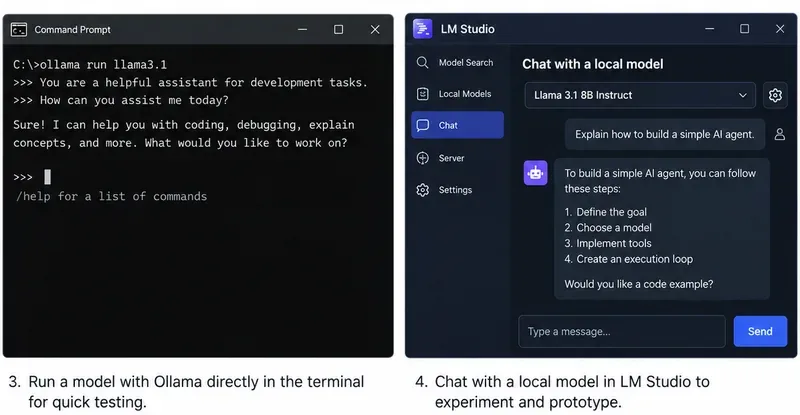
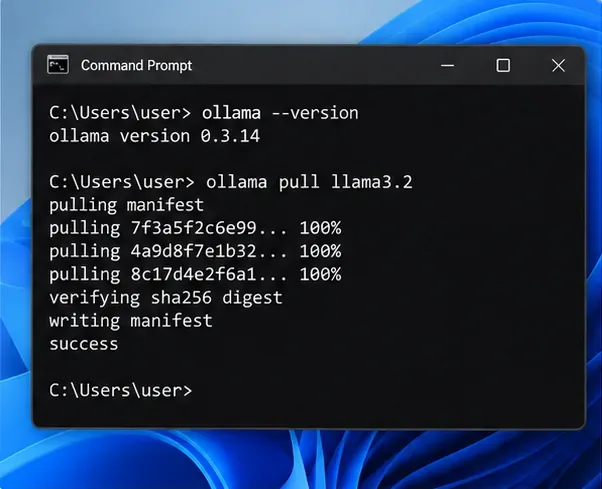
Ollama remains naturally terminal-first, while LM Studio combines a desktop workflow with a full developer server. The image is a workflow illustration rather than a version-specific benchmark.
What changed enough in 2026 to affect the decision?
Two updates narrowed the gap substantially.
First, Ollama added Anthropic Messages API compatibility in January 2026 and then introduced ollama launch, which can configure and start supported coding tools with Ollama models without manually editing environment variables or configuration files. Ollama’s current integrations documentation includes Claude Code, Codex, OpenCode, Copilot CLI, Cline, Roo Code, JetBrains, VS Code, n8n, and other tools. See Ollama’s announcement of ollama launch, Ollama’s Anthropic compatibility documentation, and Ollama integrations.
Second, LM Studio 0.4.0 separated the core runtime from the desktop app through llmster, making headless use on servers and CI a first-class option. Its native v1 REST API now supports stateful conversations, authentication, model download/load/unload operations, and MCP integrations. LM Studio also exposes OpenAI-compatible and Anthropic-compatible endpoints. See LM Studio 0.4.0 release notes and LM Studio v1 REST API documentation.
Practical consequence: “CLI versus GUI” is no longer an adequate comparison. The more useful question is whether you want a lean inference runtime that plugs into an existing agent stack, or a local AI development environment that also provides agent-oriented orchestration features.
Which is easier if you already have an agent framework?
Ollama usually wins for simplicity. Its native API runs at http://localhost:11434, and it also implements OpenAI-compatible and Anthropic-compatible endpoints. If your code already uses an OpenAI client, a framework that accepts a configurable base URL, or a coding tool supported by Ollama, switching the backend can be a small configuration change.
Ollama’s tool-calling API supports single tool calls, parallel tool calls, streaming tool calls, and multi-turn tool-calling loops. The documentation shows an agent loop where your Python or JavaScript code executes the requested function, returns the result to the model, and repeats until the model stops asking for tools. See Ollama tool-calling documentation.
A minimal OpenAI-compatible connection looks like this:
from openai import OpenAI

client = OpenAI(
    base_url="http://localhost:11434/v1",
    api_key="ollama"
)
Best fit: LangChain-style applications, your own Python agent loop, coding assistants, CI jobs, shell automation, or any project where you mainly need a dependable local model endpoint and prefer to own the orchestration logic yourself.
Which is better if you want agent orchestration built into the local stack?
LM Studio has the clearer advantage here. Its Python and TypeScript SDKs include an .act() API specifically designed for multi-round tool use. You give the model a task and tools; the SDK can execute requested tools, pass results back to the model, and continue for additional rounds until the model returns a final response or the process ends.
LM Studio’s documentation describes this as an automatic multi-round tool-calling API and provides hooks for progress, invalid tool requests, and parallel tool execution. The Python SDK can also accept ordinary type-annotated Python functions as tool definitions. See LM Studio .act() documentation.
That does not automatically make an LM Studio agent more capable. Tool-use quality still depends heavily on the model, tool descriptions, context length, and your safety controls. It does reduce the amount of agent-loop plumbing you have to write yourself.
Best fit: prototypes where you want to define Python or TypeScript functions and immediately test autonomous multi-step behavior without bringing in a separate agent framework.
Do you need MCP as a first-class part of the agent architecture?
If Model Context Protocol is central to your project, LM Studio is currently the stronger native choice. LM Studio can act as an MCP host in the app, and its API supports both configured MCP servers and per-request remote MCP servers. Its current v1 REST API and OpenAI-compatible Responses endpoint can expose MCP integrations to calling applications.
For example, LM Studio can define an ephemeral remote MCP server in a request or call MCP servers configured in mcp.json. The server settings include explicit permissions for per-request MCPs and locally configured MCP servers. See LM Studio MCP via API.
Ollama has extensive integrations with agent applications that may themselves support MCP, but Ollama’s current core documentation emphasizes function/tool calling and external integrations rather than presenting Ollama itself as an MCP host equivalent to LM Studio.
Choose LM Studio if: you want your local inference server to be the place where MCP tools are configured and exposed to agent requests.
Choose Ollama if: your higher-level agent application already owns the MCP layer and you only need Ollama to supply inference and tool-call outputs.
Which has the better API surface for stateful agents?
LM Studio currently offers more built-in state management. Its native /api/v1/chat endpoint can store a response and continue the conversation with a previous_response_id. Its OpenAI-compatible Responses API also supports stateful continuation. That can reduce how much conversation history your application has to resend for long-running workflows.
Ollama supports the OpenAI Responses API, but its current compatibility documentation states that only the non-stateful flavor is supported and that previous_response_id and conversation-based state are not supported. Your application can still maintain state by keeping the message history and sending it with later requests.
Recommendation: if server-managed conversational state is important to your architecture, LM Studio has an edge. If you already persist agent memory in your own database, message store, or framework, Ollama’s stateless approach is not a major disadvantage.
Which is better for coding agents such as Claude Code or Codex?
Ollama is especially convenient if your main goal is running existing coding agents. The current quickstart exposes ollama launch shortcuts for supported tools, and Ollama has dedicated integration documentation for Claude Code, Codex, OpenCode, Cline, Roo Code, and others. Its Anthropic-compatible Messages API supports streaming, tools, tool results, vision, and thinking-related fields for supported models.
LM Studio ยังรองรับ Claude Code ผ่านทางเอนด์พอยต์ที่เข้ากันได้กับ Anthropic /v1/messagesและ Codex ผ่านทางเอนด์พอยต์ Responses ที่เข้ากันได้กับ OpenAI ด้วย ในเดือนมกราคม 2026 LM Studio เวอร์ชัน 0.4.1 ได้เพิ่มเอนด์พอยต์ที่เข้ากันได้กับ Anthropic โดยเฉพาะ เพื่อให้สามารถใช้โมเดลในเครื่องกับ Claude Code ได้
ทั้งสองแบบสามารถทำงานแบบไม่มีหน้าจอแสดงผลบนเซิร์ฟเวอร์หรือในระบบ CI ได้หรือไม่?
ใช่ครับ เมื่อก่อน Ollama มีข้อได้เปรียบตรงนี้ชัดเจนกว่า แต่ LM Studio 0.4.0 เปลี่ยนแปลงการเปรียบเทียบไปแล้ว
Ollama มีลักษณะที่เน้นการให้บริการเป็นหลัก บนระบบ Linux คู่มือการติดตั้งอย่างเป็นทางการแนะนำให้เรียกใช้ Ollama เป็นบริการของ systemd และollama serveเปิดเผย API ในเครื่อง นอกจากนี้ยังรองรับ Docker และมีตัวแปรสภาพแวดล้อมสำหรับพฤติกรรมของเซิร์ฟเวอร์ด้วย
LM Studio ตอนนี้มีllmsterdaemon แบบสแตนด์อโลนที่ไม่ขึ้นอยู่กับ GUI เอกสารปัจจุบันระบุอย่างชัดเจนว่าเหมาะสำหรับเซิร์ฟเวอร์ Linux, อินสแตนซ์บนคลาวด์, เครื่อง GPU และ CI เริ่มใช้งานด้วยคำสั่งlms daemon upและเรียกใช้เซิร์ฟเวอร์ API ด้วยคำlms server startสั่ง
คำแนะนำ:ถ้าคุณต้องการโครงสร้างพื้นฐานที่เรียบง่ายที่สุด Ollama ยังคงให้ความรู้สึกที่ง่ายกว่า แต่ถ้าคุณต้องการการใช้งานแบบ Headless Deployment พร้อมกับคงไว้ซึ่ง API การจัดการโมเดล, แชทแบบ Stateful, การตรวจสอบสิทธิ์, การสนับสนุน MCP และระบบนิเวศ SDK ของ LM Studio llmsterLM Studio ก็เป็นตัวเลือกที่ใช้งานได้อย่างเต็มที่
ทั้งสองโปรแกรมรองรับแพลตฟอร์ม AI ท้องถิ่นหลักๆ แต่รายละเอียดแตกต่างกัน Ollama รองรับ macOS, Windows และ Linux โดยมีตัวเลือกการเร่งความเร็วแบบเนทีฟสำหรับ NVIDIA, AMD, Apple Metal และ Vulkan ที่อยู่ระหว่างการทดลอง ในขณะที่ LM Studio รองรับ Mac ที่ใช้ Apple Silicon, ระบบ Windows x64/ARM และการกำหนดค่า Linux x64/ARM64; ข้อกำหนด macOS ในปัจจุบันของ LM Studio ยังไม่รองรับ Mac ที่ใช้ Intel