Home
» AI Agents
»
Printable Event Planning Checklist & Budget Template for Word
Printable Event Planning Checklist & Budget Template for Word
The most useful event planning template is not a giant checklist with hundreds of generic tasks. It is a short, printable system that answers five questions clearly: What must be done? Who owns it? When is it due? What will it cost? Has it actually been paid or completed?
For most small and midsize events, Microsoft Word is a good fit when you want a document that is easy to customize, print, share, initial, and export to PDF. Word is less suitable when you need a live budget with many formulas, frequent scenario changes, or complex forecasting. In that case, keep the detailed calculations in Excel and use the Word template as the printable planning and approval document.
This template is designed for weddings, birthday parties, nonprofit gatherings, corporate meetings, workshops, community events, school functions, and similar events. The exact permits, insurance, accessibility requirements, staffing, security, and emergency planning you need will depend on the event, location, venue, attendance, and applicable law.
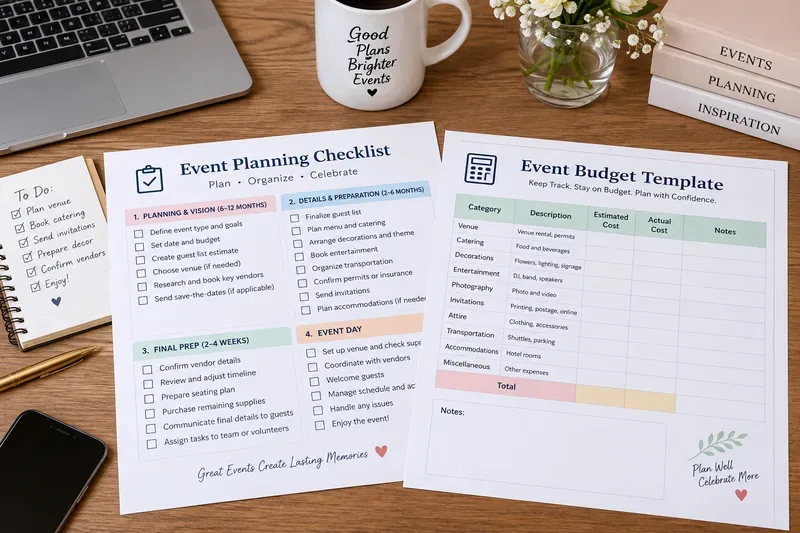
AI-generated illustration of a printable event planning checklist and budget template; it is not an actual Microsoft Word screenshot.
Start with two pages, not one overloaded form
The simplest workable setup is a Planning Checklist on page one and a Budget & Vendor Tracker on page two. Trying to combine every deadline, vendor, payment, guest note, and expense into one table usually makes the document harder to scan.
Microsoft Word supports ordinary tables for structured information, and its current versions also support both print-only checkbox symbols and interactive check box controls. Microsoft documents these features for Microsoft 365, Word 2024, Word 2021, Word 2019, and Word 2016. See Microsoft Support: Make a checklist in Word and Microsoft Support: Insert a table.
Use this setup if: your event has a manageable number of vendors and costs, you want a clean printed document, or several people need to review the same plan without learning project-management software.
Use Excel or another budgeting tool instead if: the event has hundreds of transactions, multiple funding sources, frequent forecast revisions, or detailed calculations that must update automatically.
Printable event planning checklist template
Copy the table below into Word and customize the timing. The suggested timing is illustrative, not a rule. A 30-person birthday dinner may be planned in a few weeks, while a conference or large wedding may require many months.
Done
Task
Target Timing
Owner
Due Date
Notes / Decision
□
Define event purpose and success criteria
Start
□
Set estimated guest count
Start
□
Set maximum budget
Start
□
Select preferred date and backup date
Start
□
Identify venue requirements
Early planning
Capacity, hours, accessibility, parking, load-in
□
Book venue
Early planning
Record deposit and cancellation terms
□
Create vendor list
Early planning
Catering, rentals, AV, entertainment, photo/video
□
Request and compare vendor quotes
Early planning
Compare scope, not price alone
□
Review contracts and payment deadlines
Before booking
Include deposits and final balances
□
Confirm permits, licenses, or insurance if required
Early planning
Requirements vary by event and location
□
Plan accessibility needs
Early planning
Venue access, seating, communication, restrooms
□
Develop emergency and weather contingency plan
Early planning
Especially important for public, outdoor, or large events
□
Finalize guest list
Before invitations
□
Prepare and send invitations / registration
As appropriate
□
Track RSVPs
Ongoing
□
Finalize menu and dietary-information process
Before vendor deadline
□
Create floor plan or seating plan if needed
Final planning
□
Confirm AV, power, Wi-Fi, lighting, and microphones
Final planning
□
Create event-day timeline
Final planning
Include setup, doors, program, teardown
□
Assign event-day roles
Final planning
One named owner per critical function
□
Confirm vendor arrival and load-in details
Final week
□
Confirm final guest count
Vendor deadline
□
Prepare signage, name tags, printed materials, and supplies
Final week
□
Check outstanding balances and payment method
Final week
□
Conduct final venue / logistics review
Final week
□
Run event-day briefing
Event day
□
Complete final setup walkthrough
Before guests arrive
□
Document incidents, changes, or extra charges
Event day
□
Confirm teardown and property handoff
End of event
□
Reconcile final invoices and refunds
After event
□
Record lessons learned
After event
What to repeat or change next time
The budget template needs estimated and actual cost
A common planning mistake is to keep only one “Cost” column. That makes it impossible to see whether your budget is still a forecast or has become an actual expense. Keep at least five money fields: Estimated Cost, Actual Cost, Deposit Paid, Balance Due, and Variance.
For a simple Word document, variance can be calculated manually as Actual Cost minus Estimated Cost. If you expect constant changes or want totals to update automatically, maintain the live calculation in Excel and copy the latest summary into Word before printing.
Category
Vendor / Description
Estimated
Actual
Deposit Paid
Balance Due
Variance
Due Date / Notes
Venue
$
$
$
$
$
Catering / Beverages
$
$
$
$
$
Rentals
$
$
$
$
$
Décor / Flowers / Signage
$
$
$
$
$
Entertainment / Speakers
$
$
$
$
$
Audio / Video / Lighting
$
$
$
$
$
Photography / Video
$
$
$
$
$
Printing / Invitations
$
$
$
$
$
Transportation / Parking
$
$
$
$
$
Staff / Security / Support
$
$
$
$
$
Permits / Insurance
$
$
$
$
$
Accessibility / Accommodation
$
$
$
$
$
Contingency
$
$
$
$
$
Other
$
$
$
$
$
Total
$
$
$
$
$
Budget by commitment, not just by invoice
Suppose your venue quote is $5,000, you have paid a $1,500 deposit, and the remaining $3,500 is due two weeks before the event. If the budget only records “$1,500 paid,” it can make the event look cheaper than it really is. The committed cost is still $5,000 unless the contract changes.
That is why the template separates Actual Cost from Deposit Paid and Balance Due. Actual Cost tells you the expected final obligation once confirmed; payment fields tell you when cash has already moved and what still must be paid.
This matters most when: multiple vendors require deposits, the event spans several months, or different people are responsible for approving and paying invoices.
Add a contingency line, but choose the amount based on risk
There is no universal contingency percentage that is correct for every event. A small indoor meeting with fixed contracts may need less buffer than an outdoor event where weather, attendance, rentals, staffing, and transportation can change late.
Instead of inventing a “standard” number, list the risks that could create extra cost and set the contingency accordingly. Typical examples include overtime, extra equipment, rush printing, replacement supplies, weather protection, transportation changes, additional security, or last-minute attendance increases.
Use a larger contingency when: many costs are estimates rather than contracted prices, the event is outdoors, guest count is uncertain, or suppliers can charge overtime or change fees.
Public and larger events need a separate safety plan
A generic event checklist is not a substitute for professional emergency planning. FEMA's Special Events Contingency Planning for Public Safety Agencies covers pre-event planning, forming a planning team, hazard analysis, and incident response for special events and mass gatherings. FEMA's job-aid material explains that planners should consider factors such as crowd control, staffing, transportation, medical support, weather, and community impact. See FEMA IS-15.B Special Events Contingency Planning.
For a private dinner or small office meeting, you probably do not need a mass-gathering planning structure. For a festival, parade, public concert, street event, or large gathering, however, emergency planning should become its own workstream rather than one checkbox labeled “Safety.”
Practical condition: if your event involves a large crowd, road closures, temporary structures, alcohol service, public access, outdoor weather exposure, or significant medical/security needs, consult the venue, local authorities, and qualified safety professionals early.
Accessibility should be planned before contracts are locked
Accessibility requirements depend on who is organizing the event, the venue, the services offered, and which laws apply. The U.S. Department of Justice explains that the ADA Standards for Accessible Design address physical accessibility for covered buildings and facilities. For ticketed assembly events, separate ADA requirements can apply to accessible seating and ticket sales. See ADA Standards for Accessible Design and ADA Requirements: Ticket Sales.
Do not wait until invitations have been sent to discover that the selected room, entrance, restroom arrangement, seating plan, or communication method creates an avoidable barrier.
Useful fields to add when relevant: accessible entrance confirmed, accessible restroom confirmed, accessible seating plan, captioning/interpreter requests, dietary accommodation process, quiet space, transportation access, and emergency communication.
Compare vendor quotes by scope, not headline price
A $2,000 quote and a $2,500 quote are not comparable if the first excludes delivery, setup, staffing, taxes, service charges, or teardown. Your budget table should therefore include a short scope note rather than recording only the vendor name and price.
For each major vendor, capture:
Quoted total and what is included
Deposit required
Final payment date
Cancellation or rescheduling terms
Overtime or additional-unit pricing
Setup and teardown responsibility
Delivery, travel, or service charges
Required insurance or venue documentation
Primary contact and event-day contact
This approach is especially useful when: comparing caterers, rental companies, AV vendors, photographers, transportation providers, or venues with different service bundles.
Create a separate event-day run sheet
The master planning checklist tells you what should be completed. A run sheet is different: it is a time-ordered event-day schedule showing what happens, when it happens, and who is responsible.
Time
Activity
Owner
Location
Dependencies / Notes
8:00 AM
Venue access begins
8:30 AM
Rental / AV load-in
10:00 AM
Décor and signage setup
11:30 AM
Catering arrival
12:30 PM
Final walkthrough
1:00 PM
Guest arrival / registration
1:30 PM
Program begins
5:00 PM
Program ends
5:15 PM
Teardown begins
7:00 PM
Final venue handoff
The times above are examples only. Replace them with the contracted access times, vendor arrival windows, program timing, and venue exit deadline for your event.
How to make the Word version printable
For a print-first template, Microsoft Word lets you replace ordinary bullets with an open-box symbol. For a checklist completed digitally in Word, you can use the Check Box Content Control from the Developer tab. Microsoft's current guidance also supports interactive checklists in Word for the web. See Microsoft's checklist instructions.
For wide budget tables, landscape orientation usually provides more room. Keep fonts large enough to read on paper, shorten long notes, and move contract details to a separate vendor page rather than shrinking the entire document.
Good Word structure: page 1 checklist, page 2 budget, page 3 vendor contacts, page 4 event-day run sheet. Small events may need only the first two pages.
Keep Word as the editable master and PDF as the distribution copy
Microsoft Office desktop apps can save or convert Word files to PDF without requiring an additional add-in. Microsoft recommends PDF when you want a file intended primarily for consistent viewing or printing. See Microsoft Support: Save or convert to PDF.
Keep the editable .docx file as your master. Export a fresh PDF whenever you need a stable version for vendors, volunteers, clients, or printing. This prevents an old PDF from quietly becoming the “master” while the Word file contains newer decisions.
Mistakes that make planning templates unreliable
Using vague task names
“Handle catering” does not tell anyone whether the menu is approved, guest count was sent, service time is confirmed, or the invoice is paid.
Better: split the work into specific deliverables with an owner and due date.
Marking a vendor complete after paying only the deposit
A deposit confirms part of the payment process, not necessarily the full contractual obligation.
Better: track deposit paid, balance due, final payment date, and contract status separately.
Using one budget number for both forecast and actual spending
This erases the information you need to understand cost overruns.
Better: keep Estimated and Actual columns side by side.
Leaving contingency out because every quote looks final
Even fixed-price events can encounter unplanned charges, replacements, overtime, or schedule changes.
Better: decide explicitly whether a contingency is needed and document why.
Putting every legal and safety question into a generic checkbox
Permits, insurance, accessibility, occupancy, food service, alcohol, security, and emergency planning can vary significantly by event and jurisdiction.
Better: use the template to identify the question, then verify the answer with the venue, applicable government authority, insurer, or qualified professional.
Which version of the template fits your event?
Event Type
Recommended Template Depth
Small dinner, birthday, or private gathering
Checklist + simple budget
Wedding or milestone celebration
Checklist + detailed budget + vendor tracker + run sheet
Corporate meeting or workshop
Checklist + budget + AV/logistics + attendee communication + run sheet
Nonprofit fundraiser
Checklist + revenue/expense budget + sponsor/donor tracking + run sheet
Festival, parade, public concert, or mass gathering
Planning system plus dedicated permits, accessibility, safety, security, medical, and contingency workstreams
Final printable planning checklist
Define the purpose, attendance estimate, date, and maximum budget first.
Record one owner and one due date for every critical task.
Track estimated cost separately from actual cost.
Track deposits and remaining balances separately from total vendor cost.
Write down payment deadlines and cancellation terms.
Compare vendor scope, not price alone.
Create a contingency amount based on actual event risks.
Verify permits, insurance, accessibility, and safety requirements that apply to your event.
Create a separate event-day run sheet.
Keep the Word file as the editable master and export PDF copies for distribution.
Reconcile final invoices after the event and record lessons learned.
If your event is simple, this Word template can be the entire planning system. If the event grows more complex, keep the printable checklist as the high-level control document and move detailed calculations, registration data, or operational schedules into the tools best suited to them. The goal is not to force every piece of event planning into Word; it is to give you one reliable document that makes responsibilities, deadlines, commitments, and costs visible before they become surprises.