Reducing an LLM API bill by 50% is possible in many workloads, but it is not a universal guarantee. The result depends on where your spend comes from: uncached input tokens, cached input tokens, output tokens, reasoning tokens, tool calls, or retries. Prompt compression works best when long or repetitive inputs are a meaningful share of the bill. The practical goal is therefore not “make every prompt half as long.” It is “remove tokens that do not change the answer, preserve the tokens that do, and verify the savings on real traffic.”
This guide uses four implementation steps: measure the baseline, remove redundant input, organize prompts for cache reuse, and move verbose output instructions into structured controls where the API supports them. The examples are illustrative rather than benchmark claims. Provider pricing and cache behavior change over time, so verify current rates before making a production estimate.
What does a 50% API cost reduction actually require?
Start with the billing equation for your model. For a simple text workload, total request cost is approximately the cost of uncached input plus cached input plus output. Some models or features add other billable categories. OpenAI’s current API responses expose input and output token usage, including cached-token details, and its model pages publish separate rates for input, cached input, and output.
| Illustrative workload | Input tokens | Output tokens | Relative result |
|---|
| Baseline request | 10,000 | 1,000 | 100% of baseline cost |
| Only input is cut in half | 5,000 | 1,000 | Less than 50% total savings when output remains unchanged |
| Input and output are both cut in half | 5,000 | 500 | Approximately 50% lower token-based cost when rates are unchanged |
For a concrete current example, the official GPT-5.6 Sol model page listed, on September 11, 2026, $4 per million input tokens, $0.40 per million cached input tokens, and $20 per million output tokens. At those rates, a 10,000-input/1,000-output request costs about $0.06 before other fees. Cutting only input to 5,000 tokens brings that example to about $0.04, a 33% reduction. Cutting both input and output by half brings it to about $0.03, a 50% reduction. These prices can change, so treat the arithmetic as a method, not a permanent quote. See the official GPT-5.6 Sol model page for current pricing.
Quick reference: the four highest-value moves
| Technique | Best fit | Main risk | What to measure |
|---|
| Token audit | Any production workload | Optimizing the wrong component | Input, cached input, output, retries, cost per successful task |
| Redundancy removal | Long system prompts, repeated policies, verbose examples | Deleting a constraint that actually matters | Task success and instruction-following parity |
| Cache-friendly layout | Repeated requests sharing stable instructions or context | Low cache reuse because dynamic text appears too early | Cached-token ratio and latency |
| Structured output controls | JSON extraction, classification, fixed response formats | Schema too rigid for the task | Output tokens, parse failures, retries |
Step 1: Measure the real token baseline before changing prompts
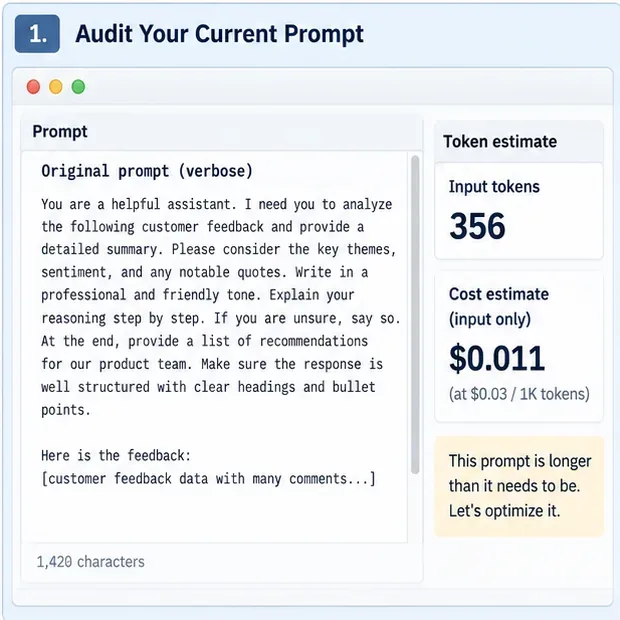
Caption: An illustrative token-audit interface records the original prompt size and a sample cost estimate before compression; the figures are not current provider pricing.
Collect a representative sample of production requests rather than optimizing one hand-picked prompt. At minimum, record input tokens, cached input tokens when available, output tokens, model name, latency, retries, and whether the final answer passed your business-quality check. If your provider offers an input-token counting endpoint, use it before sending requests when you need deterministic budgeting. OpenAI currently documents a Responses input-token counting endpoint in its official API reference.
Calculate cost per successful task, not just cost per API call. A compressed prompt that causes more retries can be more expensive even if each request is shorter. Segment the baseline by task type as well: summarization, extraction, RAG question answering, agentic tool use, and long conversations usually have different token profiles.
Step 2: Remove redundancy without deleting decision-critical information
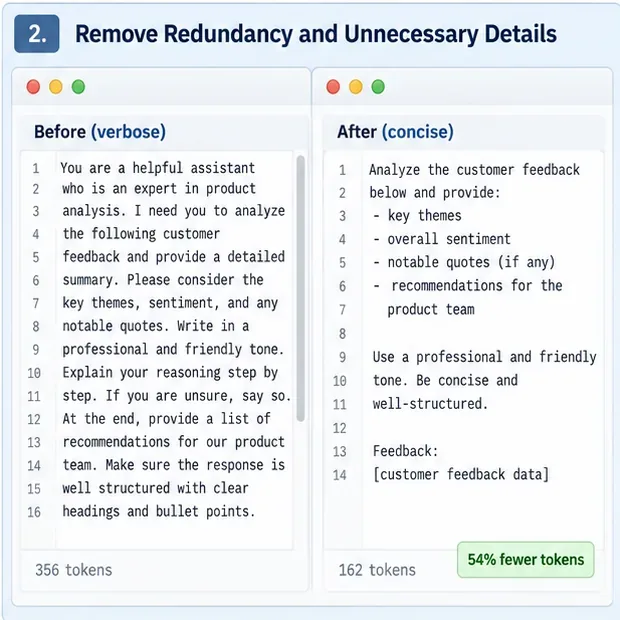
Caption: An illustrative before-and-after prompt keeps the same requested outputs while removing repeated wording and unnecessary process instructions.
The safest first compression pass is semantic deduplication. Delete repeated role descriptions, duplicated constraints, polite filler, explanations of obvious formatting, and examples that teach the same pattern more than once. Merge overlapping rules into a single instruction. Prefer one precise sentence over several sentences that restate the same requirement.
Before
You are a helpful assistant who is an expert in product analysis.
I need you to analyze the following customer feedback and provide
a detailed summary. Please identify the key themes, overall sentiment,
notable quotes, and recommendations for our product team. Make sure
your response is professional, clear, concise, and well structured.
After
Analyze the customer feedback.
Return: key themes, overall sentiment, notable quotes, and product recommendations.
Be concise and factual.
Do not compress away exceptions, policy boundaries, domain definitions, tool safety rules, or evidence requirements merely because they are long. Those are often high-value tokens. A useful test is to ask: “If I remove this sentence, can the acceptable output change?” If yes, keep it unless an API control or schema can enforce the same behavior more reliably.
Step 3: Put stable content first and dynamic content last
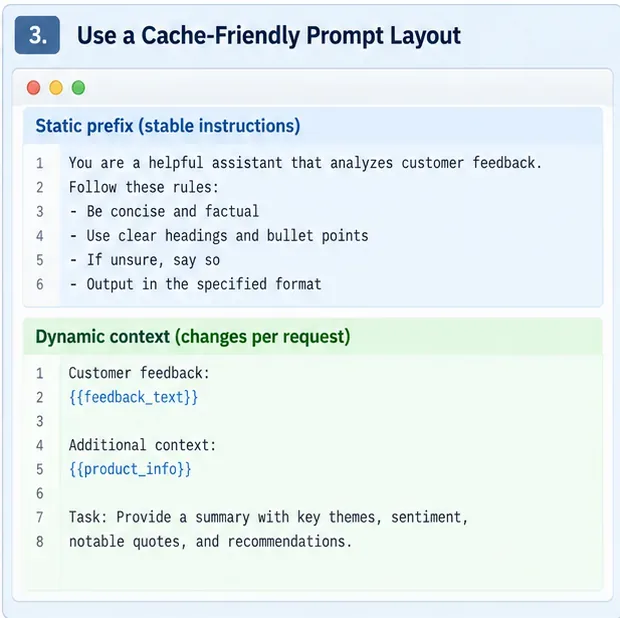
Caption: An illustrative prompt layout places stable instructions in a reusable prefix and appends request-specific context later.
Prompt caching does not reduce the raw token count, but it can reduce the amount billed at the normal input rate and lower prompt-processing latency. This makes prompt layout part of cost optimization. Group system instructions, shared examples, tool guidance, and other stable content together. Put request-specific facts, retrieved passages, user data, and the current question later.
OpenAI’s model guidance explicitly recommends putting static content first and dynamic content last to improve prompt-cache reuse, and its response usage object exposes cached-token information for measurement. See the official model guidance and the Responses API reference.
Avoid changing harmless whitespace, example ordering, timestamps, random IDs, or per-user text inside an otherwise reusable prefix unless the provider’s cache semantics say those changes are safe. Measure cache hits from the API response instead of assuming a prompt is being reused.
Step 4: Replace prose about format with structured output controls
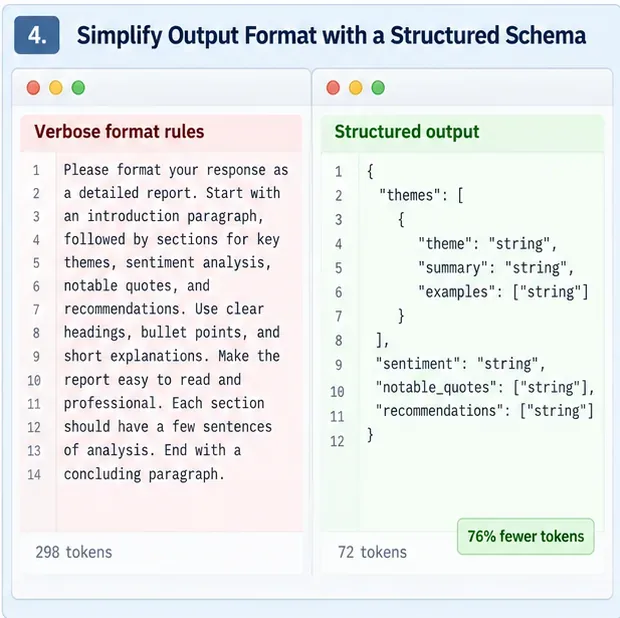
Caption: An illustrative structured-output view shows how a schema can replace many lines of prose that repeatedly describe the same response shape.
Extraction and classification prompts often waste tokens describing JSON fields, allowed values, nesting, ordering, and validation rules in natural language. When the API supports structured outputs or typed tool arguments, move as much of that contract as possible into the structured interface and keep the natural-language instruction focused on meaning.
Current OpenAI guidance specifically recommends removing output-schema definitions from the prompt where possible and using Structured Outputs instead. This can reduce prompt text and also reduce malformed-output retries. The exact mechanism varies by provider, so do not copy an OpenAI-specific request format into another API without checking that provider’s documentation.
Advanced compression for RAG, long documents, and conversations
After the four basic steps are stable, larger savings usually come from reducing context rather than polishing sentence wording. In RAG systems, retrieve fewer but more relevant passages, deduplicate near-identical chunks, and avoid attaching documents that cannot affect the answer. For long conversations, keep durable facts and unresolved decisions, but summarize or drop turns that no longer influence the current task. For agent systems, expose only the tools and tool descriptions relevant to the current stage when your architecture safely allows it.
Learned prompt compressors are another option for very long contexts. Microsoft’s open-source LLMLingua project implements token-level prompt compression. The original LLMLingua paper reported compression ratios up to 20× with limited benchmark degradation in its evaluated settings. LongLLMLingua targets long-context tasks, while LLMLingua-2 uses a task-agnostic learned compressor. Those are research results, not a promise that the same ratios will preserve quality on your data. Benchmark your own tasks, languages, models, and prompt types before deploying aggressive compression.
How to prove the optimization is actually better
Run an A/B evaluation on the same representative requests. The baseline and compressed versions should use the same model, reasoning settings, tools, retrieval inputs, and success criteria. Change one compression technique at a time when possible so you can identify what caused a regression.
| Metric | Why it matters | Suggested interpretation |
|---|
| Input-token reduction | Shows raw prompt shrinkage | Useful, but not sufficient by itself |
| Cached-token ratio | Shows whether stable prefixes are reused | Higher is usually better when quality is unchanged |
| Output-token reduction | Can materially change total cost | Verify that concise output still completes the task |
| Cost per successful task | Includes retries and failures | This is the primary business metric |
| Task success / accuracy | Detects information loss | Set an acceptable non-inferiority threshold before testing |
| p50 and p95 latency | Shows real user impact | Compression preprocessing can offset inference savings |
Do not declare victory because a prompt is 50% shorter. The stronger acceptance condition is: the compressed configuration reduces measured cost by roughly your target amount while staying within your pre-defined quality, latency, and reliability tolerances.
When should you stop compressing?
Stop or back off when the next reduction removes facts needed for correct decisions, increases hallucinations, causes tool-call errors, weakens policy compliance, or raises retries enough to erase the savings. Compression can also add latency if you run a separate model to compress each prompt. A 2026 study of prompt compression in real-world inference settings found that preprocessing overhead can cancel out inference gains outside favorable prompt-length and hardware regimes, which is another reason to measure end-to-end performance rather than token count alone.
For small prompts, manual cleanup and cache-friendly organization are usually easier to justify than adding a dedicated compression model. For large RAG payloads or multi-document workflows, context selection and learned compression become more attractive because the removable token volume is much larger.
Quick implementation checklist
- Capture a production baseline with input, cached input, output, latency, retries, and task success.
- Remove duplicated instructions, low-value prose, and redundant examples first.
- Preserve domain definitions, exceptions, evidence requirements, and safety constraints.
- Put stable prompt content before dynamic request-specific content when caching semantics reward reusable prefixes.
- Use structured outputs or tool schemas instead of repeatedly describing fixed response formats in prose.
- For RAG, reduce irrelevant and duplicate context before trying token-level compression.
- Limit output length only when the task can still be completed correctly.
- Compare cost per successful task, not just prompt token count.
- Run regression tests before and after every meaningful compression change.
- Recheck provider pricing and cache rules whenever you change models or API versions.
Bottom line
A 50% reduction is a reasonable engineering target for some verbose, context-heavy workloads, but it should be treated as an outcome to validate, not a default expectation. The most reliable path is to measure first, remove semantically redundant text, maximize safe cache reuse, shorten output contracts with structured controls, and then attack the largest remaining context blocks with retrieval pruning, summarization, or a tested prompt compressor. If the final cost per successful task falls while quality remains inside your acceptance band, the compression is working. If quality or retries deteriorate, restore the missing information and optimize a different part of the request.
Primary references