Home
» AI Agents
»
How to Create an Automated Invoice Processing Agent Using Open-Source AI
How to Create an Automated Invoice Processing Agent Using Open-Source AI
An automated invoice processing agent does not need to begin as a large autonomous AI system. For a first useful version, think of an agent as a controlled software workflow that receives an invoice, calls the right document and AI tools, validates the result, decides whether a human must review it, and only then saves or exports approved data.
That distinction matters in finance. A language model can help turn messy invoice layouts into structured fields, but it should not be the only thing deciding whether an invoice is valid or safe to post. The beginner-friendly design in this guide keeps extraction probabilistic and the important accounting checks deterministic.
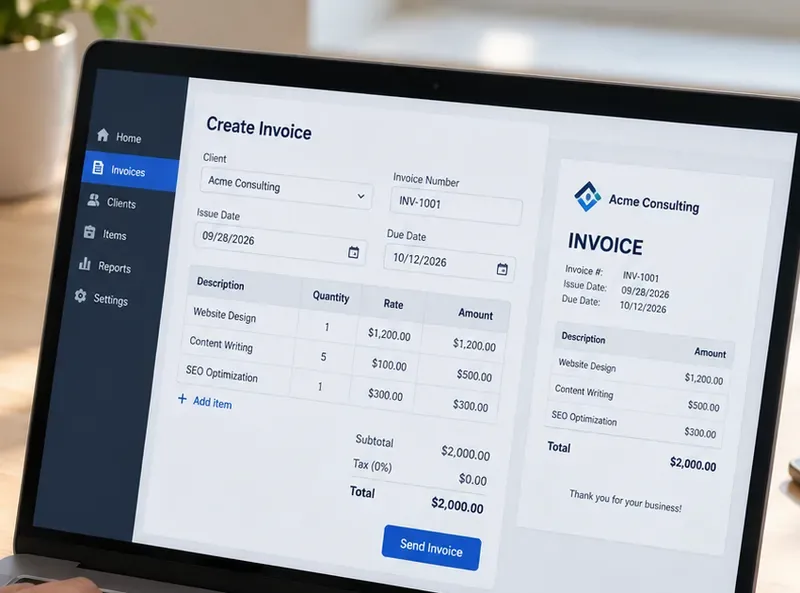
By the end, you will have a local prototype that accepts PDF or image invoices, extracts fields such as vendor, invoice number, dates, currency, totals, and line items, validates those fields against rules, routes questionable documents to review, stores an audit trail, and exposes the process through an API.
What do you need to understand before you start?
There are four terms worth knowing:
OCR (optical character recognition) turns text visible in an image or scan into machine-readable text.
Document parsing preserves more structure than plain OCR, such as reading order, tables, headings, and layout regions.
LLM (large language model) can map variable invoice text into a consistent JSON structure.
Human-in-the-loop means the system stops and asks a person to review cases that fail checks instead of pretending every result is correct.
As of September 2026, several actively maintained open-source projects cover these layers. Docling supports PDF, image, office-document, and other document formats; PaddleOCR provides OCR and document-understanding pipelines and is released under Apache 2.0; and the Tesseract project documents its current 5.x line as an open-source OCR engine in the official Tesseract manual.
For local model inference, llama.cpp's server documentation describes OpenAI-compatible endpoints and schema-constrained JSON output. That makes it useful for an extraction service because you can ask a locally hosted model to return a defined object rather than unconstrained prose.
One licensing warning is important: an open-source inference engine does not automatically make every model weight open source. Check the license for the exact model checkpoint you deploy, especially for commercial use.
Which stack should a beginner use?
Layer
Practical choice
Why it is here
Document conversion
Docling
Converts PDFs and images into a structured document representation and exportable text.
OCR fallback
PaddleOCR or Tesseract
Useful when the invoice is a scan or photo and text extraction needs OCR.
Local AI extraction
llama.cpp + a suitable instruction model
Maps variable invoice text to a stable JSON schema while keeping inference local.
Schema validation
Pydantic
Validates Python data against declared field types and constraints.
API
FastAPI
Accepts invoice uploads and returns processing results.
Storage
SQLite for a prototype; PostgreSQL for a shared service
Stores normalized data, review status, source-file identity, and audit events.
Orchestration
Plain Python first; LangGraph optional later
A deterministic function is easier to debug. Add a stateful agent framework when branching and human review become more complex.
Pydantic's official documentation explains that models inherit from BaseModel, validate incoming data, and can emit JSON Schema through model_json_schema(). See Pydantic model validation. If you later need durable, stateful branching, LangGraph's reference describes support for long-running stateful agents, persistence, and human-in-the-loop workflows.
Step 1: Set up the project and define a narrow first goal
Do not start with “automate accounts payable.” Start with one document class and one output contract. A good MVP is: English-language supplier invoices, PDF or image input, one legal entity, one currency set, and no automatic payment execution.
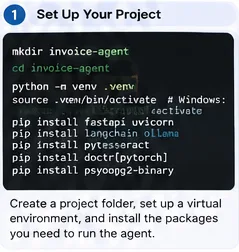
Install your OCR engine separately if you need one. Docling's current installation guide uses pip install docling; PaddleOCR's current installation documentation distinguishes its base OCR package from optional document parsing and information-extraction dependency groups. Use the Docling installation guide or the PaddleOCR 3.x installation guide rather than copying an old dependency list.
Step 1: Create a small isolated Python project first. Keep the first invoice type and output schema narrow enough to test thoroughly.
Step 2: Convert invoices into text and layout data
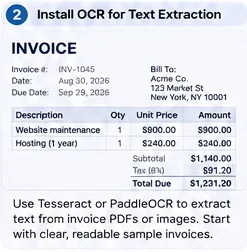
Born-digital PDFs may already contain usable text. Scanned PDFs and photos require OCR. Your parser should hide that difference from the rest of the pipeline: later stages should receive normalized document text plus any useful layout or table information.
A minimal Docling conversion looks like this:
from docling.document_converter import DocumentConverter

converter = DocumentConverter()

def parse_document(path: str) -> str:
    result = converter.convert(path)
    return result.document.export_to_markdown()
Docling's official quickstart uses the same convert-then-export pattern. For OCR-heavy collections, test PaddleOCR or Tesseract on your own scans. PaddleOCR's project documentation recommends its newer PP-StructureV3 family for document analysis, while Tesseract can be called from the command line or API for printed-text OCR.
Step 2: Begin with readable sample invoices that contain the fields you plan to extract, then add harder scans only after the basic pipeline works.
Step 3: Decide exactly what data the agent is allowed to produce
The extraction schema is the contract between AI and accounting logic. Avoid a giant “anything that might appear on an invoice” schema. Start with fields you can validate.
from datetime import date
from decimal import Decimal
from pydantic import BaseModel, Field, ConfigDict

class LineItem(BaseModel):
    description: str
    quantity: Decimal | None = None
    unit_price: Decimal | None = None
    amount: Decimal

class Invoice(BaseModel):
    model_config = ConfigDict(extra="forbid")

    vendor_name: str
    invoice_number: str
    invoice_date: date
    due_date: date | None = None
    currency: str = Field(min_length=3, max_length=3)
    subtotal: Decimal | None = None
    tax: Decimal | None = None
    total: Decimal
    line_items: list[LineItem] = []
extra="forbid" is useful in this context because unexpected LLM fields should not silently become part of your accounting record. Also note that Pydantic validation confirms structure and types; it does not prove that the extracted vendor or amount matches the invoice image.
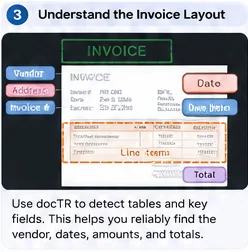
Step 3: Define the target fields around business needs, then use layout and table information to preserve where those values came from.
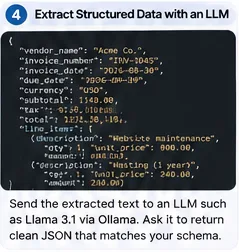
Step 4: Use a local model to map document text into structured JSON
Run a suitable instruction model behind llama.cpp's HTTP server. The exact model size depends on your hardware and invoice complexity. Do not assume a larger model is automatically better; benchmark field accuracy, latency, and memory on your own invoice set.
llama.cpp currently supports schema-constrained JSON responses. You can derive that schema from Pydantic and send it with the extraction request:
import json
import httpx

def extract_invoice(document_text: str) -> Invoice:
    schema = Invoice.model_json_schema()

    prompt = f"""
Extract one supplier invoice from the text below.
Do not invent values. If an optional field is absent, use null.
Currency must be a three-letter code.
Return only data that fits the required schema.

DOCUMENT:
{document_text}
"""

    payload = {
        "model": "local-model",
        "messages": [{"role": "user", "content": prompt}],
        "temperature": 0,
        "response_format": {
            "type": "json_schema",
            "schema": schema
        }
    }

    r = httpx.post(
        "http://127.0.0.1:8080/v1/chat/completions",
        json=payload,
        timeout=120
    )
    r.raise_for_status()

    content = r.json()["choices"][0]["message"]["content"]
    return Invoice.model_validate_json(content)
Schema-constrained generation helps with valid structure, but it does not guarantee semantic truth. A perfectly valid JSON object can still contain the wrong total. That is why the next step is mandatory.
Step 4: Ask the local model for a strict structured object, not free-form prose, so downstream validation receives predictable fields.
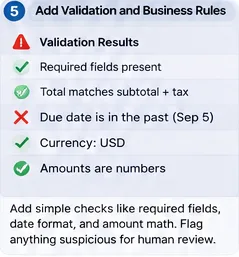
Step 5: Add deterministic accounting checks and review rules
Do not ask the LLM “Are you confident?” and trust the answer. Self-reported model confidence is not a calibrated control. Build checks that can be recomputed from the extracted data and your systems.
Useful first rules include:
required fields are present;
invoice number is not already recorded for the same vendor;
currency is allowed for that vendor or entity;
line-item amounts approximately sum to subtotal;
subtotal plus tax approximately equals total;
invoice date and due date are plausible;
vendor exists in your vendor master or is routed for onboarding;
purchase-order references match when PO matching is required.
from decimal import Decimal

def validate_business_rules(inv: Invoice) -> list[str]:
    errors = []

    if inv.subtotal is not None and inv.tax is not None:
        expected = inv.subtotal + inv.tax
        if abs(expected - inv.total) > Decimal("0.02"):
            errors.append("subtotal_plus_tax_does_not_match_total")

    line_sum = sum((x.amount for x in inv.line_items), Decimal("0"))
    if inv.subtotal is not None and abs(line_sum - inv.subtotal) > Decimal("0.02"):
        errors.append("line_items_do_not_match_subtotal")

    if inv.due_date and inv.due_date < inv.invoice_date:
        errors.append("due_date_before_invoice_date")

    return errors
Route every failed check to a review queue. For a first deployment, it is reasonable to route all invoices to review while you measure extraction quality. Automation thresholds should come from evidence collected on your own labeled invoices, not from a generic percentage copied from another system.
Step 5: Treat arithmetic, duplicate detection, vendor matching, and date rules as deterministic controls; route exceptions to a person.
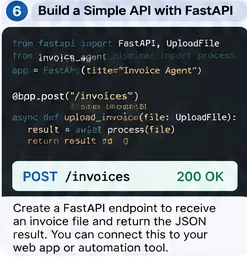
Step 6: Wrap the processor in a small API
An API lets an upload form, email worker, shared folder watcher, or accounting integration call the same processing function. FastAPI's official file-upload guide recommends UploadFile for uploaded files and notes that it uses a spooled file, which is better suited than loading large files entirely into memory.
from pathlib import Path
from tempfile import NamedTemporaryFile
from fastapi import FastAPI, UploadFile, HTTPException

app = FastAPI()

@app.post("/invoices")
async def process_upload(file: UploadFile):
    if file.content_type not in {
        "application/pdf",
        "image/png",
        "image/jpeg"
    }:
        raise HTTPException(415, "Unsupported file type")

    suffix = Path(file.filename or "").suffix

    with NamedTemporaryFile(suffix=suffix, delete=False) as tmp:
        tmp.write(await file.read())
        path = tmp.name

    result = process_invoice(path)
    return result
See the current FastAPI request-file documentation for the supported upload patterns. In production, also enforce file-size limits, malware scanning where appropriate, authenticated callers, request IDs, and secure temporary-file cleanup.
Step 6: Expose one processing endpoint after the local pipeline works, so multiple input channels can reuse the same validation path.
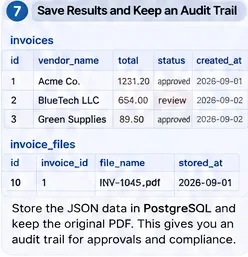
Step 7: Store the original evidence, normalized result, and audit events
Never store only the final JSON. Keep enough evidence to reconstruct what happened: original file identity, hash, parser version, model identifier, prompt version, extracted JSON, validation results, review decision, timestamps, and the user or service that approved a change.
A simple prototype can use SQLite. A multi-user service can use PostgreSQL with uniqueness and foreign-key constraints. PostgreSQL's current documentation covers table constraints, which are useful for protecting keys and relationships independently of the AI pipeline.
CREATE TABLE invoices (
    id BIGSERIAL PRIMARY KEY,
    vendor_id BIGINT NOT NULL,
    invoice_number TEXT NOT NULL,
    invoice_date DATE NOT NULL,
    currency CHAR(3) NOT NULL,
    total NUMERIC(18,2) NOT NULL,
    status TEXT NOT NULL,
    source_sha256 TEXT NOT NULL,
    extracted_json JSONB NOT NULL,
    created_at TIMESTAMPTZ NOT NULL DEFAULT now(),
    UNIQUE (vendor_id, invoice_number)
);
The source hash gives you a second way to detect accidental resubmission. Keep file storage permissions tighter than general application logs because invoices often contain addresses, bank details, tax IDs, and other business-sensitive data.
Step 7: Persist both normalized invoice data and source-file metadata so approvals, duplicates, and later corrections remain auditable.
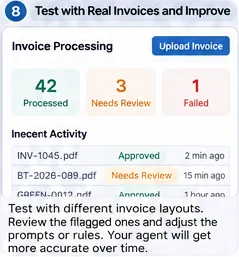
Step 8: Test with real invoice variation before automating downstream actions
A prototype that works on five clean PDFs is not production-ready. Build a labeled evaluation set that represents the inputs you actually receive: different vendors, scans, rotated pages, small fonts, multi-page invoices, discounts, negative lines, taxes, shipping charges, multiple currencies, missing purchase orders, and duplicate submissions.
Track field-level metrics separately. “Invoice accuracy” can hide the fact that vendor name is easy while line-item quantity is unreliable. At minimum, measure:
exact-match accuracy for invoice number, currency, and dates;
numeric tolerance accuracy for subtotal, tax, and total;
line-item precision and recall if line items matter downstream;
percentage routed to human review;
false auto-approval rate;
processing latency and failure rate;
duplicate-detection precision.
Store failures as test cases. Every time you fix a parser rule, prompt, schema, or model, rerun the whole evaluation set. This prevents one vendor's improvement from quietly breaking another vendor's layout.
Step 8: Measure the review queue and failure cases on representative invoices before allowing the agent to automate downstream accounting actions.
How should the agent decide what happens next?
Keep the state machine explicit. The “agent” can be a plain Python function at first:
This is already agent-like because it coordinates tools and chooses a branch. You do not need an LLM to choose every next step. Add LangGraph or another orchestration framework when you need persisted multi-stage reviews, retries, asynchronous callbacks, or several specialized tools whose execution order changes by case.
What mistakes should beginners avoid?
Letting the LLM be the accounting control
The model should extract and normalize; code and trusted system data should verify. Arithmetic, duplicate checks, vendor status, PO matching, and approval limits belong in deterministic logic.
Discarding the source document after extraction
Keep the original invoice or a controlled reference to it. Reviewers need evidence, and you need a way to reproduce failures after model or parser upgrades.
Using one prompt without a version
Store a prompt version and model identifier with each processed invoice. Otherwise, you cannot explain why two invoices processed months apart behaved differently.
Automatically posting every schema-valid result
JSON validity is not invoice validity. Start with human review, then automate only low-risk cases after your evaluation demonstrates acceptable performance.
Ignoring model and data licenses
Libraries and model weights can have different licenses. PaddleOCR and Tesseract publish open-source licenses, while the license of the model you run through llama.cpp depends on that specific checkpoint. Confirm it before deployment.
Building the UI before proving extraction quality
A polished dashboard cannot compensate for incorrect amounts. Test document parsing, schema extraction, and validation first; add a review interface after you know what reviewers actually need to see.
When should you use OCR-only, layout models, or an LLM?
Approach
Best fit
Main limitation
OCR + rules
Small number of highly stable vendor templates
Rules become brittle as layouts vary.
Document layout model
Tables, forms, and fields where position matters
May need task-specific training or post-processing.
OCR/document parser + local LLM
Many invoice formats with a common target schema
Must be constrained and validated; inference costs more compute.
Vision-language model
Complex documents where text and visual layout are tightly coupled
Higher hardware requirements and additional evaluation complexity.
Hugging Face's current LayoutLMv3 documentation describes a document-AI model that combines text and visual layout information. PaddleOCR's PP-StructureV3 documentation likewise focuses on layout, tables, and structured document analysis. These are options when plain text plus an LLM is not enough.
What is a sensible path from prototype to production?
Move in stages. First, run locally on a folder of labeled invoices. Second, add the API and persistent storage. Third, introduce a human review queue. Fourth, integrate read-only lookups such as vendor master or purchase orders. Fifth, allow controlled export to an accounting staging area. Only after monitoring proves the controls should you consider automatic posting for tightly defined low-risk cases.
At every stage, preserve three things: evidence (the original document and extracted source), determinism (business rules that can be re-run), and traceability (which parser, model, prompt, and reviewer produced the final record).
Final checklist
The invoice parser works on both born-digital PDFs and the scans you actually receive.
The extraction output is constrained to a versioned Pydantic schema.
The model is not allowed to invent missing values.
Totals, dates, duplicates, vendor identity, and PO rules are validated outside the LLM.
Failed rules produce a human-review state instead of silent correction.
The original document, source hash, model, prompt version, and validation result are logged.
The API restricts file type and size and is authenticated before production use.
Your test set contains real layout variation and edge cases.
Model and library licenses have been checked for your intended deployment.
Downstream accounting writes are introduced gradually and remain auditable.
If those controls are in place, you have more than an OCR demo: you have the foundation of a dependable invoice processing agent. The open-source components can change over time, but the architecture remains durable—parse evidence, extract into a schema, validate with code, route uncertainty to people, and record every decision.