Home
» AI Agents
»
Printable Daily Time Blocking Template PDF for WFH Professionals
Printable Daily Time Blocking Template PDF for WFH Professionals
The most useful recent official update for people planning long work-from-home days is not a new productivity fad. On July 16, 2026, the U.S. National Institute for Occupational Safety and Health (NIOSH) updated its office-environment guidance and again highlighted that short breaks during computer work can help reduce discomfort. That matters for time blocking: a good schedule should not pack every minute. It should deliberately reserve room for breaks, transitions, and unexpected work. See the current NIOSH office-environment guidance.
Digital calendars reinforce the same basic idea of protecting time. Google Calendar currently supports Focus time events on eligible work or school accounts, including options to mute Chat notifications and automatically decline meetings. Microsoft Viva Insights also includes features for protecting focus time for users with the applicable subscription. Those tools are useful, but a printable daily time blocking template still has an advantage for WFH professionals: it gives you a simple planning surface that is independent of a specific employer, calendar platform, or notification system.
A paper time-blocking sheet can be the planning layer for a remote workday, while digital calendars handle meeting conflicts, shared availability, and notifications.
What a daily time blocking template is supposed to do
Time blocking means assigning a specific part of the day to a type of work, task, meeting, break, or routine. Instead of keeping a long to-do list and deciding what to do every few minutes, you decide in advance what each block is for.
The goal is not to follow the sheet perfectly. The goal is to make tradeoffs visible. If your calendar already contains four hours of meetings, the template should show that you do not also have six uninterrupted hours for project work. If a task takes longer than expected, the blank buffer on the page tells you where that work can go without automatically pushing the entire evening later.
This matters in remote work because home-based days can mix scheduled calls, asynchronous messages, individual work, household interruptions, and blurred start-and-stop boundaries. NIOSH's earlier work-from-home guidance recommends keeping a routine, creating focus times, setting boundaries between work and home, and taking frequent breaks. You can review the original NIOSH working-from-home guidance.
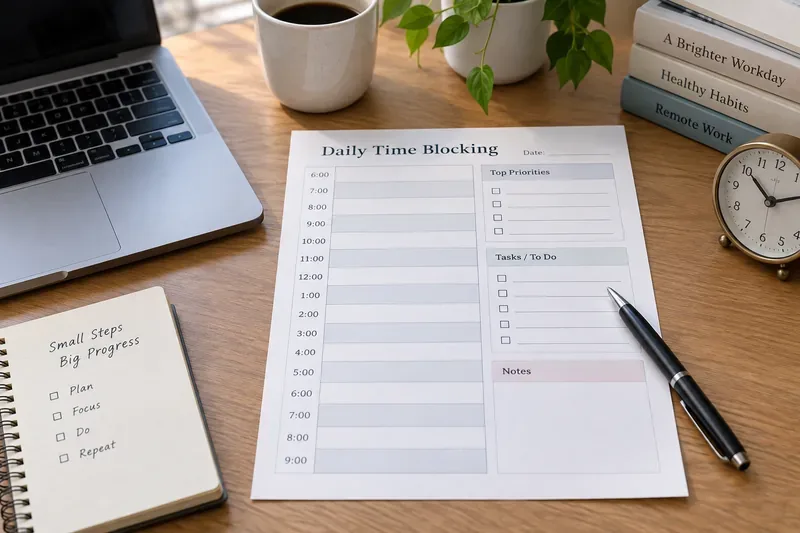
Printable one-page daily time blocking template
The layout below is designed to fit the way many WFH professionals actually work: fixed commitments first, then focus work, communication windows, breaks, buffer, and a defined shutdown. Print the page directly, or use your browser's Print command and choose a PDF-saving option when your operating system or browser provides one. Exact print-menu wording varies by platform.
Daily setup
Field
Write this before the day begins
Date
____________________________
Work window
Start ________ End ________
Top outcome 1
____________________________________________
Top outcome 2
____________________________________________
Top outcome 3
____________________________________________
Availability boundary
Examples: lunch, school pickup, appointment, no-meeting window
Must-answer communication window
____________________________________________
Hourly schedule
Time
Block or task
Type
Notes / moved to
7:00–8:00
8:00–9:00
9:00–10:00
10:00–11:00
11:00–12:00
12:00–1:00
1:00–2:00
2:00–3:00
3:00–4:00
4:00–5:00
5:00–6:00
6:00–7:00
If you need 30-minute precision, divide each row in half by hand. If your day starts earlier or later, relabel the rows. The point is to keep the format simple enough that you will actually use it.
Start with meetings, appointments, deadlines that require attendance, and any personal boundary that makes you unavailable. A paper plan should never pretend that those hours are free. If your employer uses a shared calendar, the digital calendar should remain the source of truth for other people's access to your time.
2. Choose no more than three important outcomes
An outcome is more useful than a vague activity. “Draft the client proposal through the pricing section” is easier to schedule than “work on proposal.” “Review and respond to the five open hiring decisions” is clearer than “email.” The top-three area forces a daily priority decision before the day becomes reactive.
3. Protect concentration-heavy work before filling small tasks
Place demanding work in the part of the day when you can realistically protect it. As a starting experiment, try a 45- to 90-minute focus block, then adjust based on the work and your role. There is no universal ideal block length. A support engineer who may be interrupted frequently needs a different plan from a writer, analyst, designer, or researcher.
Research on interruptions helps explain why this matters. In an experimental study by Gloria Mark, Daniela Gudith, and Ulrich Klocke, people compensated for interruptions by working faster, but reported more stress, frustration, time pressure, and effort. The study does not prove that every interruption is harmful in every job, but it supports a sensible scheduling principle: reduce unnecessary task switching when the work requires sustained attention. Read the original University of California, Irvine paper.
4. Batch communication instead of letting it occupy the whole day
Email, chat, and team messages often arrive continuously, but that does not mean every message needs an immediate response. If your role allows it, create one or more communication windows and keep them visible on the sheet. For example, you might check messages after the morning focus block, after lunch, and before shutdown. If your job has a response-time requirement, build that requirement into the schedule instead of copying someone else's routine.
5. Schedule breaks and transitions as real blocks
Do not treat breaks as leftover space. NIOSH's current office guidance notes that short breaks each hour can reduce discomfort for computer workers, and its work-from-home guidance recommends regular breaks and changes in posture. A time-blocking sheet should therefore include recovery time, not just output time.
You do not need to turn every break into a rigid timer. A practical pattern might be a short screen-and-posture break between major blocks plus a longer meal break. If your work requires long video meetings, protect a few minutes afterward for notes, water, movement, or simply switching context.
6. Leave a buffer for work you cannot predict
A fully booked page looks efficient but is fragile. If every hour is assigned, a late meeting or urgent request forces the rest of the day to slide. As a starting point, leave roughly 10% to 20% of the workday uncommitted. That percentage is not a scientific rule; it is a planning buffer to test and adjust. Highly reactive roles may need more.
7. End with a shutdown block
Remote work can make the end of the day ambiguous because the same laptop remains nearby after work. A shutdown block gives the day a clear finish: capture unfinished tasks, update the calendar, prepare the first task for tomorrow, and stop. Even 10 to 15 minutes can be enough if you keep the routine simple.
A realistic WFH example
Suppose your work window is 8:30 a.m. to 5:30 p.m., with a team meeting at 10:00, a client call at 2:00, and a proposal due tomorrow. A workable plan might look like this:
Time
Block
Reason
8:30–9:45
Proposal focus block
Highest-priority concentration work before meetings
9:45–10:00
Break and meeting prep
Transition rather than carrying focus work into the call
10:00–10:45
Team meeting
Fixed commitment
10:45–11:15
Messages and follow-ups
Batch communication
11:15–12:15
Proposal focus block
Second protected work period
12:15–1:00
Lunch away from desk
Longer break
1:00–1:45
Admin and preparation
Lower-intensity work before client call
1:45–2:00
Client-call prep
Transition buffer
2:00–3:00
Client call
Fixed commitment
3:00–4:00
Buffer / urgent work / follow-up
Absorbs surprises without breaking the evening
4:00–5:10
Proposal completion or review
Final substantial work block
5:10–5:30
Shutdown
Capture next steps and end the workday
The example is intentionally not packed to 100% capacity. If the client call runs long, the buffer absorbs some of the impact. If nothing urgent happens, the buffer becomes useful discretionary time rather than wasted time.
Paper, PDF, or digital calendar: which should be the source of truth?
For many WFH professionals, the best answer is hybrid. Use the printable sheet for personal prioritization and use the shared calendar for availability, meetings, and organization-wide scheduling rules.
Google's current documentation says Focus time can mute Google Chat notifications and automatically decline meetings on eligible Workspace accounts. Microsoft documents time-management features in Viva Insights that can protect time on a calendar for subscribed users. Those capabilities are useful when coworkers need to see that you are unavailable. A printed page cannot decline a meeting invitation or silence a chat application by itself.
How to tell whether the template is actually helping
Judge the template by the quality of the workday, not by whether every box was completed exactly as planned. After a week, look for a few concrete signals:
Your highest-priority work is getting a protected place on the schedule before the day fills with smaller tasks.
You are rescheduling fewer blocks because estimates are becoming more realistic.
Meetings and communication windows are not silently consuming time that was supposed to be focused work.
Breaks and lunch appear on the plan instead of disappearing when the day becomes busy.
Unexpected requests can fit into buffers without routinely pushing work into the evening.
You can end the day with a clear list of what is done, deferred, delegated, or waiting.
If the sheet is constantly wrong by noon, change the method rather than forcing yourself to obey a bad plan. Shorten block lengths, add more buffer, plan only the next half-day, or switch to a digital-first calendar if meetings change too quickly for paper.
When this template is the wrong tool
A printable schedule has limits. It does not automatically sync with coworkers, protect your status in chat tools, warn you about double-bookings, or recalculate when a meeting moves. It is also a poor fit for jobs where priorities are determined minute by minute by incidents, queues, customers, or live operations.
In those roles, use the page as a lightweight priority and notes layer rather than a precise timetable. For example, block only the few periods that truly can be protected, then use broader categories such as “support queue,” “incident response,” “admin,” and “handoff.”
Quick print checklist
Print one page per workday or save one clean copy as your reusable PDF master.
Write fixed commitments first.
Choose up to three important outcomes.
Protect at least one realistic focus block if your role permits it.
Add communication windows instead of scattering them everywhere.
Reserve breaks, lunch, and transition time.
Keep some time unassigned for surprises.
End with a shutdown block and carry forward only what still matters.
A daily time blocking template is useful when it makes the day more realistic, not more crowded. The best version is the one that helps you see limited time clearly, protect the work that deserves attention, and stop when the planned workday is over.