Home
» AI Agents
»
How to Generate Cinematic Lighting Prompts for Luma Dream Machine
How to Generate Cinematic Lighting Prompts for Luma Dream Machine
Cinematic lighting prompts work best when they describe visible light rather than relying on the word “cinematic” by itself. For Luma Dream Machine, that means naming the light source, direction, softness, color, contrast, atmosphere, and the way the camera sees the scene. The product details in this guide were checked against Luma’s official documentation available in September 2026.
Luma’s official Dream Machine best-practices guide recommends natural, specific language and explicitly calls out style, mood, and lighting as useful prompt details. Its 2026 video-model field guide goes further for Ray3.14: it recommends describing a subject already in motion, the setting, secondary motion, camera movement, and lighting or mood, while avoiding vague adjectives. That is a useful foundation for lighting-focused prompts.
The fastest prompt formula
For most shots, start with this compact structure:
[Subject + action] + [setting] + [light source and direction] + [light quality and contrast] + [color] + [atmosphere] + [camera movement or framing] + [mood]
For example:
A courier walks through a rain-soaked alley at night, cyan neon from storefronts on camera left and warm amber practical lights behind him, hard side light with deep shadows, wet pavement reflecting magenta and blue, thin mist in the air, slow tracking shot at eye level, tense but elegant mood.
Notice what the prompt does not depend on: “epic,” “beautiful,” or “stunning.” Those words express taste but give the model little visual information. A concrete phrase such as “hard side light with deep shadows” gives the scene a more specific lighting problem to solve.
Lighting prompt anatomy: the six details that matter
You rarely need every field. A clean daytime scene may need only source, direction, and softness. A stylized night scene benefits from color, contrast, and reflective surfaces. If a prompt becomes crowded, remove the least important adjective before adding more.
Four reliable lighting recipes
1. Golden-hour backlight for warmth and separation
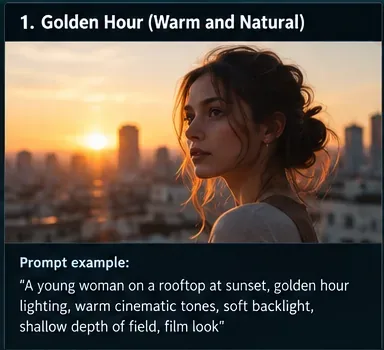
Use golden-hour lighting when you want warmth, soft skin tones, long shadows, and a glowing edge around the subject. The key phrase is not just “golden hour”; describe where the sun sits relative to the subject.
A woman walks across a rooftop at sunset, low sun behind her creating warm backlight and a soft rim around her hair, gentle fill on the face, amber highlights, subtle lens flare, shallow depth of field, slow push-in, reflective and hopeful mood.
Golden-hour reference: the low sun sits behind the subject, producing warm backlight, rim separation, and softer facial illumination.
When it fails: if the face becomes too dark, add “gentle fill on the face” or “face remains readable.” If the whole frame turns orange, ask for “neutral skin tones with warm highlights” rather than simply adding more warm-light keywords.
2. Low-key side light for suspense and drama
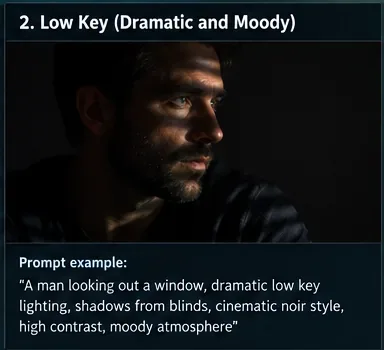
Low-key lighting means the frame is dominated by darker tones with selective illumination. It works well for noir, suspense, interviews, stage-like portraits, and intimate interiors. Direction matters: a narrow side source creates shape; a front source often flattens it.
A detective turns toward a window in a dark office, narrow hard side light cutting through blinds from camera right, deep shadow on the far side of his face, faint cool ambient fill, high contrast, dust visible in the beam, locked medium close-up, restrained noir mood.
Low-key reference: a narrow side source leaves much of the frame dark while selective highlights define the face and create tension.
When it fails: if everything becomes black, keep one readable anchor: “eyes remain visible,” “subtle ambient fill,” or “background retains faint detail.” If it looks like ordinary night lighting, specify the direction and shadow behavior instead of repeating “dark” and “moody.”
3. Neon mixed lighting for stylized night scenes
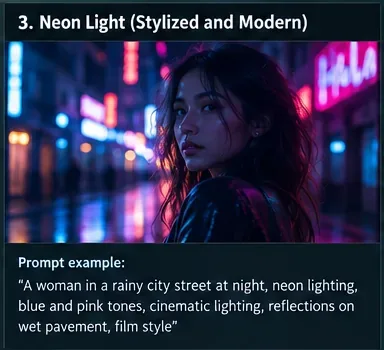
Neon prompts become more controllable when you state at least two colors, assign them to different sides or surfaces, and describe reflections. Rain, glass, polished metal, and wet pavement help the lighting interact with the environment instead of floating as colored glow.
A woman walks through a rainy downtown street at night, cyan neon key light from the left and magenta signage from behind, cool highlights on wet hair, saturated reflections across the pavement, soft haze around distant signs, handheld tracking shot, energetic modern nightlife mood.
Neon reference: assigning cyan and magenta to different sources, then adding wet reflections, gives the model more concrete lighting relationships.
When it fails: if the frame becomes a uniform purple wash, reduce the palette to two named colors and give each a role: “cyan key, magenta rim.” If signs overpower the subject, state that the subject remains the exposure priority.
4. Soft window light for natural realism
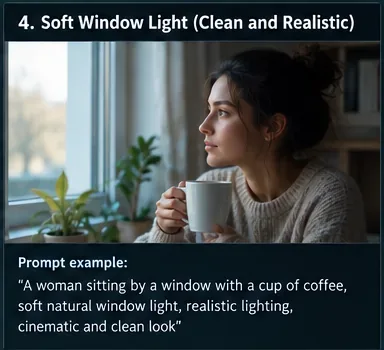
Soft window light is useful when you want an understated commercial, documentary, lifestyle, or interview look. A large window acts like a broad source, creating gentle transitions from light to shadow. It is often more convincing to describe the window’s position than to ask for “studio lighting.”
A ceramic artist trims a bowl at a worktable beside a large window, soft daylight entering from camera left, gentle side light across the hands and face, subtle shadow falloff, neutral color, quiet studio background, slow lateral camera move, calm documentary mood.
Soft-window reference: a broad daylight source from one side creates smooth shadow transitions and a clean, realistic interior look.
When it fails: if the room becomes flat and overexposed, ask for “soft side light with preserved window detail and gentle shadow falloff.” High-key does not have to mean featureless white.
Build the prompt in four passes
Pass 1: Write the action before the lighting
Video prompting benefits from an active subject. Luma’s official Ray3.14 field guide recommends using a subject with a mid-action verb rather than temporal setup phrases such as “starts to.” Begin with what is already happening: “a chef plates pasta,” “a runner crosses a bridge,” or “steam rises from espresso.” This gives the shot a motion backbone before you style it.
Pass 2: Add one primary lighting idea
Choose one dominant setup: golden-hour backlight, soft window side light, low-key practical light, cool moonlight, fluorescent overhead light, or another clear source. One strong lighting idea is easier to debug than five competing ones.
Pass 3: Add interaction, not just adjectives
Describe what the light does: “rim light catches the hair,” “neon reflects on wet asphalt,” “light shafts become visible in haze,” “warm lamp light falls off into a cool hallway,” or “specular highlights move across chrome.” Interaction makes the lighting part of the scene rather than a label attached to it.
Pass 4: Add camera language last
Camera movement changes how lighting reads over time. A push-in emphasizes facial modeling; an orbit can reveal rim light; a tracking shot can move a subject through alternating pools of light. Luma’s official Camera Motion guide documents moves including pan, orbit, crane, directional moves, push in, and pull out. You can use those ideas in the prompt even when you are primarily testing lighting.
hard side light through blinds, deep negative fill, narrow highlights, cool ambient shadows, low-key contrast
Luxury product
large softbox-style key from above-left, crisp controlled reflections, dark gradient background, subtle rim light
Moonlit exterior
cool moonlight from behind, faint warm practicals in the distance, thin mist, silver highlights, readable shadows
Volumetric interior
sun shafts through tall windows, dusty haze, directional beams, warm particles in the air, deep room shadows
Cozy practical lighting
warm tungsten table lamps as motivated practicals, soft falloff, cool dusk outside the windows, intimate contrast
Bright beauty look
large diffused frontal source, high-key exposure, soft shadow under the chin, clean catchlights, pale neutral background
Mixed urban night
cool blue ambient light, warm streetlamp key, colored signs as rim accents, wet reflections, moderate contrast
How long should a Dream Machine prompt be?
There is no single perfect length. The official Ray3 FAQ says Ray3 works best with clear prompts of roughly two to four sentences, while also handling other prompt styles. For lighting, that is usually enough room for action, environment, lighting, camera, and mood without turning the prompt into a contradictory specification sheet.
A useful test is whether you can point to the dominant light after reading the prompt once. If you cannot, simplify it.
Common prompt mistakes and quick fixes
Problem
Why it is weak
Better direction
“Cinematic lighting, beautiful scene”
No source, direction, or contrast is defined.
Name the source and its behavior: “warm backlight from the setting sun, soft rim, gentle facial fill.”
Use only the shot size, movement, or lens behavior that materially affects the frame.
Changing everything at once
You cannot tell which edit helped.
Iterate one variable at a time: direction, softness, color, then atmosphere.
A practical iteration workflow
Generate a baseline. Use subject, action, setting, and one lighting phrase.
Fix direction first. If the face or object is not modeled correctly, specify left/right/front/back and what stays readable.
Adjust softness and contrast. Use “broad soft source,” “hard direct light,” “gentle falloff,” or “deep shadows.”
Refine color. Name one dominant temperature and, if needed, one secondary accent.
Add atmosphere only if it serves the shot. Haze and rain can make light visible, but too much can obscure the subject.
Introduce camera motion after the lighting works. This helps you avoid confusing lighting problems with motion problems.
Luma’s best-practices documentation explicitly encourages iterative refinement instead of trying to solve everything in one prompt. That approach is especially useful for lighting because small wording changes can shift the perceived time of day, exposure, or source direction.
Ray3.14 note for current Dream Machine users
As of the official documentation checked in September 2026, Luma’s Ray3.14 user guide describes Ray3.14 as the latest addition to the Ray video family, and Luma’s February 2026 field guide calls it the default recommended model for most video work. The field guide also highlights native 1080p and HDR support and specifically cites dramatic lighting scenarios as a reason HDR can be useful. Availability, settings, and model naming can change, so check Luma’s current documentation if your Dream Machine interface differs from the descriptions here.
Final lighting-prompt checklist
Is the subject already doing something visible?
Can you identify the primary light source?
Did you state its direction?
Did you choose soft or hard light?
Is the contrast level intentional?
Are color terms attached to specific sources?
Does the environment react to the light through reflections, haze, shadows, or highlights?
Is the camera move simple enough to support the lighting idea?
Did you avoid vague filler words that do not describe the frame?
Can you remove one adjective without losing the core visual idea? If yes, simplify.
Bottom line
The most useful cinematic-lighting prompt is not the longest one. It is the one that tells Dream Machine where the light comes from, how it behaves, what it touches, and how the camera experiences it. Start with action, choose one dominant lighting setup, describe interaction, then add camera motion. Once that foundation works, build complexity through small, testable edits rather than piling more style words into the same prompt.