A weekly cleaning schedule is useful for an Airbnb host because it separates two jobs that are easy to mix together: cleaning after every guest stay and maintenance tasks that only need to happen on a weekly or rotating basis. The weekly sheet should support your turnover routine, not replace it.
Airbnb’s current ground rules say listings should be clean and free of health hazards before check-in, and hosts should clean between every stay, including tasks such as laundry, trash removal, vacuuming or sweeping, and wiping surfaces. See Airbnb’s official ground rules for listing cleanliness. The template below turns that broad requirement into a practical paper workflow you can edit in Microsoft Word or print as a PDF.
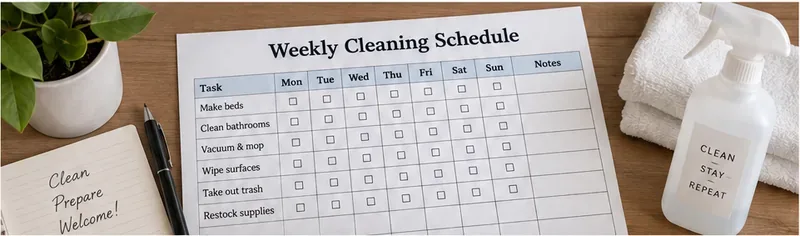
A simple weekly cleaning schedule can sit with turnover supplies so hosts or cleaners can mark recurring tasks without confusing them with the cleaning required after each guest stay.
What should be on an Airbnb weekly cleaning schedule?
Keep the weekly sheet short enough to use at a glance. It should answer three questions: what needs attention, when should it be checked, and who confirmed it was done. A useful template normally includes the property name, week beginning date, task or area, day-of-week checkboxes, and a notes or initials column.
Section
What to track
Why it helps
Property and week
Listing name, address shorthand, week beginning
Prevents sheets from being mixed between properties or weeks
Turnover reminder
Clean after every stay
Keeps the weekly plan from replacing reservation-by-reservation cleaning
Weekly tasks
Deep-clean, inspection, inventory, exterior, appliance, and maintenance items
Captures work that is easy to miss during a fast turnover
Day checkboxes
Monday through Sunday
Shows when recurring work was completed
Initials or owner
Host, co-host, or cleaner initials
Adds accountability when more than one person handles the property
Notes
Damage, low stock, maintenance follow-up
Turns the cleaning sheet into an actionable handoff without storing sensitive guest information
Turnover cleaning comes first
A weekly checklist should not suggest that bathrooms, linens, floors, or kitchen surfaces can wait until a particular weekday if a guest checks out sooner. For every completed stay, use a turnover checklist that fits the property. Common turnover items include:
Strip used beds and replace linens with clean sets.
Replace used towels and check spare linen inventory.
Clean the toilet, shower or tub, sink, mirrors, and bathroom floor.
Clean kitchen counters, sink, dining surfaces, and visibly used appliances.
Remove trash and recycling and install fresh liners.
Vacuum or sweep floors and mop where appropriate.
Wipe frequently touched surfaces and visible marks.
Restock the amenities you promise in the listing.
Check for forgotten items, damage, leaks, odors, pests, or maintenance issues.
Complete a final walk-through before the next guest checks in.
Airbnb also states that hosts should offer homes that are clean and secure and address health and safety hazards. That expectation is described in Airbnb’s official host standards overview.
Printable weekly cleaning schedule template
Copy this table into Word, replace the sample tasks with property-specific items, and print one page per property each week. The checkboxes are intentionally simple so the form remains usable with a pen on a clipboard.
Inspect lights, batteries, remotes, and small equipment
□
□
□
□
□
□
□
Review maintenance or damage follow-ups
□
□
□
□
□
□
□
Review linen and towel inventory
□
□
□
□
□
□
□
A practical Monday-to-Sunday example
You do not need to perform every weekly task on the same day. Spreading deeper checks across the week makes the schedule easier to fit around reservations. The following example is a planning model, not an Airbnb requirement.
Microwave, refrigerator shelves, cabinet fronts, small appliances
Food residue or spills left by the previous guest
Thursday
Baseboards, vents, lampshades, high and low dust points
Obvious dust or debris guests will see at check-in
Friday
Amenities, paper goods, batteries, bulbs, cleaning supply inventory
Items promised in the listing that are needed for the next stay
Saturday
Entry, patio, balcony, exterior furniture, bins
Unsafe or unsanitary conditions
Sunday
Maintenance notes, cleaner feedback, next-week supply order
Urgent repair or safety issues
How should cleaning and disinfecting be handled?
Do not treat “clean” and “disinfected” as interchangeable terms. The U.S. Centers for Disease Control and Prevention says cleaning with soap or detergent removes dirt and most germs from surfaces, while disinfecting uses chemicals to kill remaining germs. In most home situations, routine cleaning is generally sufficient; disinfection is particularly relevant when someone is sick or at higher risk.
Follow the official CDC cleaning and disinfecting guidance and the product label. Clean a visibly dirty surface before disinfecting it. Never mix bleach or other disinfectants with incompatible cleaners. If your jurisdiction has lodging-specific sanitation rules, those local rules take priority over a generic template.
The layout can shift when fonts, printers, or page settings change
PDF
Printing the same approved checklist repeatedly and sharing a stable layout
Less convenient for frequent edits
Both
Keeping Word as the editable master and PDF as the print version
Requires re-exporting the PDF after important edits
A practical workflow is to maintain one master Word file for each property, update it when the listing changes, then export a clean PDF for the host, co-host, or cleaning team. Microsoft documents that Word can save or convert a document to PDF while preserving the intended layout for sharing and printing. See Microsoft’s official Word-to-PDF instructions.
How to customize the template for different Airbnb properties
Apartment or condo
Add elevator or hallway checks if they are part of the host’s responsibility, balcony glass, entry mat, intercom instructions, and compact appliance checks. Keep building common areas off the checklist unless the host or cleaner is actually responsible for them.
House
Add porch or deck cleaning, outdoor bins, entry lighting, extra bathrooms, stairs, laundry-room checks, and yard-facing windows that guests regularly touch.
Pet-friendly listing
Add pet-hair inspection for upholstery and under furniture, odor checks, washable covers, and a review of pet amenities. Do not rely on fragrance to hide an odor; find and clean the source.
Longer-stay listing
Weekly tasks may need to focus more on mid-stay supply restocking and scheduled housekeeping rather than repeated full turnovers. Make sure any mid-stay cleaning arrangements match what you tell guests in the listing or messages.
Quality-control checklist before the next guest
All turnover tasks for the completed stay are finished.
Used linens and towels have been replaced with clean ones.
Bathrooms and kitchen are visibly clean and free of residue.
Floors, furniture, and high-visibility surfaces are free of obvious dust and debris.
Trash and recycling have been removed.
Required amenities and consumables are restocked.
No obvious leaks, pests, mold, odors, broken items, or safety hazards are present.
Weekly tasks due that day are checked off and initialed.
Maintenance issues have an owner and follow-up date.
The property receives a final visual walk-through from the guest’s point of view.
Keep the schedule simple enough to be used
The best printable weekly cleaning schedule is not the one with the most rows. It is the one that reliably catches work that falls outside the normal checkout clean. Use the weekly sheet for recurring inspections, deeper cleaning, inventory, and maintenance; use a separate turnover checklist after every stay.
Keep the editable master in Word, print or share a stable PDF when needed, and review the task list whenever you change amenities, furniture, cleaning products, or the property itself. That gives a solo host or cleaning team a repeatable system without pretending that one generic checklist can replace Airbnb’s cleanliness expectations, local rules, or the actual condition of the listing.