Home
» AI Agents
»
Ollama vs LM Studio: Which Is Better for Local AI Agent Development in 2026?
Ollama vs LM Studio: Which Is Better for Local AI Agent Development in 2026?
The answer changed in 2026. Ollama is no longer just a small command-line model runner, and LM Studio is no longer just a desktop GUI for chatting with local models. Ollama added Anthropic-compatible APIs and a one-command ollama launch workflow for coding tools such as Claude Code, Codex, and OpenCode. LM Studio 0.4.0 introduced llmster for true headless deployment, a stateful REST API, parallel serving, and MCP access through the API. For local AI agent development, both are now serious developer platforms.
Short answer: choose Ollama when you want the shortest path from terminal to local model server, already have your own agent framework, or want easy integration with coding agents and automation scripts. Choose LM Studio when you want built-in model discovery plus a developer server with stateful chats, MCP integrations, first-party Python/TypeScript SDKs, and an automatic multi-round agent API. Neither is universally better; the right choice depends on which layer of the agent stack you want the runtime to manage.
This comparison was checked against current Ollama and LM Studio documentation on September 13, 2026.
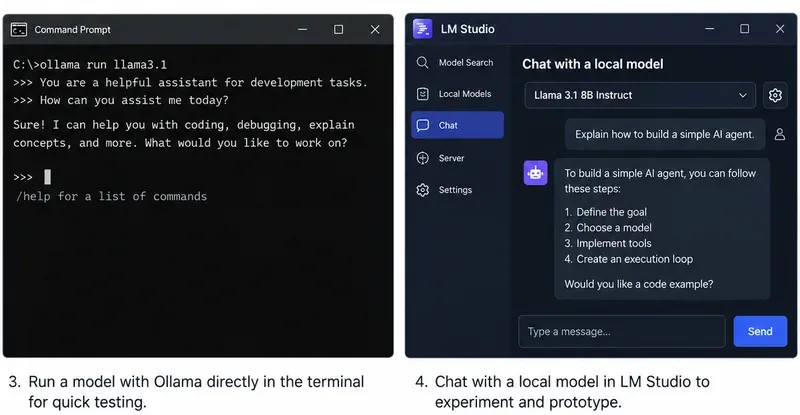
Ollama remains naturally terminal-first, while LM Studio combines a desktop workflow with a full developer server. The image is a workflow illustration rather than a version-specific benchmark.
What changed enough in 2026 to affect the decision?
Two updates narrowed the gap substantially.
First, Ollama added Anthropic Messages API compatibility in January 2026 and then introduced ollama launch, which can configure and start supported coding tools with Ollama models without manually editing environment variables or configuration files. Ollama’s current integrations documentation includes Claude Code, Codex, OpenCode, Copilot CLI, Cline, Roo Code, JetBrains, VS Code, n8n, and other tools. See Ollama’s announcement of ollama launch, Ollama’s Anthropic compatibility documentation, and Ollama integrations.
Second, LM Studio 0.4.0 separated the core runtime from the desktop app through llmster, making headless use on servers and CI a first-class option. Its native v1 REST API now supports stateful conversations, authentication, model download/load/unload operations, and MCP integrations. LM Studio also exposes OpenAI-compatible and Anthropic-compatible endpoints. See LM Studio 0.4.0 release notes and LM Studio v1 REST API documentation.
Practical consequence: “CLI versus GUI” is no longer an adequate comparison. The more useful question is whether you want a lean inference runtime that plugs into an existing agent stack, or a local AI development environment that also provides agent-oriented orchestration features.
Which is easier if you already have an agent framework?
Ollama usually wins for simplicity. Its native API runs at http://localhost:11434, and it also implements OpenAI-compatible and Anthropic-compatible endpoints. If your code already uses an OpenAI client, a framework that accepts a configurable base URL, or a coding tool supported by Ollama, switching the backend can be a small configuration change.
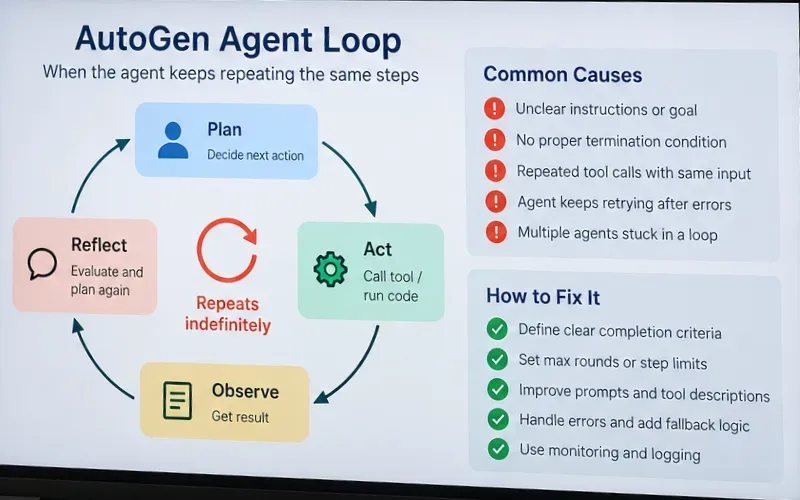
Ollama’s tool-calling API supports single tool calls, parallel tool calls, streaming tool calls, and multi-turn tool-calling loops. The documentation shows an agent loop where your Python or JavaScript code executes the requested function, returns the result to the model, and repeats until the model stops asking for tools. See Ollama tool-calling documentation.
A minimal OpenAI-compatible connection looks like this:
from openai import OpenAI

client = OpenAI(
    base_url="http://localhost:11434/v1",
    api_key="ollama"
)
Best fit: LangChain-style applications, your own Python agent loop, coding assistants, CI jobs, shell automation, or any project where you mainly need a dependable local model endpoint and prefer to own the orchestration logic yourself.
Which is better if you want agent orchestration built into the local stack?
LM Studio has the clearer advantage here. Its Python and TypeScript SDKs include an .act() API specifically designed for multi-round tool use. You give the model a task and tools; the SDK can execute requested tools, pass results back to the model, and continue for additional rounds until the model returns a final response or the process ends.
LM Studio’s documentation describes this as an automatic multi-round tool-calling API and provides hooks for progress, invalid tool requests, and parallel tool execution. The Python SDK can also accept ordinary type-annotated Python functions as tool definitions. See LM Studio .act() documentation.
That does not automatically make an LM Studio agent more capable. Tool-use quality still depends heavily on the model, tool descriptions, context length, and your safety controls. It does reduce the amount of agent-loop plumbing you have to write yourself.
Best fit: prototypes where you want to define Python or TypeScript functions and immediately test autonomous multi-step behavior without bringing in a separate agent framework.
Do you need MCP as a first-class part of the agent architecture?
If Model Context Protocol is central to your project, LM Studio is currently the stronger native choice. LM Studio can act as an MCP host in the app, and its API supports both configured MCP servers and per-request remote MCP servers. Its current v1 REST API and OpenAI-compatible Responses endpoint can expose MCP integrations to calling applications.
For example, LM Studio can define an ephemeral remote MCP server in a request or call MCP servers configured in mcp.json. The server settings include explicit permissions for per-request MCPs and locally configured MCP servers. See LM Studio MCP via API.
Ollama has extensive integrations with agent applications that may themselves support MCP, but Ollama’s current core documentation emphasizes function/tool calling and external integrations rather than presenting Ollama itself as an MCP host equivalent to LM Studio.
Choose LM Studio if: you want your local inference server to be the place where MCP tools are configured and exposed to agent requests.
Choose Ollama if: your higher-level agent application already owns the MCP layer and you only need Ollama to supply inference and tool-call outputs.
Which has the better API surface for stateful agents?
LM Studio currently offers more built-in state management. Its native /api/v1/chat endpoint can store a response and continue the conversation with a previous_response_id. Its OpenAI-compatible Responses API also supports stateful continuation. That can reduce how much conversation history your application has to resend for long-running workflows.
Ollama supports the OpenAI Responses API, but its current compatibility documentation states that only the non-stateful flavor is supported and that previous_response_id and conversation-based state are not supported. Your application can still maintain state by keeping the message history and sending it with later requests.
Recommendation: if server-managed conversational state is important to your architecture, LM Studio has an edge. If you already persist agent memory in your own database, message store, or framework, Ollama’s stateless approach is not a major disadvantage.
Which is better for coding agents such as Claude Code or Codex?
Ollama is especially convenient if your main goal is running existing coding agents. The current quickstart exposes ollama launch shortcuts for supported tools, and Ollama has dedicated integration documentation for Claude Code, Codex, OpenCode, Cline, Roo Code, and others. Its Anthropic-compatible Messages API supports streaming, tools, tool results, vision, and thinking-related fields for supported models.
LM Studio also supports Claude Code through its Anthropic-compatible /v1/messages endpoint and Codex through its OpenAI-compatible Responses endpoint. In January 2026, LM Studio 0.4.1 added the Anthropic-compatible endpoint specifically so local models could be used with Claude Code.
Need
Better default
Reason
One-command setup for several coding agents
Ollama
ollama launch is designed around supported agent integrations.
Claude Code with a local backend
Either
Both expose Anthropic-compatible Messages APIs.
Codex with a local backend
Either
Both support OpenAI-compatible APIs appropriate for Codex workflows.
Agent plus MCP tools managed by the local server
LM Studio
MCP is integrated into LM Studio’s current server/API architecture.
Which is easier for finding, testing, and swapping models?
LM Studio is better for visual exploration. Its desktop app includes model discovery and can search supported models from Hugging Face. Its CLI can also search and download models with lms get, including GGUF and MLX formats where supported. You can choose quantizations, inspect local models, estimate memory requirements before loading, and configure per-model load settings such as context length, GPU offload, and Flash Attention.
This is useful when you are testing several small agent models and want to compare them interactively before locking one into code.
Ollama’s model workflow is more opinionated and scriptable: use commands such as ollama pull, ollama list, ollama run, and ollama create. A Modelfile can define a base model and settings for reusable variants. This is convenient for infrastructure-as-code style setups because model preparation can live in shell scripts, Docker workflows, or deployment automation.
Recommendation: LM Studio for browsing and interactive experimentation; Ollama for a reproducible terminal-driven model workflow.
Yes. This used to be a clearer Ollama advantage, but LM Studio 0.4.0 changed the comparison.
Ollama is naturally service-oriented. On Linux, the official installation guide recommends running Ollama as a systemd service, and ollama serve exposes the local API. It also provides Docker support and environment variables for server behavior.
LM Studio now provides llmster, a standalone daemon that does not depend on the GUI. The current documentation explicitly positions it for Linux servers, cloud instances, GPU machines, and CI. Start it with lms daemon up and launch the API server with lms server start.
Recommendation: if you want the smallest conceptual stack, Ollama still feels simpler. If you want headless deployment while retaining LM Studio’s model-management API, stateful chat, authentication, MCP support, and SDK ecosystem, llmster makes LM Studio fully viable.
There is no responsible universal winner. Performance depends on the model format, quantization, context length, CPU/GPU, driver stack, batching, memory pressure, and runtime settings.
Ollama exposes scheduling controls for parallel requests and loaded models, and its 2026 Apple Silicon work includes an MLX-based engine in preview. LM Studio 0.4.0 introduced continuous batching for parallel requests, and it supports both llama.cpp runtimes and MLX on Apple Silicon. LM Studio also exposes explicit load controls such as GPU offload, context length, Flash Attention, and KV-cache placement for applicable runtimes.
Action: benchmark the exact model and context size your agent will use. Measure at least time to first token, tokens per second, memory consumption, and multi-request throughput. Do not choose a runtime based on a generic benchmark using different quantization or context settings.
What about hardware compatibility?
Both support the mainstream local-AI platforms, but the details differ. Ollama supports macOS, Windows, and Linux, with native acceleration options documented for NVIDIA, AMD, Apple Metal, and experimental Vulkan paths. LM Studio supports Apple Silicon Macs, x64/ARM Windows systems, and x64/ARM64 Linux configurations; its current macOS requirements do not support Intel Macs.
If you have unusual hardware, verify the exact GPU and operating-system combination before committing to either runtime.
Which is safer for local agents with file or browser tools?
The inference runtime is only part of the security boundary. Once an agent receives tools that can write files, execute commands, browse authenticated websites, or call internal APIs, the risk comes from the tool permissions as much as from the model server.
LM Studio explicitly warns that MCP servers can run arbitrary code, access local files, and use the network, and it provides server settings for authentication and MCP permissions. Ollama’s tool API leaves function execution to your application, which gives you direct control over what each function is allowed to do.
Recommendation: use narrow tool schemas, validate arguments, separate read-only and destructive tools, require confirmation for high-impact actions, and do not expose a local model API or MCP server to an untrusted network without appropriate access controls.
Which should a Python developer choose?
Choose Ollama if your Python application already has an agent loop or uses a framework that can talk to OpenAI-compatible APIs. The Python SDK can also accept Python functions directly as tools, so the basic tool-calling workflow remains compact.
Choose LM Studio if you want the runtime’s own SDK to handle multi-round tool execution. The lmstudio-python SDK includes model loading/unloading, embeddings, structured responses, agentic flows, and tool definitions in the same package.
A useful rule is:
You own orchestration: Ollama is usually cleaner.
You want orchestration helpers from the runtime SDK: LM Studio is usually more productive.
Which should you choose for a first local agent project?
Your situation
Recommended starting point
You want a local API up in minutes and prefer terminal workflows
Ollama
You want to browse models visually before choosing one
LM Studio
You already use LangChain, LlamaIndex, your own loop, or another orchestration layer
Ollama
You want MCP tools directly in the local server/API workflow
LM Studio
You want a first-party multi-round agent helper in Python/TypeScript
LM Studio
You mainly want Claude Code, Codex, OpenCode, or similar coding-agent integrations
Ollama, with LM Studio also viable
You need GUI testing locally but headless serving later
LM Studio
You prefer a minimal service that is easy to script and deploy
Ollama
Bottom line
Ollama is the better default for developers who want a minimal, terminal-first model runtime that plugs into an existing agent ecosystem. Its API, function calling, OpenAI/Anthropic compatibility, and 2026 coding-agent integrations make it especially convenient when your application or external framework already owns memory, MCP, planning, retries, and tool execution.
LM Studio is the better default when you want more of the agent-development stack in one local environment. Its 2026 headless daemon removed the old GUI-only concern, while its stateful REST API, MCP support, model-management endpoints, OpenAI/Anthropic compatibility, and .act() SDK give it a strong advantage for developers who want integrated orchestration and interactive model experimentation.
If you are still unsure, the practical choice is simple: prototype the same tool-calling task on both using the same model and quantization. If the agent framework already does everything you need, keep Ollama’s simpler runtime. If you find yourself building state management, MCP plumbing, model-management controls, and multi-round tool loops from scratch, LM Studio may save more engineering time.