A rental property spreadsheet is most useful when it does two jobs well: it shows what is happening with cash during the year, and it keeps transactions organized enough that year-end reporting does not become a search through bank statements and receipts.
Illustrative example: Maya owns one duplex and one small condo that she rents long term. This fictional scenario is only used to show how the workbook can be applied in practice; the names, properties, and numbers below are not customer results or test data. Maya wants one Excel file that lets her record rent, repairs, utilities, insurance, property taxes, and other costs by property while still seeing monthly and annual totals.
The structure below can serve as a free rental property expense and income tracker Excel template. You can build it in a blank workbook, save a master copy, and reuse it for each tax year. Microsoft also provides a library of free Excel templates if you prefer to start from an existing workbook design and adapt it.
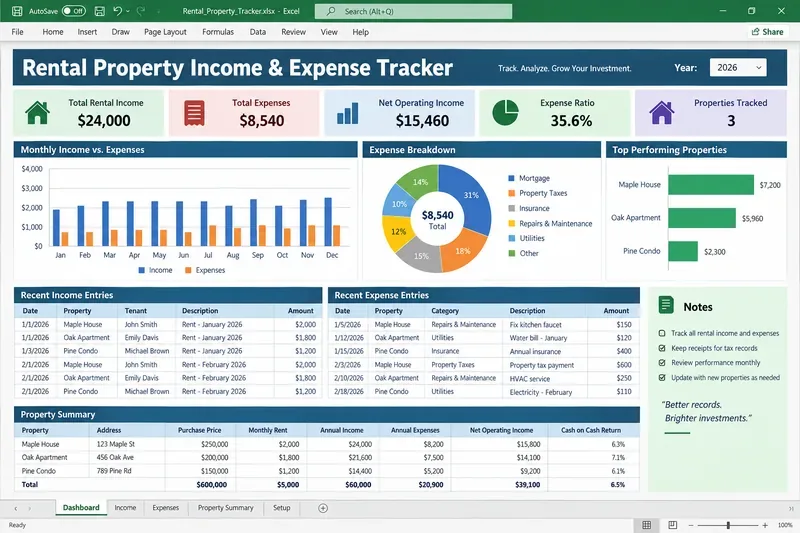
Example workbook dashboard with sample income, expenses, property summaries, and recent transactions. The figures are illustrative only; customize categories for your properties, and separate mortgage interest from principal when organizing records for tax preparation.
What the rental property tracker should contain
A practical workbook does not need dozens of tabs. For a small landlord, five sheets are usually enough:
Dashboard: monthly income, monthly expenses, net cash flow, and property-level summaries.
Income: every rent payment and other rental-related amount received.
Expenses: each paid expense with a category, property, vendor, amount, and receipt reference.
Property Summary: annual totals by property so you can compare performance without mixing addresses together.
Setup: standardized property names and expense categories used in drop-down lists.
For Maya, the Setup sheet contains exactly two property names: “Cedar Duplex” and “Lakeview Condo.” Using consistent names matters because “Cedar Duplex,” “Cedar,” and “123 Cedar St.” would otherwise be treated as different values in summaries.
Start with one clean transaction table
The simplest approach is to store detailed transactions in a single Excel Table named Transactions. Microsoft explains that Excel Tables use structured references, which adjust when rows are added or removed. That makes the workbook easier to maintain than formulas tied to a fixed range such as A2:A500.
Column
What to record
Date
The date income was received or an expense was paid, based on your accounting method.
Property
A consistent property name from the Setup sheet.
Type
Income or Expense.
Category
Rent, repairs, insurance, utilities, taxes, management fees, and other appropriate categories.
Description
A short explanation such as “January rent” or “Replace leaking faucet.”
Amount
The transaction amount as a positive number; Type determines whether it is income or expense.
Payee/Payer
Tenant, contractor, utility, insurer, tax authority, or other party.
Receipt/Document
A file name, cloud folder reference, receipt number, or statement reference.
Notes
Anything needed to explain unusual treatment, reimbursement, or allocation.
Excel Tables also support calculated columns and automatically extend formulas as new rows are added. Microsoft's Excel Tables overview describes this behavior and the related data-validation features.
Use SUMIFS for property and month totals
Once the transaction table is consistent, a dashboard can calculate totals instead of requiring manual addition. Microsoft's SUMIFS documentation confirms that the function adds values that meet multiple criteria.
For example, if cell A2 on the Property Summary sheet contains a property name, an annual income formula can be:
A simple cash-flow line is then income minus expenses. Do not assume that this cash-flow result is the same as taxable rental profit or net operating income. Mortgage principal, depreciation, capital improvements, refundable deposits, and personal-use allocations can all require different treatment.
Match expense categories to records you may need at tax time
For U.S. federal tax purposes, rental real estate is commonly reported on Schedule E. The current Schedule E lists categories including advertising, auto and travel, cleaning and maintenance, commissions, insurance, legal and professional fees, management fees, mortgage interest paid to banks, other interest, repairs, supplies, taxes, utilities, depreciation, and other expenses.
The IRS also explains in Topic No. 414, Rental Income and Expenses that rental income can include more than normal monthly rent and that deductible rental costs can include repairs, operating expenses, and depreciation, subject to the applicable rules. At the time this article was prepared in September 2026, the current IRS Publication 527 is the 2025 edition for preparing 2025 returns.
A useful tracker therefore separates ordinary cash expenses from items that need special treatment:
Tracker category
Practical treatment
Repairs
Keep ordinary repair transactions separate from improvements that add value or extend useful life.
Mortgage payment
Split interest from principal. The full payment should not be treated as one deductible expense.
Capital improvement
Track separately with the date placed in service and supporting invoice; it may be recovered through depreciation rather than deducted immediately.
Security deposit
Use a separate deposit or liability field when the amount may need to be returned to the tenant.
Depreciation
Keep this as a separate tax-oriented calculation rather than pretending it is a cash payment.
Do not treat every deposit as rental income
This is an easy place for a spreadsheet to create misleading totals. The IRS states that advance rent is generally included in income when received. A security deposit that may have to be returned is generally not income when received. If a deposit is intended to serve as the final month's rent, however, it is treated as advance rent.
In Maya's illustrative workbook, she records refundable tenant deposits on a separate Deposit sheet rather than in the Income table. If part of a deposit is later retained under circumstances that make it income, she records the appropriate amount at that time and keeps the related documentation.
Keep documentation connected to each transaction
The spreadsheet is an index, not a replacement for source documents. IRS guidance on rental real estate recordkeeping says good records help identify receipts, track deductible expenses, prepare returns, and support reported items if examined. Documentary evidence can include receipts, canceled checks, and bills.
A low-friction system is to give every receipt file a consistent name, such as 2026-02-14_CedarDuplex_Plumbing_185.pdf, then paste that file name into the Receipt/Document column. You do not need to embed every receipt inside the workbook.
How the illustrative example works month to month
In January, Maya receives $1,800 of rent for the Lakeview Condo and $2,400 for the Cedar Duplex. She enters two income rows rather than one combined $4,200 row, because property-level detail is more useful later.
A week later, she pays $165 to repair a faucet at the condo. She records the date, Lakeview Condo as the property, Expense as the type, Repairs as the category, the contractor in the payee field, $165 as the amount, and the receipt file name.
When she opens the Dashboard, formulas summarize the new data by month and property. She can see that January income is $4,200 and that Lakeview has at least $165 of recorded expenses. The example is deliberately simple: the dashboard does not decide whether a cost is deductible, capitalized, allocated, or limited. Those decisions depend on the facts and applicable tax rules.
A monthly review is more valuable than a year-end cleanup
Set aside a short monthly review and check four things:
Every rent payment shown on bank or payment-platform records appears in the tracker.
Every significant property expense has a category and supporting document.
Refundable deposits and owner transfers are not accidentally mixed into rental income.
Transactions are assigned to the correct property, especially when one contractor serves several addresses.
This process makes the annual totals more reliable because problems are corrected while receipts and circumstances are still easy to remember.
Common spreadsheet mistakes to avoid
Mixing mortgage principal with mortgage interest
A bank payment may contain both. Track them separately rather than labeling the entire payment “mortgage expense.”
Calling every large project a repair
Repairs and improvements can have different tax treatment. Keep a Capital Improvements category and retain invoices that explain the work.
Using inconsistent property names
Use drop-down lists from the Setup sheet so formulas do not miss transactions because of spelling variations.
Overwriting the original template
Save a clean master file, then create a new copy for each year. This protects formulas and makes year-to-year archiving easier.
Using the dashboard as a tax return
The workbook is a recordkeeping and management tool. Schedule E, depreciation, passive-activity rules, personal-use rules, and state or local requirements can require additional calculations. For complex situations, review the records with a qualified tax professional.
When this free Excel template is enough
For one or a few long-term rentals, a disciplined Excel tracker can be completely practical. It is especially useful when the owner personally reviews transactions and wants transparent formulas instead of another subscription.
Consider dedicated property-management or accounting software when you need automated bank feeds, tenant portals, online rent collection, security-deposit accounting, work-order management, multi-user controls, or consolidated reporting across many properties. The point is not to force Excel beyond its strengths.
Final setup checklist
Create a master workbook with Dashboard, Transactions, Property Summary, and Setup sheets.
Convert the Transactions range to an Excel Table and give it a meaningful name.
Use standardized property and category values.
Add SUMIFS formulas for income and expenses by property and period.
Separate deposits, mortgage principal, capital improvements, and depreciation from ordinary operating expenses.
Attach or reference source documents for significant transactions.
Reconcile the workbook monthly and archive a year-end copy.
A rental property expense and income tracker works best when it stays simple enough to update consistently. The spreadsheet should help you answer three questions at any time: what came in, what went out, and which property the transaction belongs to. Once those records are clean, summaries and year-end preparation become much easier.