Home
» AI Agents
»
Minimalist Investor Pitch Deck PowerPoint Template for Tech Startups: What to Include and How to Structure It
Minimalist Investor Pitch Deck PowerPoint Template for Tech Startups: What to Include and How to Structure It
A minimalist investor pitch deck should make a startup easier to understand, not merely make the slides look empty. The practical test is simple: can an investor quickly grasp what the company does, who needs it, why the opportunity matters, what progress has been made, and what the founders are asking for?
That is why a useful PowerPoint template starts with content structure before colors, gradients, or animation. Y Combinator’s pitching guidance repeatedly emphasizes clarity and concise communication. Its How to Pitch Your Company framework centers on direct questions such as what the company does, who the customers are, the size of the market, progress, growth, and the team. YC’s pitch deck design guidance similarly argues that founders should identify the handful of ideas they most want investors to remember.
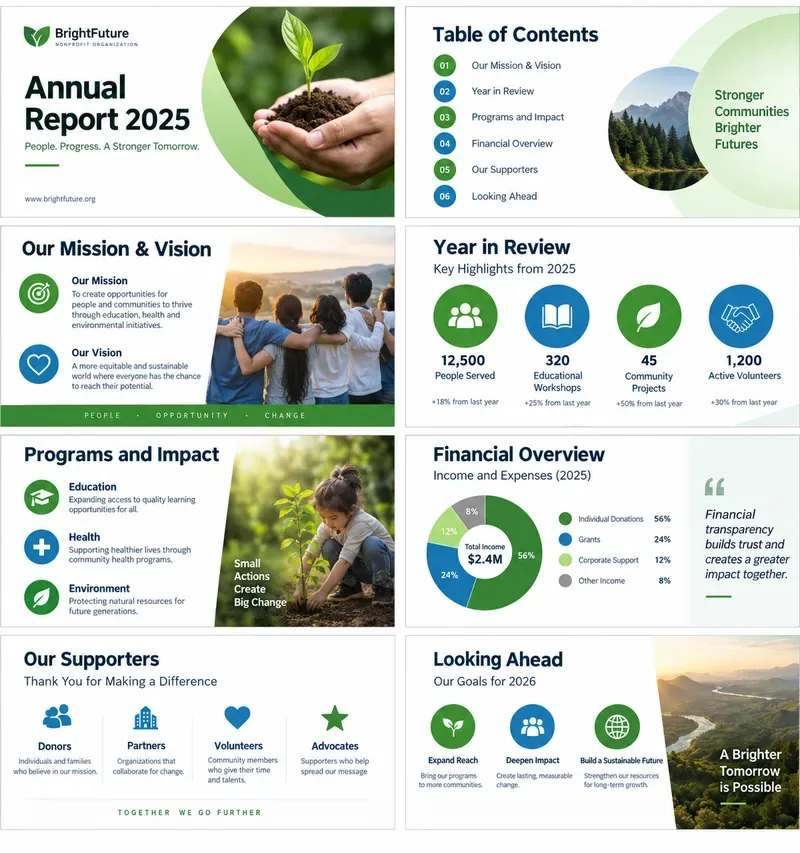
A minimalist pitch deck uses a strong title, restrained color, and one clear visual focal point instead of filling the slide with decorative elements.
What should “minimalist” mean in an investor pitch deck?
Minimalist should mean low visual friction and strong information hierarchy. It should not mean deleting the evidence an investor needs to evaluate the business.
A strong minimalist template typically uses one dominant message per slide, short headlines, generous spacing, a restrained color system, consistent charts, and only the visuals that support the spoken or written story. The goal is to help the reader find the important information in seconds.
Microsoft distinguishes a PowerPoint theme from a template: a theme controls coordinated colors, fonts, and effects, while a template can also contain slide layouts, placeholders, and purpose-specific content. That distinction matters for startup teams because the reusable asset should be more than a color palette. It should include layouts for metrics, product screenshots, market sizing, team profiles, and the funding ask. Microsoft documents this difference in its PowerPoint templates and themes guidance.
Which slides should the template include?
There is no universal slide count that every investor requires. A practical starting point is a compact core deck that tells the story without forcing every possible detail into the main presentation. The exact order can change when one fact is unusually compelling—for example, strong revenue growth may deserve to appear earlier.
Slide
Main question to answer
Minimalist content to include
1. Cover
What is the company?
Company name, one-line description, optional logo, presenter name.
2. Company / Problem
What important problem exists, and for whom?
One clear problem statement plus one or two pieces of evidence.
3. Solution / Product
What does the product do?
Product screenshot, workflow, or simple diagram with a short explanation.
4. Customer
Who buys or uses this?
Specific customer segment and purchasing context.
5. Market
How large can this become?
Bottom-up market logic, assumptions, and source notes where possible.
6. Traction
What evidence shows demand or execution?
Revenue, active users, pilots, retention, signed contracts, or another relevant metric.
7. Business Model
How does the company make money?
Pricing model, buyer, unit, and a simple revenue mechanism.
8. Go-to-Market
How will customers be acquired?
Primary channel, sales motion, current funnel, or repeatable acquisition path.
9. Competition / Insight
Why can this company win?
Specific differentiation, proprietary advantage, or unique market insight.
10. Team
Why is this team suited to the problem?
Founders, roles, and only the experience relevant to execution.
11. Ask
What are you raising and what will it enable?
Round target if appropriate, intended milestones, and next-step contact information.
YC’s Practical Design: Pitching describes a short-pitch flow that covers what the company does, how it works, customers, unique insight, market size, progress, growth, team, and memorable facts. Use that as a content check rather than treating any slide order as a rigid rule.
How many slides should a tech startup actually use?
Use as many slides as necessary to tell the investment story clearly, but make every slide earn its place. For many early-stage startups, roughly 8–12 core slides is a reasonable working range, followed by an appendix. That is a practical editorial recommendation, not an official investor rule.
The better test is whether the deck becomes repetitive. If “problem,” “market problem,” “customer pain,” and “why now” all repeat the same point, consolidate them. If a single traction slide has six charts that require tiny labels, split it into two slides or move the detail to the appendix.
What should the visual system look like?
A minimalist technology pitch deck works best when the visual rules are decided once and applied through Slide Master rather than manually formatting every slide. Microsoft’s current PowerPoint documentation for Microsoft 365 and PowerPoint 2024 explains that Slide Master and layouts can control placeholders, fonts, backgrounds, and repeated design choices. See Create and save a PowerPoint template.
Background: use white, near-white, or one dark neutral for selected section slides.
Typography: use one readable sans-serif family or a restrained heading/body pair.
Accent color: choose one primary brand accent and reserve secondary colors for data categories.
Alignment: use a consistent grid, margins, and title position throughout the deck.
Charts: remove decorative borders and label the one comparison or trend the investor should notice.
Imagery: prefer actual product screens, customer workflow visuals, or relevant product photography over generic stock imagery.
Minimalism still needs accessibility. Microsoft recommends sufficient contrast and warns against using color as the only way to communicate meaning. Its PowerPoint accessibility guidance also recommends readable fonts and use of the Accessibility Checker.
What belongs on a traction slide?
Use the metric that most directly demonstrates progress for the business model. A SaaS startup might show ARR or MRR, retention, paid accounts, or expansion. A marketplace may care more about GMV, completed transactions, repeat behavior, and take rate. A developer tool may emphasize active teams, usage, conversions, and enterprise pilots.
Do not invent impressive numbers to make the template look finished. Placeholder data should be unmistakably labeled, such as “Example only” or “[Insert actual metric].” In the real investor deck, every number should be traceable to company records or a clearly identified external source.
For growth charts, label the time period and unit directly. A chart titled “Revenue Growth” is weaker than “Monthly Recurring Revenue, Jan–Aug 2026” because the second title tells the reader what is being measured before they inspect the graph.
How should a startup present market size?
Prefer a transparent calculation to an enormous market number with no connection to the actual product. YC’s pitching material specifically discusses bottom-up market sizing as a credible approach: identify potential customers, estimate what they could reasonably pay, and show the logic behind the total opportunity.
A minimalist market slide can therefore be simple: customer count × annual value per customer, followed by the segment actually reachable today. If the calculation depends on public research, place the source in small but readable text at the bottom of the slide or in speaker notes.
Should the file be PPTX or POTX?
Use PPTX for the working investor deck; use POTX when you want a reusable PowerPoint template. A .pptx file is the presentation founders edit for a specific fundraise. A .potx file is useful when an accelerator, venture studio, internal design team, or repeat founder wants a template that generates new presentations with predefined layouts.
As of September 2026, Microsoft’s support documentation says creating and saving a .potx template requires the desktop version of PowerPoint; PowerPoint for the web can use presentations but does not provide the same template-creation workflow. Microsoft documents the desktop process in its template creation guide.
What should go in the appendix?
The appendix is where the deck can stay minimal without withholding useful diligence material. Common appendix slides include:
Detailed financial model assumptions or historical financials.
Cohort retention and expansion data.
Sales pipeline details and customer references.
Competitive landscape with more complete feature or positioning analysis.
Product architecture for deep-tech, infrastructure, or AI startups.
Security, compliance, regulatory, or clinical information where relevant.
Unit economics, margin structure, CAC, payback period, and LTV methodology.
Hiring plan and use-of-funds detail.
The main deck should still make sense without opening the appendix. Treat appendix slides as answers to predictable follow-up questions, not as a place to hide the core investment case.
How do you make the deck easy to share?
Keep an editable PowerPoint master, then create a PDF version for distribution when you want the layout to remain fixed. Microsoft notes that saving a PowerPoint as PDF preserves the formatting and layout for viewers who may not have PowerPoint. The official steps are available in Save PowerPoint presentations as PDF files.
If the PPTX becomes too large because of product screenshots or photography, compress images carefully rather than deleting useful evidence. Microsoft provides PowerPoint file-size guidance covering picture compression, resolution, fonts, and media.
Investor-ready template checklist
The first slide explains the company in one line.
Each slide has one primary takeaway.
Every metric uses a real unit and time period.
Market-size assumptions are visible and defensible.
Product visuals show the actual product or workflow where possible.
Team bios include relevant evidence rather than full resumes.
The ask identifies what the next financing milestone should accomplish.
All placeholder numbers are removed or clearly labeled before sharing.
Fonts, colors, spacing, and chart styles are controlled consistently.
A PDF sharing copy and an editable PPTX master are both reviewed before sending.
A minimalist investor pitch deck is most effective when design removes distractions and the structure answers investor questions in a logical order. Start with the company’s strongest facts, build reusable PowerPoint layouts around them, and keep detailed diligence material in the appendix. The result should feel simple because the thinking is clear—not because important information has been left out.