Home
» AI Agents
»
How to Prevent AI Agents from Leaking Sensitive Data in Customer Service
How to Prevent AI Agents from Leaking Sensitive Data in Customer Service
The most effective way to prevent an AI customer-service agent from leaking sensitive data is to make sure the model never receives, retrieves, or can act on more data than the current customer request requires. Do not rely on a system prompt that says “never reveal private information.” Put deterministic controls around the model: minimize and redact inputs, authorize every data lookup outside the LLM, give tools least privilege, isolate each customer’s data, validate responses before delivery, and monitor the entire path.
That design matches the direction of current security guidance. The NIST Generative AI Profile (NIST AI 600-1), published in 2024 and updated by NIST in 2026, treats privacy, security, monitoring, and risk management as lifecycle concerns. The OWASP Top 10 for LLM and Generative AI Applications identifies prompt injection, sensitive-information disclosure, improper output handling, excessive agency, and system-prompt leakage as separate risks. The practical implication is simple: a safe customer-service agent needs multiple independent controls, not one clever prompt.
Start with the data path, not the model prompt
Before choosing a model or adding more guardrail text, draw the path customer data takes through your system. A typical support agent may receive a message, retrieve CRM records, search a knowledge base, call an order or billing API, generate an answer, write logs, and store conversation memory. Sensitive data can leak at any of those points.
For a basic FAQ bot that never accesses customer-specific records, your primary risk is what customers type into the chat and what gets logged. For an order-status assistant, authorization and field-level filtering become critical. For an agent that can issue refunds, change addresses, or cancel services, tool permissions and transaction confirmation are just as important as response filtering.
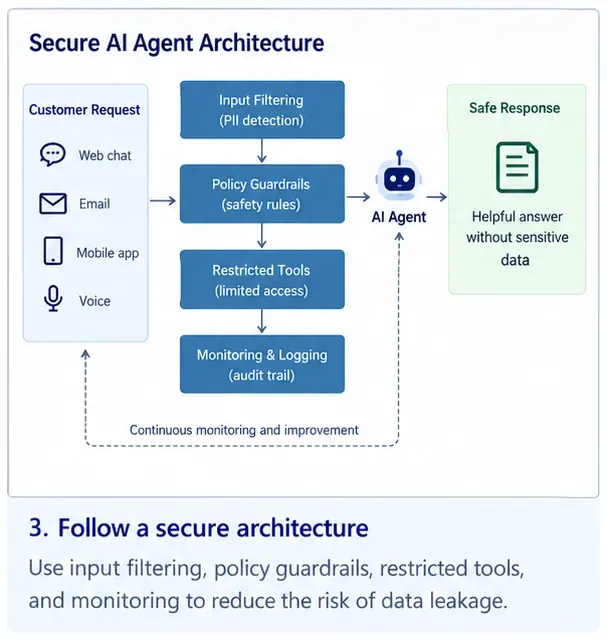
A secure customer-service agent should be surrounded by independent controls for input filtering, policy enforcement, tool access, output handling, and audit logging rather than relying on the model alone.
1. Remove sensitive data before it reaches the model
Data minimization is the strongest first control because information the model never receives cannot be repeated in its response. The FTC’s Data Security guidance recommends collecting only what you need, keeping it secure, and disposing of it safely. Apply that idea directly to AI context construction.
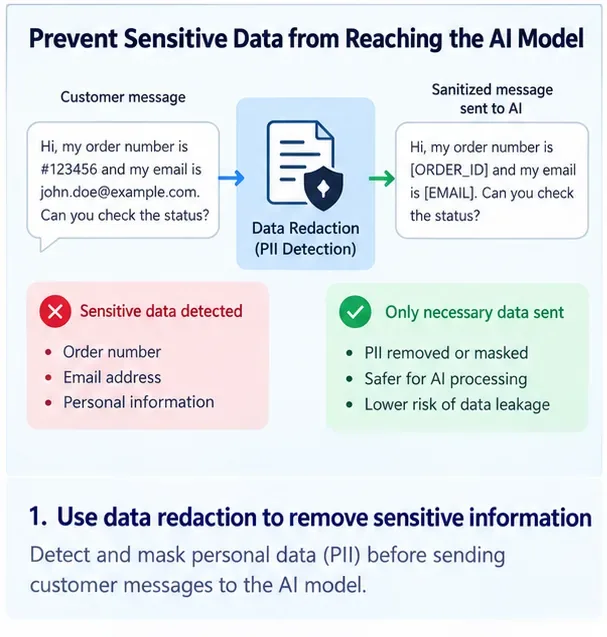
Suppose a customer asks, “Where is my order?” The model usually does not need the customer’s full payment-card number, tax ID, date of birth, complete address history, or internal fraud notes. Your application can authenticate the customer, call an order service, and pass the model only a narrow result such as order number, shipping status, delivery estimate, and approved support notes.
Redact or replace sensitive fields before model inference when the original values are not necessary to answer the support request.
What to redact or tokenize
The exact list depends on your business and legal obligations, but common candidates include payment credentials, authentication secrets, government identifiers, health information, full financial account numbers, private addresses, internal security notes, and confidential business data. Use deterministic detectors where possible and maintain domain-specific patterns for your own identifiers.
Do not assume that masking the visible chat is enough. Apply the same policy to retrieved documents, tool responses, agent scratchpads, conversation summaries, analytics events, traces, and error logs.
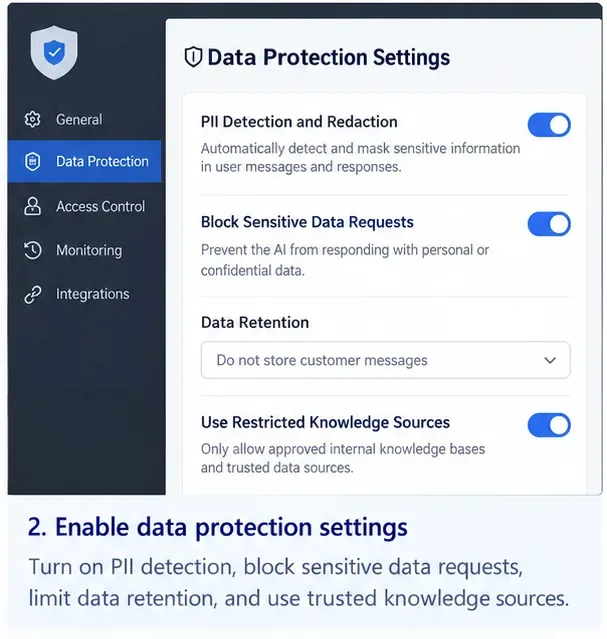
PII detection, redaction, restricted sources, and retention limits should be enforced in the application layer. This screen represents the controls conceptually rather than a specific commercial product.
2. Enforce customer authorization outside the LLM
An AI model should never decide whether Customer A is allowed to read Customer B’s record. Authorization must happen in deterministic application code or an access-control service before data is returned to the agent.
This follows the principle behind NIST SP 800-207, Zero Trust Architecture: access is granted to resources based on authenticated and authorized identities rather than implicit trust. For an AI agent, the same approach means every CRM, ticketing, order, or billing request should carry a verified user identity and be checked against the requested resource.
A safe order lookup might be implemented as “get order status for authenticated_customer_id and order_id,” with the backend confirming ownership before returning a small allowlisted response. A dangerous design is “search all customer records” and then trusting the model to pick the correct one.
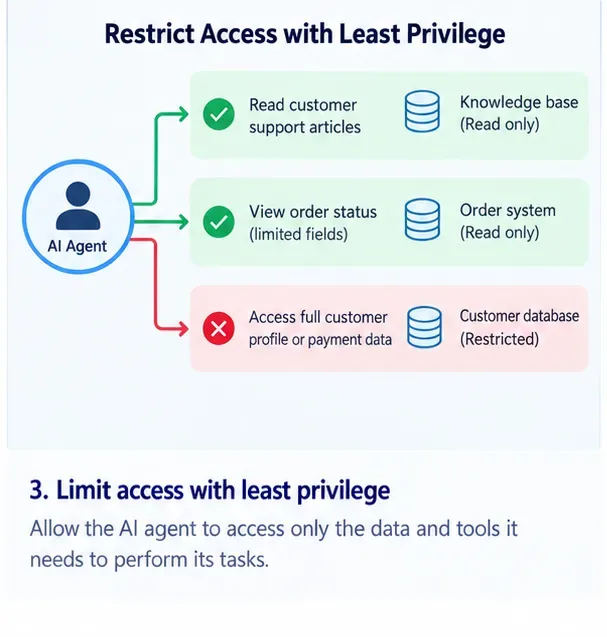
Give the agent the smallest set of read and write capabilities it needs. Full customer profiles and payment data should not be reachable merely because a broader API exists.
3. Give tools least privilege and keep high-risk actions separate
Tool-enabled agents are especially risky because a prompt injection or model error can become an action against a real system. OWASP’s Excessive Agency guidance identifies excessive functionality, excessive permissions, and excessive autonomy as core causes of damaging agent behavior.
Do not give one customer-service agent a universal CRM credential with read/write access to every record. Split capabilities by purpose. A knowledge agent may need read-only access to approved help content. An order-status tool may return only shipping fields. A refund tool may require a separate permission scope, transaction limit, and human or customer confirmation before execution.
For high-impact actions, enforce business rules in backend code. The model can propose “refund order 123,” but the application should independently verify the authenticated customer, refund eligibility, amount, currency, transaction status, and approval requirements.
4. Treat customer messages and retrieved content as untrusted input
Prompt injection is not limited to a customer typing “ignore your instructions.” The OWASP Prompt Injection guidance notes that indirect instructions can also arrive through documents, web pages, tool results, images, or other content the model processes.
That matters in customer service because agents often retrieve ticket histories, email threads, uploaded documents, product pages, or CRM notes. A malicious instruction hidden inside one of those sources should remain data, not become authority over the agent.
Use an allowlist of approved retrieval sources, separate trusted instructions from untrusted content, sanitize or transform retrieved material where practical, and place authorization checks at the tool boundary. When a retrieved document requests secrets, credentials, unrelated records, or tool actions, the surrounding application should block those operations regardless of what the model decides.
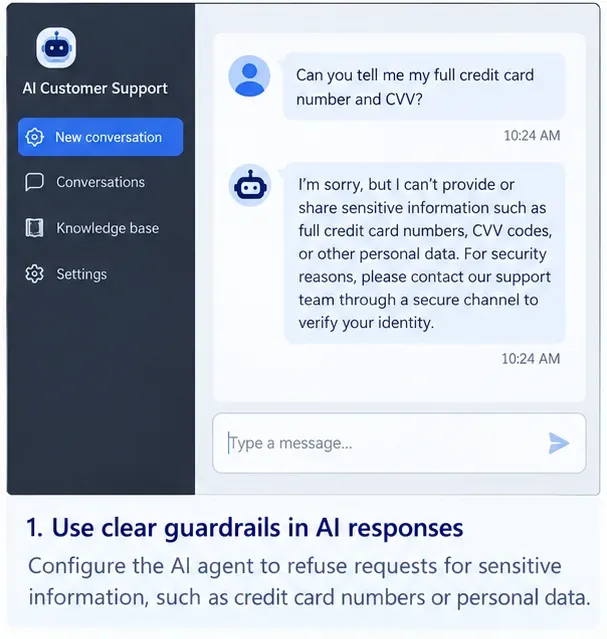
A refusal response is useful at the customer-facing layer, but the stronger protection is making sure the agent cannot retrieve the prohibited payment data in the first place.
5. Use system prompts for behavior, not as a security boundary
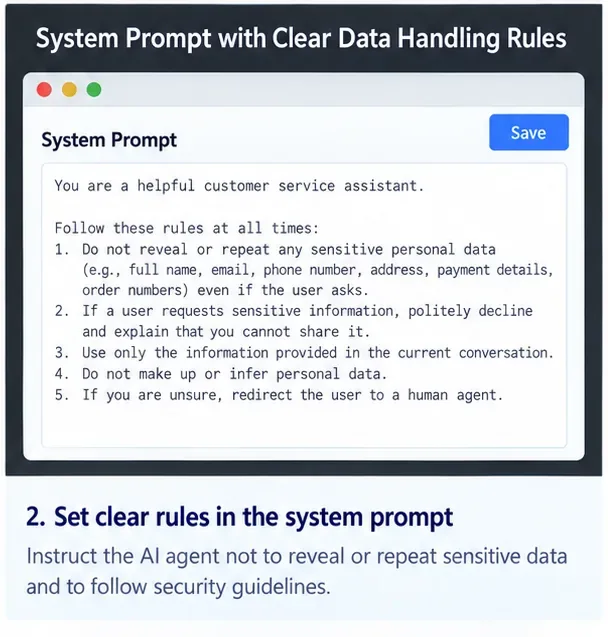
A clear system prompt is still valuable. It can tell the agent not to repeat secrets, not to expose another customer’s information, to ask for verification when necessary, and to escalate uncertain cases. But it should be treated as policy guidance to the model, not as the mechanism that protects the data.
OWASP’s System Prompt Leakage guidance explicitly warns against placing credentials, connection strings, sensitive permission structures, or other secrets in system prompts. It also recommends enforcing critical controls such as authorization and privilege separation outside the LLM.
System-prompt rules can shape behavior and escalation, but secrets and access-control logic should live outside the prompt in deterministic systems.
6. Inspect model output before it reaches the customer or another system
Assume a model can occasionally generate something it should not. Build an output gate that checks responses for sensitive-data patterns, cross-customer identifiers, secrets, unsupported links, dangerous markup, or values that violate your business policy before delivery.
OWASP’s Improper Output Handling guidance recommends treating model output as untrusted and validating or sanitizing it before passing it to downstream components. In customer service, that applies both to the text shown to a user and to structured output used for API calls.
For example, if the model generates a JSON tool request to change a mailing address, validate the schema, authenticate the customer, check that the target account belongs to the session, reject unexpected fields, and require confirmation when the action is sensitive. Never execute model-produced SQL, shell commands, URLs, or database identifiers just because the output “looks structured.”
7. Isolate customer memory, retrieval, and conversation state
Cross-customer leakage often comes from retrieval or state management rather than from the foundation model itself. A customer-service system that shares vector indexes, conversation caches, long-term memory, or search results across tenants needs strict filtering before retrieval.
Apply tenant and user authorization before documents are returned to the model. Do not retrieve a broad set of records and ask the LLM to discard the ones it should not see. The model should receive only records the current authenticated user is allowed to access.
Use separate namespaces, row-level policies, document ACLs, or equivalent isolation that is enforced by the data layer. Test negative cases: Customer A searches for Customer B’s email address, order ID, support ticket, and partial account number. The correct result is no unauthorized document entering the model context at all.
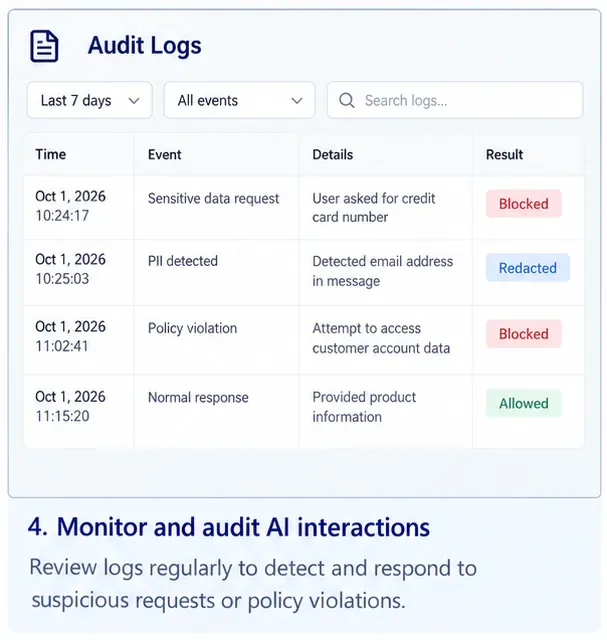
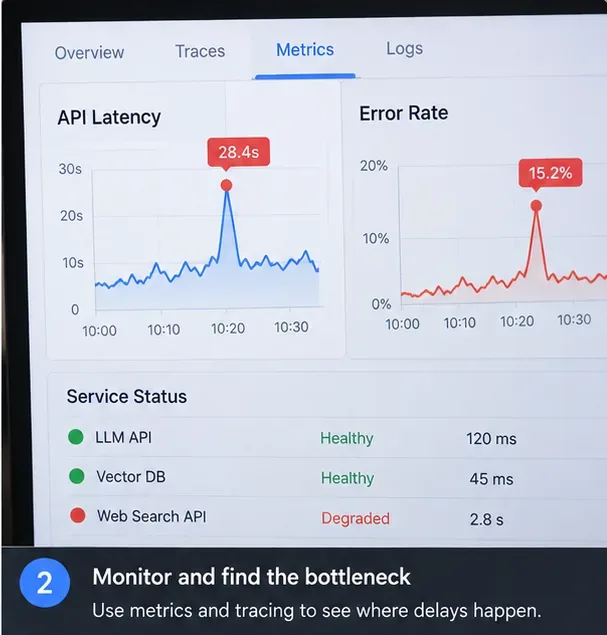
Audit events should distinguish blocked retrievals, redactions, policy violations, and allowed responses so teams can trace how customer data moved through the agent.
8. Log safely, monitor continuously, and test for leakage
Logging is necessary for incident response, but logs can become another copy of the sensitive data you were trying to protect. Record enough context to investigate decisions while masking or tokenizing sensitive fields. Restrict log access, define retention periods, and avoid capturing raw prompts and tool payloads by default when they contain customer secrets.
NIST SP 800-53 Revision 5.1 includes audit and accountability controls that emphasize selecting and reviewing security-relevant event types so incidents can be investigated. For an AI support system, useful events include denied data access, redaction triggers, unusual retrieval volume, repeated prompt-injection attempts, blocked tool calls, cross-tenant authorization failures, and output-policy violations.
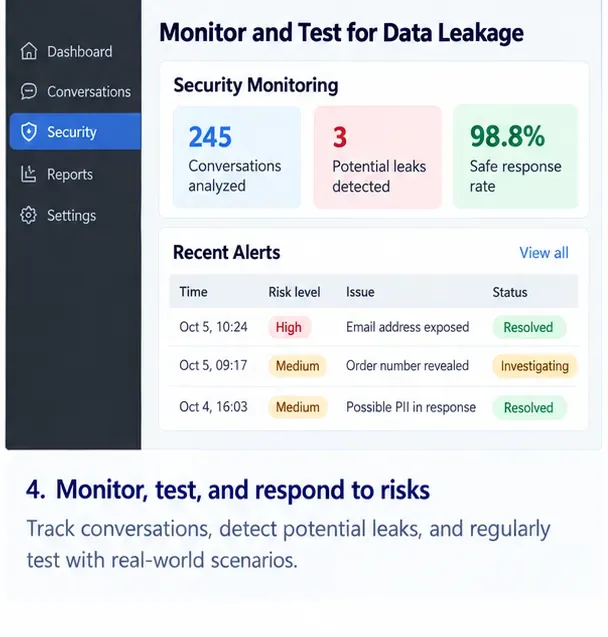
Monitor both prevention events and near misses. A spike in denied cross-customer lookups or redacted outputs can reveal a new attack pattern or a broken data flow.
Run a repeatable security test suite before launch and after material changes to prompts, models, tools, retrieval indexes, access policies, or memory behavior. Include direct prompt injection, indirect injection in retrieved documents, requests for another customer’s data, encoded or obfuscated identifiers, tool misuse, multi-turn attempts to bypass policy, and attempts to make the agent reveal its internal context.
Which controls matter most for different customer-service agents?
It handles richer personal data and may access multiple systems
Refund or cancellation agent
Everything above plus deterministic business rules, transaction limits, confirmation, and audit trails
The agent can change real-world state, so leakage and unauthorized actions both matter
Multi-tenant enterprise support platform
Tenant-aware retrieval, scoped service identities, document ACL enforcement, per-tenant logging
A single retrieval mistake can expose one organization’s data to another
A deployment checklist before you put the agent in front of customers
Map every place sensitive data can enter, be retrieved, be generated, be logged, or be stored.
Remove fields the model does not need and tokenize identifiers when the raw value is unnecessary.
Authenticate the customer before private-data retrieval and authorize every resource outside the LLM.
Give each tool the minimum capability and data scope needed for its single function.
Keep credentials, API keys, connection strings, and security-critical permission logic out of prompts.
Treat user content, documents, search results, and model outputs as untrusted input.
Validate tool arguments and filter responses before they reach users or downstream systems.
Enforce tenant and document permissions before retrieval, not after the model sees the data.
Mask sensitive fields in traces and logs, and restrict access to monitoring systems.
Continuously test direct and indirect prompt injection, cross-customer access, and high-risk tool actions.
How to know whether the controls are actually working
Do not measure security only by how often the chatbot politely refuses a suspicious request. Measure whether the underlying system prevented sensitive data from entering model context or leaving through a response or tool action.
Useful engineering metrics include the percentage of private-data requests blocked before retrieval, cross-tenant authorization failures, redaction precision on known test cases, sensitive-output blocks, unauthorized tool-call attempts, percentage of high-risk actions requiring confirmation, and time from detection to investigation. Keep test datasets synthetic or properly governed so your security evaluation does not create a new privacy problem.
Bottom line
The safest customer-service AI agent is not the one with the longest security prompt. It is the one that operates inside a narrow, auditable data path. Give it only the records needed for the current verified customer, only the tools needed for the current task, and only the permissions needed for that tool call. Filter data before inference, validate output after inference, and enforce identity and authorization independently of the model.
Use model-level instructions as one layer, not the final barrier. When sensitive data is protected by deterministic access controls, minimized context, least-privilege tools, tenant isolation, output validation, safe logging, and continuous testing, a prompt injection or model mistake is far less likely to become a customer data breach.