Home
» AI Agents
»
Why Your AutoGen Agent Gets Stuck in Infinite Loops—and How to Fix It
Why Your AutoGen Agent Gets Stuck in Infinite Loops—and How to Fix It
There is an important platform change to know before debugging an AutoGen loop. As of September 2026, the official AutoGen repository is in maintenance mode: it is expected to receive maintenance work rather than new features, and Microsoft recommends Microsoft Agent Framework for new projects. The official AutoGen repository still lists Python 0.7.5 as the current stable line, while Microsoft published an updated AutoGen-to-Agent-Framework migration guide on August 25, 2026. If you already have AutoGen in production, though, the troubleshooting techniques below remain directly useful. See the official AutoGen repository, the official AutoGen releases, and Microsoft's AutoGen migration guide.
An AutoGen agent usually looks “stuck in an infinite loop” for one of five reasons: the run has no reliable termination condition, the next-speaker policy keeps choosing an unproductive participant, a tool call does not create observable progress, agents hand work back and forth, or the application keeps resuming stale state. The fastest fix is not to rewrite every prompt. First identify which loop you actually have, then add a hard stop, then repair the transition that is failing.
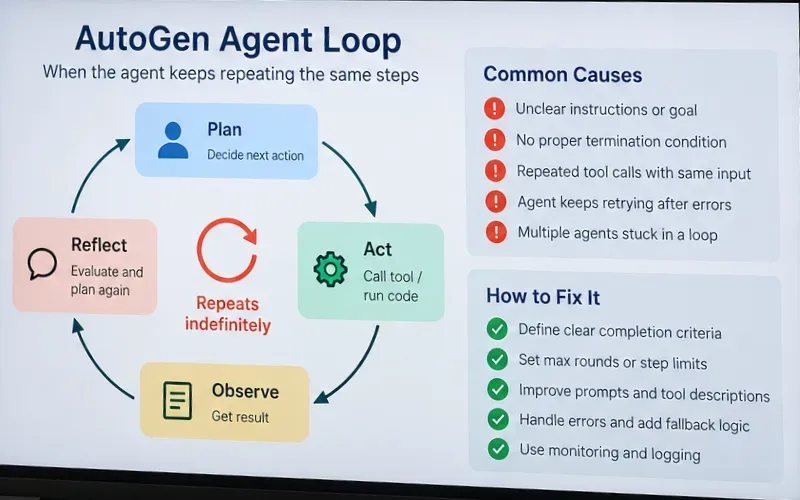
A compact diagnostic view: repeated planning, tool use, observation, and reflection becomes a loop when completion criteria or hard limits never fire.
Quick diagnosis: what kind of loop are you seeing?
Symptom
Likely cause
First thing to check
The same two agents alternate indefinitely
Routing or handoff ping-pong
Speaker selection, handoff targets, and a maximum-message or maximum-turn limit
One agent repeatedly calls the same tool with nearly identical arguments
Tool result does not prove progress or failure
max_tool_iterations, tool return schema, and retry logic
The team keeps talking after the task is visibly complete
Completion is only implied in the prompt
Explicit termination condition and deterministic completion signal
A selector repeatedly chooses the wrong specialist
Ambiguous agent descriptions or selector prompt
Participant descriptions, candidate set, and allow_repeated_speaker
A new task seems to inherit the previous task's behavior
State was intentionally preserved
Whether the team or agent should be reset before the new task
A graph workflow cycles forever through review/rewrite
Exit condition never becomes true
Cycle exit predicate plus an independent safety termination
1. Add a hard stop before you debug anything else
AutoGen AgentChat provides built-in termination conditions specifically to keep teams bounded. The stable documentation includes MaxMessageTermination, TextMentionTermination, TokenUsageTermination, TimeoutTermination, HandoffTermination, SourceMatchTermination, ExternalTermination, StopMessageTermination, TextMessageTermination, FunctionCallTermination, and FunctionalTermination. See the official AutoGen termination documentation.
For most production workflows, use a semantic completion condition and an independent safety ceiling. The important operator is usually OR, because you want the run to stop when either the task finishes normally or the safety limit is reached.
A common mistake is relying only on “say TERMINATE when done.” That leaves correctness to model behavior. Another mistake is combining conditions with & when you actually mean “stop on either.” AutoGen supports both AND and OR composition, so choose the semantics deliberately.
What this fixes
A team that never produces the expected completion phrase.
A selector that keeps finding another speaker even though useful work has stopped.
A handoff chain that has no natural end.
An unexpected model or tool behavior that would otherwise consume unbounded turns.
A hard cap is a circuit breaker, not proof that the workflow is correct. If the run always stops because it hits the cap, you still have a logic problem to fix.
2. Make completion machine-detectable, not merely conversational
The strongest termination signal is one your application can recognize without interpreting prose. If the workflow has a clear success event, use the closest matching termination condition. For example, a specific handoff can be detected with HandoffTermination, a particular tool completion can be detected with FunctionCallTermination, and custom logic can be expressed with FunctionalTermination.
If you use TextMentionTermination("TERMINATE"), make the responsibility explicit: which agent is allowed to declare completion, and under what verified condition? Avoid giving every participant vague instructions such as “continue until satisfied.” That kind of instruction can produce endless critique-and-rewrite behavior because “satisfied” has no observable boundary.
A useful completion contract is concrete: “The reviewer emits TERMINATE only after the draft contains all three required sections and no open blocker remains.” Better still, when practical, make the reviewer produce structured state that the application can check.
3. Fix SelectorGroupChat routing before rewriting all agent prompts
SelectorGroupChat uses a model to choose the next speaker from the shared conversation context. The stable documentation notes that participant names and descriptions matter because they are used in speaker selection. By default, the same speaker is not selected consecutively unless it is the only available agent, although allow_repeated_speaker=True changes that behavior. AutoGen also provides selector_func and candidate_func when you need more deterministic control. Review the official SelectorGroupChat documentation.
If the same participant keeps getting selected, check these in order:
Agent descriptions: each description should say what the agent does and when it should be chosen. Overlapping descriptions make routing unstable.
Selector prompt: keep routing rules short enough for the model to apply reliably. The AutoGen documentation explicitly recommends considering a custom selector when the prompt starts accumulating many conditions.
Repeated speaker setting: leave allow_repeated_speaker off unless consecutive turns are genuinely required.
Candidate restriction: if only two agents are valid after a particular state, restrict the candidate set rather than asking the model to choose from every participant.
Deterministic transitions: use selector_func when the workflow is really a state machine disguised as a conversation.
The key distinction is simple: use LLM-based speaker selection when the next speaker genuinely requires semantic judgment. Use deterministic routing when the next speaker is dictated by workflow state.
4. Stop repeated tool calls by making progress visible
In current AgentChat, AssistantAgent has a max_tool_iterations parameter. The stable API documentation says the default is 1; when increased, the agent can make additional sequential tool calls until the model returns a text response or the maximum is reached. That means a single agent run is bounded by this setting, but the same agent can still be selected again by a team and repeat the same failed tool pattern across turns. See the official AssistantAgent API reference.
If you see the same tool and arguments over and over, reducing the iteration limit only contains the damage. The root fix is usually in the tool contract. The model needs enough information to tell whether the call succeeded, failed permanently, failed transiently, or produced no new information.
That is more useful than a generic string such as “No result” because the model can see that repeating the same call is not progress. For side-effecting tools, also add idempotency at the application level so a repeated call cannot repeatedly create the same ticket, payment, message, or database mutation.
Also check parallel tool calls
The stable AssistantAgent reference notes that multiple tool calls may execute concurrently and that parallel tool calls can be disabled in supported model clients. It also warns that if multiple handoffs are detected, only the first is executed, and recommends disabling parallel tool calls to avoid that situation. If your workflow assumes strict one-action-at-a-time state transitions, parallel calls can make the resulting state harder to reason about.
5. Break handoff ping-pong in Swarm-style teams
A handoff loop usually looks like this: Agent A decides Agent B is better suited, Agent B sees incomplete context and sends the task back, and both choices remain locally reasonable forever. The problem is not that either model is “wrong.” The handoff policy lacks ownership and a terminal state.
Fix it by giving every handoff a narrow condition and a rule for what happens when the target cannot make progress. For user-interactive workflows, HandoffTermination(target="user") is designed to stop the team when control should return to the application or person. AutoGen's human-in-the-loop documentation also explains that Swarm workflows need deliberate resume behavior after a user handoff. See the official human-in-the-loop documentation.
A good handoff contract includes:
the exact capability the target owns;
the evidence that justifies the handoff;
what the target should return if it succeeds;
what the target should do if required information is missing;
a prohibition against sending the task back unchanged.
6. Treat GraphFlow cycles as real loops that need explicit exits
GraphFlow supports deliberate cycles, conditional branching, and loop exits. The stable API describes loops as valid only when there is a condition that eventually exits the loop, and the builder validates graph structure. It is also marked experimental. A structurally valid loop can still run for too long if the exit condition is logically unreachable, so keep an independent termination condition or turn limit around it. See the official AutoGen teams API reference.
This matters especially in “writer → reviewer → writer” designs. If the reviewer is instructed to “keep improving until perfect,” the exit predicate may never become true. Replace subjective perfection with a finite rubric such as required sections present, validation checks passed, no critical defects, and maximum revision count reached.
7. Reset state when the next task is unrelated
AgentChat agents and teams are stateful. AutoGen's stable documentation says the team keeps conversation context across runs so related tasks can continue, and it provides reset() to clear team and participant state. This behavior is useful for continuation, but it can look like a loop if an unrelated task inherits old context, unfinished delegation, or prior assumptions.
await team.reset()
result = await team.run(task=new_unrelated_task)
The stable agent API also warns callers to pass only new messages on each call rather than replaying the entire conversation history manually. Re-injecting full history while the agent also maintains state can duplicate context and reinforce repetitive behavior.
8. Log the transition, not just the final text
When a loop is hard to reproduce, record enough information to answer four questions for every turn: who acted, why they were selected, what action they attempted, and what changed afterward. AutoGen provides tracing and observability support, and the stable tracing guide demonstrates tracing AgentChat teams. See the official AutoGen tracing documentation.
At minimum, log:
run ID and turn number;
message source and message type;
selected speaker and available candidates;
tool name plus a hash or normalized form of arguments;
tool status and whether state changed;
handoff source and target;
termination-condition result;
TaskResult.stop_reason when the run ends.
A very effective diagnostic is “same action, same state” detection. If the same agent invokes the same tool with equivalent arguments and the shared state hash has not changed for several turns, stop the run and mark it as a no-progress loop. That check lives in your application logic rather than being a built-in AutoGen feature, but it catches a class of failures that token or message limits only contain after the fact.
A practical safe baseline
For an existing AutoGen AgentChat application, a conservative baseline is:
Always configure a hard message, turn, timeout, or token ceiling.
Combine that ceiling with a meaningful completion condition using OR when either should stop the run.
Keep max_tool_iterations small unless the agent genuinely needs a multi-step tool sequence.
Return structured tool results that distinguish success, no progress, retryable error, and permanent error.
Do not allow repeated speakers unless the workflow needs them.
Use deterministic selectors for deterministic workflows.
Give handoffs explicit ownership and a terminal route.
Reset teams between unrelated tasks.
Trace turns and detect repeated action with unchanged state.
What not to do
Do not solve every loop by simply raising max_messages from 25 to 100. That changes the cost of failure, not the logic. Do not add a longer system prompt before checking whether the termination condition is actually wired into the team. Do not let two agents both own “final review.” Do not return ambiguous tool strings if the next model call must decide whether to retry. And do not assume a run that eventually stops is healthy: a workflow that always reaches its safety cap is still malfunctioning.
When to migrate instead of keep patching
If you are maintaining an existing AutoGen application, these fixes are appropriate and the current documentation remains available. For a new system or a major orchestration rewrite, however, the maintenance-mode status changes the decision. Microsoft now directs new users to Microsoft Agent Framework, and its migration documentation describes a shift from AutoGen's event-driven core and high-level teams toward typed, graph-based workflows. That does not mean an AutoGen loop must be migrated immediately, but it does mean you should weigh the cost of deeper AutoGen-specific orchestration work against moving to the supported successor.
The shortest reliable debugging path is therefore: bound the run, identify the repeating transition, make progress observable, then make the exit deterministic. Once those four pieces are in place, most “infinite” AutoGen loops become ordinary workflow bugs you can reproduce and fix.