Home
» AI Agents
»
Best Free Invoicing Apps for Small Service Businesses in the US (2026)
Best Free Invoicing Apps for Small Service Businesses in the US (2026)
If you run a small service business, a “free” invoicing app should do more than let you type a total and email a PDF. A good result is a workflow that lets you create an accurate invoice quickly, gives the client an obvious way to pay, shows you what is still outstanding, and does not surprise you with limits or fees after you have moved your customer list into the system.
This guide compares free or no-required-monthly-fee invoicing options that are practical for US service businesses such as consultants, cleaners, designers, repair businesses, tutors, contractors, and small agencies. Pricing and limits below were checked against official US or vendor pricing pages on September 13, 2026. Payment-processing fees can change, so confirm the current rate before you commit to a platform.
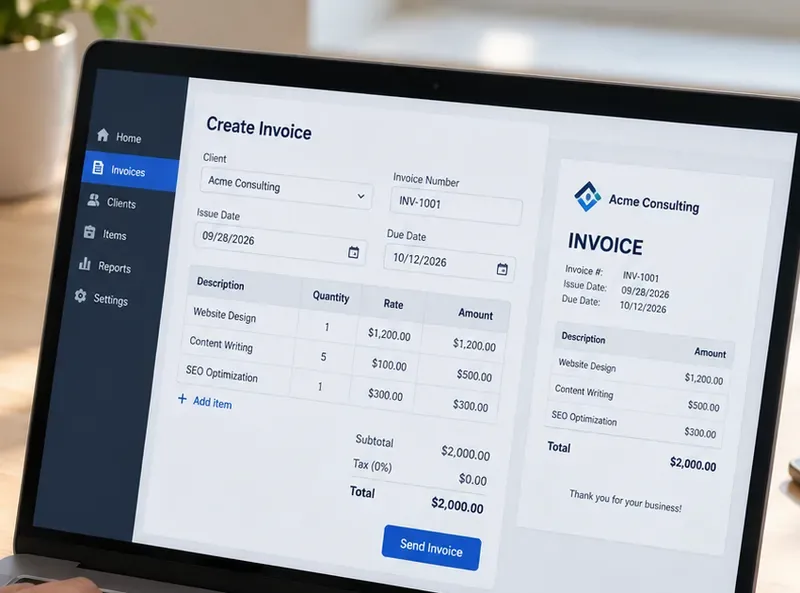
A useful free invoicing app should make the core workflow clear: add the client and service lines, confirm dates and totals, preview the invoice, and send it without unnecessary steps.
What “free invoicing” should mean for a small service business
For this comparison, “free” means you can create and send invoices without a required monthly software subscription. That does not mean online payments are free. Card and ACH processing fees still apply on most platforms, and those fees can matter more than the subscription price once your invoice volume grows.
The right free plan should pass four practical tests:
Invoice capacity: You can send enough invoices for your real workload without hitting a low annual or client cap.
Collection workflow: Clients can pay online, or you can clearly record cash, check, ACH, or other payment methods.
Follow-up visibility: You can see which invoices are draft, sent, paid, or overdue without maintaining a second spreadsheet.
Administrative fit: The app supports the estimates, recurring billing, time tracking, bookkeeping, or client portal features you actually use.
A good sign after your first month is that you spend less time re-entering customer details, checking whether an invoice was paid, or recreating recurring bills. If you still need a separate spreadsheet to track status, manually copy every payment into accounting software, or repeatedly explain payment steps to clients, the free plan may not be saving enough work.
Quick comparison: the strongest free options
App
Best fit
Key free-plan limit
Online payment cost to watch
Zoho Invoice
Best overall for feature depth
500 invoices/year, 2 users, 3 projects
Depends on connected gateway; Zoho says it adds no extra fee
Wave Starter
Best for invoicing plus basic bookkeeping
Unlimited invoices and estimates
Cards start at 2.9% + $0.60; ACH 1% with $1 minimum
Square Free
Best if you also take in-person payments
Unlimited invoices, estimates, and recurring invoices
Online/invoice card payments 3.3% + $0.30; ACH 1% with $1 minimum
PayPal Invoicing
Best for client familiarity and easy payment choice
No fee to create or send standard invoices
Cards/Apple Pay 2.99% + $0.49; PayPal/Venmo 3.49% + $0.49; ACH 1% capped at $10
Invoice Ninja Free
Best for a very small recurring client list
5 clients, unlimited invoices
Depends on the payment gateway you connect
1. Zoho Invoice: best overall free feature set
Zoho Invoice is the strongest starting point for many small service businesses because the free product includes more than basic invoice creation. According to the official Zoho Invoice pricing page, the free plan supports automated payment reminders, recurring invoices, quotes, expense tracking, time tracking, a customer portal, reporting, and branded invoice customization.
The main tradeoff is capacity. Zoho currently states that the free plan supports up to two users, three projects, and 500 invoices per year. For a consultant sending 10 to 20 invoices a month, that can be generous. For a cleaning company, mobile repair service, or tutor sending dozens of small invoices each week, 500 invoices per year can become a real ceiling.
Online payments are flexible because Zoho Invoice can connect to multiple gateways. Its official integrations page lists options such as Zoho Payments, PayPal, Stripe, Square, Authorize.Net, and others. Zoho notes that the payment processor may charge transaction fees; Zoho itself does not add an extra processing fee for integrations such as Stripe or Square.
Choose Zoho Invoice if
You bill by project or by time, want recurring invoices and reminders without paying a monthly subscription, and are unlikely to exceed 500 invoices in a year.
Switch when
Your annual invoice count approaches the limit, you need more collaborators, or your workflow expands beyond three active projects. At that point, a broader accounting or business-management platform may reduce more administrative work than staying on a constrained free plan.
2. Wave Starter: best for invoicing plus simple bookkeeping
Wave is a strong option when you want invoicing and bookkeeping in the same place. The official Wave pricing page says the Starter plan is $0 and includes unlimited estimates, invoices, bills, and bookkeeping records. That removes the invoice-count anxiety you get with capped plans.
For US card payments on Starter, Wave lists 2.9% + $0.60 for Visa, Mastercard, and Discover transactions and 3.4% + $0.60 for American Express. ACH bank payments are 1% with a $1 minimum, according to Wave's official payments page.
The fixed $0.60 portion matters if you send many small invoices. On a $25 invoice, a $0.60 fixed fee is proportionally more painful than it is on a $1,000 invoice. That does not make Wave a bad choice, but it is a reason to calculate your typical effective payment cost instead of comparing percentages alone.
Another limitation is automation. Wave's current pricing table places automated late-payment reminders in Pro, not Starter. If chasing overdue invoices is your biggest pain point, Zoho's free reminder automation may be more valuable even with its annual invoice cap.
Choose Wave if
You want unlimited invoicing and basic bookkeeping in one dashboard, and your invoice values are large enough that the fixed card fee is not a major issue.
Switch when
You need automated bank imports, automated categorization, receipt capture, or reminder automation often enough that paying for Pro would save more time than manual work.
3. Square Free: best for service businesses that also take in-person payments
Square is especially useful for businesses that invoice some clients but also take card payments in person. Square's support documentation says businesses can send an unlimited number of digital invoices, estimates, and recurring invoices. The official Square invoice guide also shows that invoices can be created and managed from the Square Dashboard, Square Invoices app, or supported point-of-sale apps.
The free software plan does not eliminate payment fees. On the official Square pricing page, Square Free currently lists 3.3% + $0.30 for online or invoice card payments. ACH bank transfer through an invoice costs 1% with a $1 minimum on Square Free. Square notes that ACH payments deposited into Square Checking can have $0 processing fees, subject to its current terms.
The quality advantage here is consolidation. If your field team already uses Square for point-of-sale payments, creating a separate invoicing stack may add more reconciliation work than it saves.
Choose Square if
You already use Square, accept both remote and face-to-face payments, or want invoices, recurring billing, and payment history in the same ecosystem.
Switch when
Your business becomes mostly invoice-based and another platform offers materially lower collection costs or better project/time-tracking features for your specific workflow.
4. PayPal Invoicing: best for familiar client checkout
PayPal remains useful when clients already recognize and trust PayPal or Venmo. The official PayPal Invoicing page states that creating and sending standard invoices is included with a PayPal account, and clients do not need a PayPal account to pay an invoice.
PayPal also supports recurring invoices, which can work well for monthly retainers, lessons, maintenance plans, or recurring professional services.
For US invoicing transactions, PayPal currently lists 3.49% + $0.49 for PayPal, Venmo, or PayPal Guest Checkout; 2.99% + $0.49 for standard credit/debit cards and Apple Pay; and 1% for ACH with a $10 cap. These rates are shown on PayPal's official merchant fee page, last updated September 1, 2026.
The main question is whether client familiarity is worth the processing cost for your typical invoice size. A business with a few high-value invoices may care less about a $0.49 fixed fee than a business issuing many $20 or $30 invoices.
Choose PayPal if
Your clients already prefer PayPal or Venmo, you want a recognizable checkout experience, and you value simple recurring invoicing more than a full bookkeeping suite.
Switch when
You need tighter accounting workflows, lower payment costs at scale, deeper project tracking, or more sophisticated receivables automation.
5. Invoice Ninja Free: best for a tiny client roster with recurring work
Invoice Ninja's free plan is unusually capable if you have very few clients. Its official 2026 pricing page says the free tier includes up to five clients with unlimited invoicing, four invoice templates, recurring invoices, auto-billing, projects, billable time tracking, expense tracking, deposits, partial payments, and a client portal.
The five-client limit is the defining constraint. A freelance designer with four long-term retainers may find this excellent. A house-cleaning business with 40 recurring households will outgrow it immediately.
The free plan also keeps Invoice Ninja branding and does not include some Pro features such as automatic payment reminders, API access, or additional account users. Payment costs depend on the gateway you connect; Invoice Ninja lists integrations with providers such as Stripe, PayPal, Square, and GoCardless.
Choose Invoice Ninja if
You have five or fewer active clients, bill recurring projects, and value time tracking plus a client portal more than broad accounting features.
Switch when
You add a sixth client, need multiple staff accounts, want automatic reminders, or require API/integration workflows that the free tier does not include.
Which free invoicing app is best for your service business?
There is no single winner for every small service business. The better choice depends on where your administrative friction actually comes from.
Choose Zoho Invoice if you want the most complete free invoicing workflow and can stay under 500 invoices per year.
Choose Wave if unlimited invoicing plus bookkeeping matters more than free reminder automation.
Choose Square if invoicing is one part of a broader in-person and online payment workflow.
Choose PayPal if familiar client checkout and PayPal/Venmo acceptance are the priority.
Choose Invoice Ninja if you have five or fewer clients and want project/time tracking without a monthly bill.
How to judge whether your choice is actually working
After 30 days, review the workflow instead of just the feature list. A good free invoicing app should show measurable improvements in everyday work. You should be able to answer these questions quickly:
Can you create and send a normal invoice in a couple of minutes without re-entering data?
Can you tell which invoices are overdue without checking email threads or a separate spreadsheet?
Can a client understand the amount due, due date, and payment method without asking for clarification?
Can you reconcile payments without manually copying the same information into multiple systems?
Are transaction fees acceptable at your average invoice size?
Are you still comfortably below the free plan's invoice, project, user, or client limits?
If the answer to several of those questions is no, changing tools can be more valuable than trying to force a free plan to fit. Free software is most useful when its limitations do not create more manual work than the subscription would cost.
A note on tools that are low-cost but not truly free
Some popular invoicing products have no monthly subscription but still charge a platform fee on paid invoices. Stripe Invoicing is a good example: Stripe's official pricing page lists Invoicing Starter at 0.4% per paid invoice, separate from payment-processing fees. That can still be a reasonable choice if your business already runs on Stripe, but it does not meet the same definition of free used for the main list above.
Limits to keep in mind
An invoicing app can organize billing, but it does not replace bookkeeping review, tax advice, payroll, or legal guidance. Sales-tax obligations for services vary by state and by service type, and a template that calculates tax correctly only works if you have configured the right rule in the first place.
Also remember that payment fees, plan limits, and product features change. Before migrating your client list, verify the current official pricing page, send yourself a test invoice, test the client payment experience, and export a sample report. That short trial is usually more revealing than choosing only from a feature checklist.