Home
» AI Agents
»
Siri AI in iOS 27: What It Can Do and When It Still Asks You to Confirm
Siri AI in iOS 27: What It Can Do and When It Still Asks You to Confirm
Last checked: September 28, 2026. Apple describes Siri AI in iOS 27 as a beta. Its new abilities can help search personal information, understand what is on screen, answer broad questions, draft text, and take supported actions in apps. Whether the assistant completes an action immediately or asks first depends on what the action changes, how the app exposes it, and your settings.
Consider this clearly hypothetical example: Jordan is running late to dinner. Jordan wants to find the reservation details, check a message with the address, and tell a friend the new arrival time. This example explains how to think through Siri’s capabilities; it is not a report of a test or a promise that every app will behave the same way.
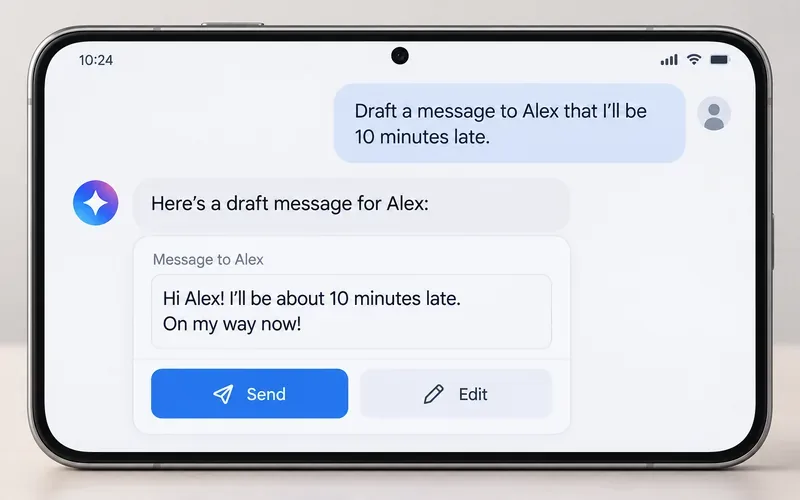
Conceptual interface: the assistant has prepared a short late-arrival message, while Send and Edit remain separate choices.
What Siri AI in iOS 27 can help with
Apple’s iOS 27 support guide describes Siri AI as a conversational assistant with personal-context understanding, onscreen awareness, and broad world knowledge. In practice, that means Jordan can ask for information in ordinary language, refine the request in follow-up turns, and ask Siri to use information visible on the phone or found in supported apps.
Find details across personal information
Jordan might ask, “Find the dinner reservation email,” or “What address did Maya send me?” Apple says Siri AI can search sources such as Photos, Mail, Messages, and Calendar, including requests for an old photo, a family member’s recommendation, or flight details in an email or calendar. It can also answer questions about content on the current screen, such as an image or PDF. The practical limit is access: the information must be available to the device and the relevant app or content must be accessible to Siri.
Ask questions, draft, and revise
Jordan can ask a general question, request a plan, or say, “Draft a message to Maya that I’m ten minutes late.” Siri AI can produce text, summarize information, proofread writing, and continue revising after a follow-up prompt. A draft is still different from a delivered message. The review step gives Jordan a chance to check the recipient, wording, and timing before anything leaves the phone.
Take supported actions in apps
Apple’s examples include creating a reminder or calendar event, sending an email, calling a contact, creating a note, adding a photo to an album, and resuming a podcast. Siri mode in Camera can also identify something in view, answer questions about it, or surface a relevant action. Jordan could ask Siri to add dinner ingredients to a shopping list or send the revised arrival message to a group.
“Across apps” does not mean every app or every operation is automatically available. An app needs to expose compatible actions and information to Apple’s system, and device permissions, account state, network access, and app-specific rules still apply. If the action is not supported, Siri may give information, ask Jordan to open an app, or be unable to complete it.
When should Jordan expect a confirmation?
There is no single rule saying that every Siri AI action always needs a tap, or that Siri can perform every action without asking. Apple’s developer guidance describes a final confirmation step for app actions where it is appropriate, especially when an action could have meaningful effects on a person’s data or the outside world. The app can help Siri determine whether an item is private, shared, or public.
Unclear details: If “Maya” matches more than one contact, or the request leaves out a necessary date or destination, Siri may ask Jordan to clarify before proceeding.
Messages: Apple provides an “Automatically Send Messages” setting that skips Siri’s confirmation step for sending messages. Jordan should check the wording and recipient before enabling it, particularly for group conversations.
Shared or public information: Editing an event that has invitees, changing shared content, or canceling something with effects for other people is more likely to call for confirmation than a private change. Apple’s developer session gives the example of confirming a change to an event with attendees while potentially not confirming an update to a personal event. The exact behavior depends on the app and action.
Requests sent to ChatGPT: Apple says the user is asked before information is shared with the ChatGPT extension. Siri AI users must first ask ChatGPT before a prompt, photo, or file is sent. This is a separate privacy checkpoint, not the same as confirming a message or calendar change.
For Jordan’s late-arrival note, a sensible sequence is: Siri finds the right contact, drafts the text, and Jordan reviews the recipient and wording. If automatic message sending is enabled, Siri may skip the usual sending confirmation; otherwise, the confirmation behavior can depend on the request and settings. For a shared calendar change, Jordan should expect that the assistant or app may pause for approval.
A practical way to use it safely
State the target and outcome. Name the person, app, date, or item when you can: “Find Maya’s message with the restaurant address.”
Use a draft for communication. Ask Siri to write or revise the message first. Check the contact, group, and final text before sending.
Pause on changes others can see. Before changing an event with guests, canceling a booking, or editing shared content, read the confirmation details carefully.
Review settings and access. Check Siri’s response settings, app permissions, and the “Automatically Send Messages” option. If using ChatGPT, review what content is being shared before approving.
Verify the result in the app. Confirm that the message appears in the intended conversation, the event has the correct date and attendees, or the reminder is saved where expected.
Availability and limits to keep in mind
As of the date above, Apple’s support materials list Siri AI as a beta for iOS 27 on Apple Intelligence-enabled iPhone 15 Pro and iPhone 15 Pro Max models, and iPhone 16 models or later. Apple also says Siri and device language must be set to a supported language; Siri AI is available in English to start. Some features vary by region or language, server-backed features may have daily usage limits, and Apple says Siri AI is initially unavailable on iPhone in the European Union. Check Apple’s current compatibility and availability page for your exact device and location before relying on a feature.
Because this is beta software, behavior can change. Apple does not publish a complete public list of every task and the exact confirmation prompt for every app. Treat Siri’s prompt as the authority for the action in front of you, especially when a request could send, share, delete, purchase, cancel, or change something on another person’s behalf.
Jordan’s final self-check
Before finishing, Jordan checks three things: Did Siri use the correct source and person? Is the proposed action the one Jordan asked for? Has the result actually appeared in Messages, Calendar, or the relevant app? If any answer is uncertain, Jordan edits or cancels the action and completes it manually. That keeps Siri useful for finding and preparing work while leaving consequential decisions visible and reviewable.