Home
» AI Agents
»
How to Build an AI Research Assistant That Summarizes arXiv Papers to Slack
How to Build an AI Research Assistant That Summarizes arXiv Papers to Slack
September 2026 status check: you do not need a newly released platform feature to build a useful arXiv-to-Slack research assistant. The durable integration path is still straightforward: the arXiv legacy API returns Atom metadata, arXiv asks legacy API clients to make no more than one request every three seconds with a single connection, and Slack Incoming Webhooks accept JSON messages and support Block Kit. Slack also documents a general posting guideline of about one message per second per channel. Those constraints should shape the architecture from the start rather than being added as afterthoughts.
This guide builds a small Python service that discovers papers, normalizes metadata, optionally extracts full text, asks a language model for a structured summary, deduplicates versions, and sends a readable research digest to Slack. The default design is deliberately conservative: summarize the abstract first, label the result as abstract-based, and only process the full PDF when you actually need deeper coverage. That makes the system cheaper, easier to audit, and less likely to overstate what it has read.
The assistant has six logical components: a scheduler, an arXiv client, a normalizer, a summarizer, a persistence layer for deduplication, and a Slack publisher. Keep those pieces separate even if the first version runs in one Python process. Separation makes it much easier to replace a model, change a search query, or move from a webhook to a full Slack app later.
Component
Responsibility
Failure to guard against
Scheduler
Runs daily or on demand
Duplicate runs
arXiv client
Searches and retrieves metadata
Rate-limit abuse or malformed queries
Normalizer
Creates a stable internal paper record
Version confusion
Summarizer
Produces a structured, evidence-bounded digest
Hallucinated claims
Store
Tracks seen paper versions and run status
Repeated Slack posts
Slack publisher
Formats and posts the digest
Leaked webhook URLs or message floods
Step 1: Query arXiv Without Fighting the API
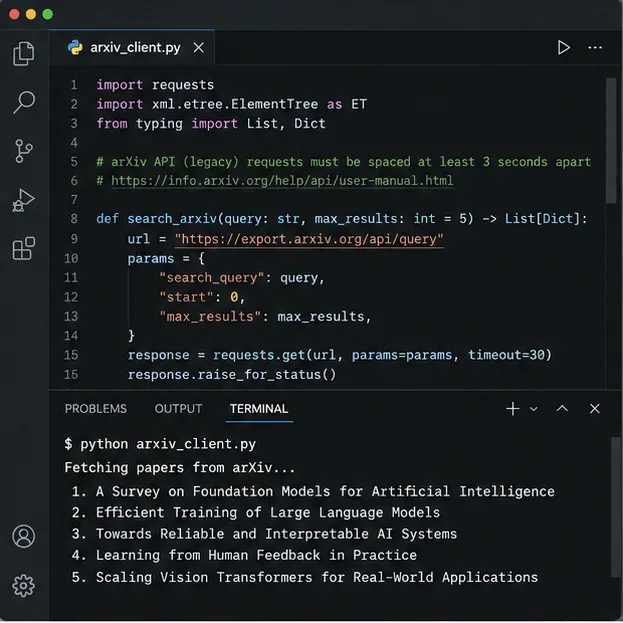
The legacy search API is a good fit for a lightweight research assistant because it exposes searchable fields such as title, author, abstract, category, and submitted date, and it returns Atom XML. A typical AI query can use a category such as cat:cs.AI, then request the newest results with sortBy=submittedDate and sortOrder=descending.
Do not treat the endpoint like a high-throughput crawling service. arXiv's current terms say legacy API requests, including RSS, OAI-PMH, and the arXiv API, should be limited to one request every three seconds and one connection at a time. If your workflow needs many pages, serialize the requests and sleep between them. For a daily digest of five or ten papers, one query may be enough.
Example arXiv client workflow: construct one search request, parse the Atom response, and pace any follow-up requests to respect arXiv's published limits.
import time
import requests
import feedparser

ARXIV_API = "https://export.arxiv.org/api/query"

def search_arxiv(query="cat:cs.AI", max_results=8):
    params = {
        "search_query": query,
        "start": 0,
        "max_results": max_results,
        "sortBy": "submittedDate",
        "sortOrder": "descending",
    }
    r = requests.get(ARXIV_API, params=params, timeout=30)
    r.raise_for_status()
    return feedparser.parse(r.content)

# If you paginate or issue another arXiv request:
time.sleep(3.1)
Step 2: Create a Slack Incoming Webhook
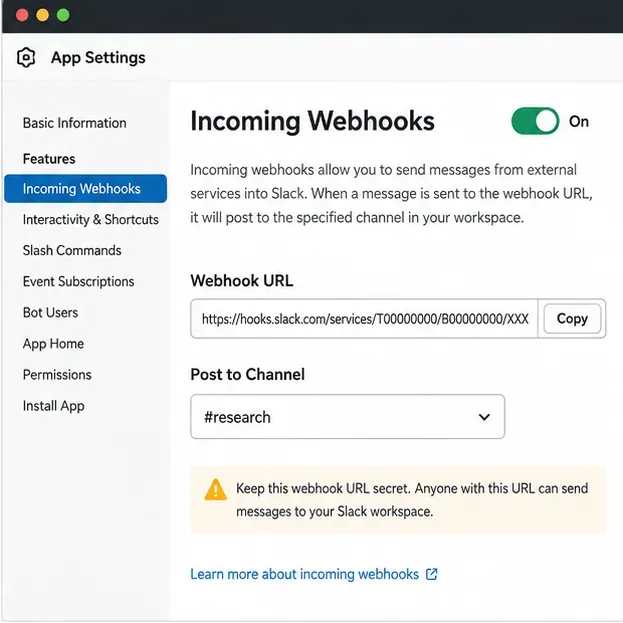
For a one-way digest, an Incoming Webhook is usually simpler than OAuth plus chat.postMessage. In your Slack app settings, enable Incoming Webhooks, add a webhook to the destination channel, and store the returned URL as a secret. Slack explicitly warns that the webhook URL is a secret and says leaked webhook URLs may be revoked.
A webhook is tied to the channel selected during installation. If your assistant later needs to choose channels dynamically, delete messages, read replies, or build interactive workflows, switch to a bot token and Slack Web API methods. For a scheduled research digest, the webhook keeps the permission surface small.
Enable Incoming Webhooks for the Slack app, authorize the research channel, and keep the webhook URL in a secret store rather than source control.
Step 3: Keep Secrets and Configuration Out of the Code
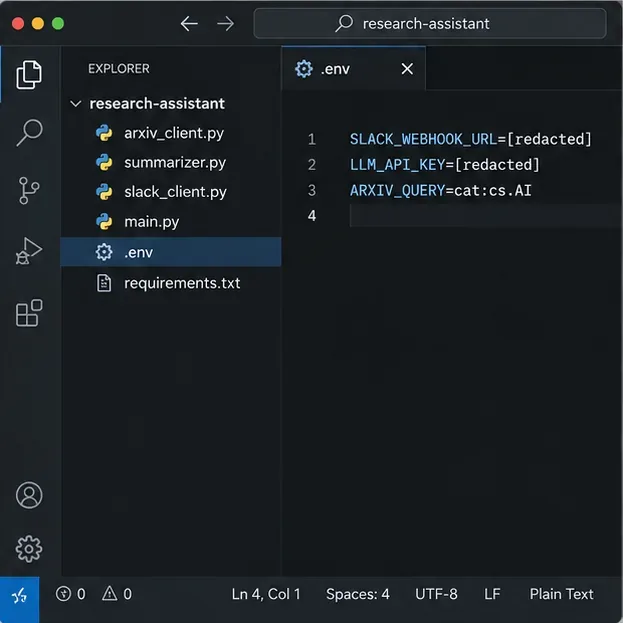
Create a small project with separate modules for discovery, summarization, Slack delivery, and orchestration. Put secrets in environment variables or your deployment platform's secret manager. The minimum useful configuration is the Slack webhook URL, model API key, model name, arXiv query, maximum number of papers, and summary mode.
A minimal project layout keeps external integrations separate and stores sensitive values outside the Python source.
# .env — never commit this file
SLACK_WEBHOOK_URL=https://hooks.slack.com/services/...
OPENAI_API_KEY=...
OPENAI_MODEL=gpt-5.6-terra
ARXIV_QUERY=cat:cs.AI
MAX_RESULTS=8
SUMMARY_MODE=abstract
If you use OpenAI for the summarization layer, the current OpenAI API quickstart uses the Responses API, and the current model guide lists GPT-5.6 models. Keeping the model in configuration prevents the article's example from becoming a hard dependency. You can also replace the model provider entirely without changing the arXiv or Slack modules.
Step 4: Normalize Metadata and Decide Whether You Need the Full PDF
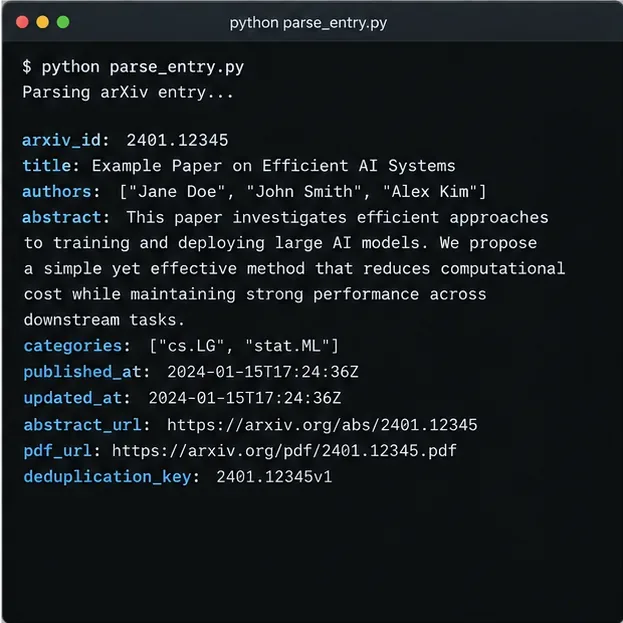
The Atom entry already gives you enough information for a strong abstract-first digest: identifier, title, authors, abstract, categories, published and updated timestamps, and links. Normalize those fields immediately and preserve the versioned identifier when available. That lets you treat a new version as a meaningful update instead of silently discarding it as a duplicate.
Normalize each Atom entry into a stable internal record before calling the language model; keep identifiers and update timestamps for deduplication.
For many teams, abstract-based summaries are enough to decide what deserves a full read. If you do download PDFs for deeper summarization, make the distinction visible in the Slack message: use labels such as Abstract summary or Full-text summary. Never claim the assistant read the full paper when it only received the abstract.
Also treat arXiv content and metadata differently. arXiv's terms allow descriptive metadata to be used broadly, but e-prints remain subject to copyright and license conditions. For an internal research assistant, it is safer to retrieve paper content only as needed, avoid redistributing stored PDFs, and link readers back to the arXiv abstract or PDF page. The official API terms are the source of record.
Step 5: Force the Model Into a Small, Auditable Summary Schema
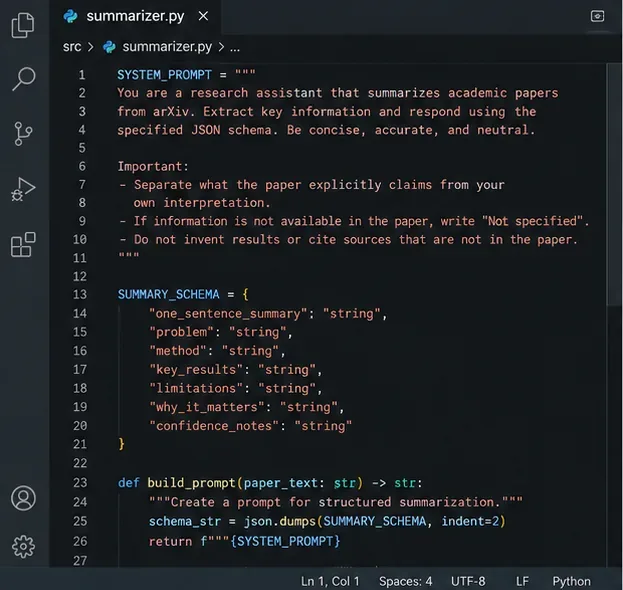
Do not ask the model to "summarize this paper" and accept an unrestricted paragraph. Give it a schema that maps directly to what researchers need in Slack. A useful record contains one sentence, the research problem, method, key results, limitations, why the paper matters, and confidence notes. Require the model to distinguish paper claims from interpretation and to say when information is not available.
A constrained prompt and fixed schema make summaries easier to validate, compare, store, and format consistently in Slack.
OpenAI's current Responses API supports Structured Outputs through a JSON Schema format. The exact model can be configurable; the important part is strict structure plus post-generation validation. The official Responses API reference documents the text.format configuration for JSON Schema output.
import json
import os
from openai import OpenAI

client = OpenAI()

SUMMARY_SCHEMA = {
    "type": "object",
    "properties": {
        "one_sentence_summary": {"type": "string"},
        "problem": {"type": "string"},
        "method": {"type": "string"},
        "key_results": {"type": "string"},
        "limitations": {"type": "string"},
        "why_it_matters": {"type": "string"},
        "confidence_notes": {"type": "string"},
    },
    "required": [
        "one_sentence_summary", "problem", "method",
        "key_results", "limitations",
        "why_it_matters", "confidence_notes"
    ],
    "additionalProperties": False,
}

def summarize(paper_text, source_mode="abstract"):
    prompt = f"""
You are summarizing a research paper for a technical team.
Source mode: {source_mode}

Rules:
- Use only information present in the supplied source.
- Separate explicit paper claims from your interpretation.
- If a requested fact is missing, write "Not specified".
- Do not invent benchmarks, datasets, limitations, or citations.

SOURCE:
{paper_text}
"""
    response = client.responses.create(
        model=os.getenv("OPENAI_MODEL", "gpt-5.6-terra"),
        input=prompt,
        text={
            "format": {
                "type": "json_schema",
                "name": "paper_summary",
                "schema": SUMMARY_SCHEMA,
                "strict": True,
            }
        },
    )
    return json.loads(response.output_text)
Step 6: Add Deduplication, Retries, and an Idempotent Run Loop
The most annoying failure in a research channel is repeated posting. Store a stable key before publishing. A practical key is the versioned arXiv identifier; if you want to notify on revisions, version changes should create a new digest. If you only want one notification per base paper, strip the version suffix and separately store the latest updated timestamp.
Use SQLite for a single-worker MVP and PostgreSQL when multiple workers or schedules may overlap. Mark each paper with statuses such as discovered, summarized, posted, and failed. Only transition to posted after Slack acknowledges the request.
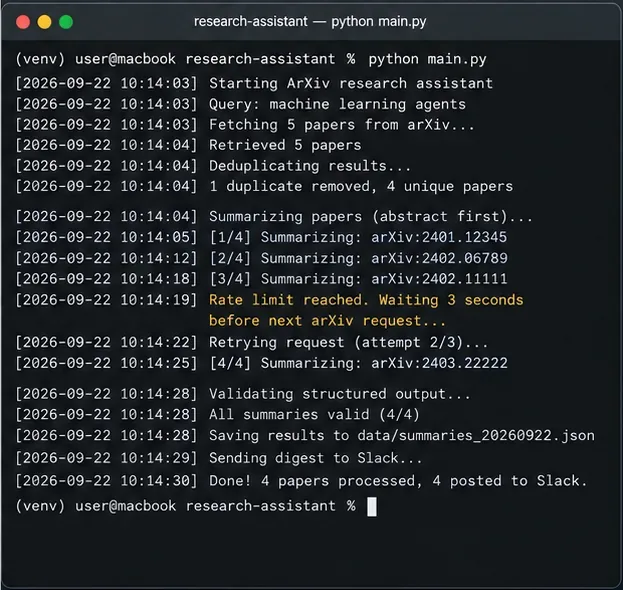
An idempotent run should show exactly which papers were discovered, skipped, summarized, validated, retried, and posted.
Retries need different rules for different systems. For arXiv, pace all requests before you get blocked. For Slack HTTP 429 responses, honor the Retry-After header rather than guessing. Slack's current documentation says incoming webhooks and message posting are generally limited to about one message per second, with short bursts sometimes tolerated. A daily digest can simply sleep between posts or combine several papers into one message.
Step 7: Format the Slack Digest for Scanning, Not for Archiving
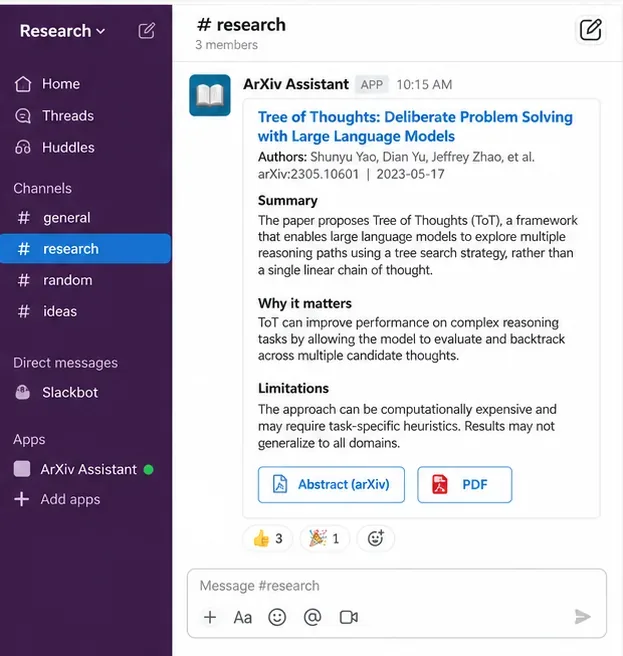
Researchers open Slack to decide what to read next. Keep each digest compact enough to scan in seconds. Put the title and authors first, then the one-sentence summary, why it matters, and limitations. Link to the arXiv abstract and PDF rather than pasting large amounts of paper text.
The Slack message should function as a triage card: enough context to decide whether the original paper is worth opening, with links back to the source.
Incoming Webhooks support Block Kit, so you can send structured blocks plus a top-level text fallback. Slack's formatting documentation notes that the top-level text remains important for notifications, especially on mobile. Keep that fallback meaningful rather than leaving it blank.
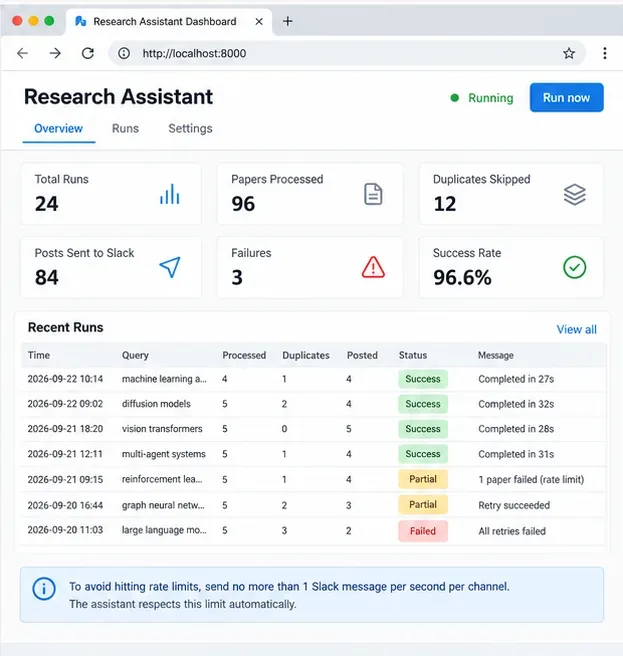
A successful HTTP response only proves that the pipeline ran. It does not prove that the summary is faithful. Track both operational metrics and content-quality checks. Useful operational signals include papers discovered, duplicates skipped, model failures, Slack failures, processing time, and the last successful run. Do not publish invented "accuracy" metrics; create a manually reviewed evaluation set first.
Track operational outcomes and failures separately from summary quality; a healthy pipeline can still produce weak or misleading summaries.
A Practical Evaluation Checklist
Metadata fidelity: title, authors, arXiv ID, dates, and links match the source record.
Source disclosure: every digest says whether it is abstract-based or full-text-based.
Claim faithfulness: key-result statements are directly supportable by the supplied source text.
No invented detail: datasets, metrics, sample sizes, and limitations are not added unless present.
Version handling: updated paper versions do not create accidental duplicates or hide meaningful changes.
Failure transparency: parsing or summarization failures are logged rather than replaced with a plausible-looking message.
For an initial validation set, manually review 20 to 50 papers across the categories you actually follow. Grade each field separately instead of assigning one vague score. A summary can be concise and readable while still misrepresenting a result; field-level review exposes that problem much faster.
Scheduling the Assistant
Once a manual run is reliable, schedule it with cron, a container scheduler, a CI job, or a cloud task service. Daily execution is usually enough because arXiv's RSS feeds are updated daily and research teams generally benefit more from a curated digest than continuous noise. If you use the search API instead of RSS, store the last successful run time and continue to deduplicate by arXiv identifier or version.
A simple cron entry for a weekday morning run might look like this:
# 8:00 AM Monday through Friday
0 8 * * 1-5 /srv/research-assistant/.venv/bin/python /srv/research-assistant/main.py
Use your server's configured timezone deliberately. If the team spans regions, consider generating one digest in a shared timezone rather than posting the same papers multiple times.
When to Upgrade Beyond This MVP
The webhook-first design is intentionally small. Upgrade when the workflow requires more than broadcasting summaries. A full Slack app becomes useful if researchers need buttons such as "save to reading list," "summarize full paper," or "ask a follow-up," or if the assistant needs to read channel replies. A queue becomes useful when you process many categories or full PDFs. A vector store becomes useful only when you want cross-paper semantic retrieval; it is unnecessary for a simple daily digest.
For larger-scale paper retrieval, review arXiv's supported bulk access options instead of trying to scale the legacy API by parallelizing requests. arXiv explicitly says not to circumvent its published rate limits. For Slack, continue to respect platform rate limits and handle HTTP 429 responses using the documented Retry-After value.
Recommended Production Shape
The most dependable architecture is not the most complicated one. Start with one scheduled worker, abstract-first summaries, strict structured output, a small database table, and one Slack destination. Add full-text extraction only for papers that need it. Preserve the original arXiv links in every digest so a researcher can verify the summary quickly.
That approach gives you the real value of an AI research assistant: less time scanning titles and abstracts, without turning the model into an untraceable source of truth. The assistant should help your team choose what to read, not replace the paper.