There is no meaningful 2026 change that suddenly makes one universal Excel maintenance log correct for every workshop. The durable approach is still the better one: use Excel to organize maintenance history and due dates, then customize the log around the equipment manufacturer’s instructions, actual operating conditions, and any safety or inspection rules that apply to that machine.
For a workshop manager, the spreadsheet should answer five questions quickly: What equipment do we have? What work was done? What is due next? What is still open? What evidence supports the record? If the workbook cannot answer those questions without searching through emails, paper notes, or individual technicians’ memory, it is not yet doing enough.
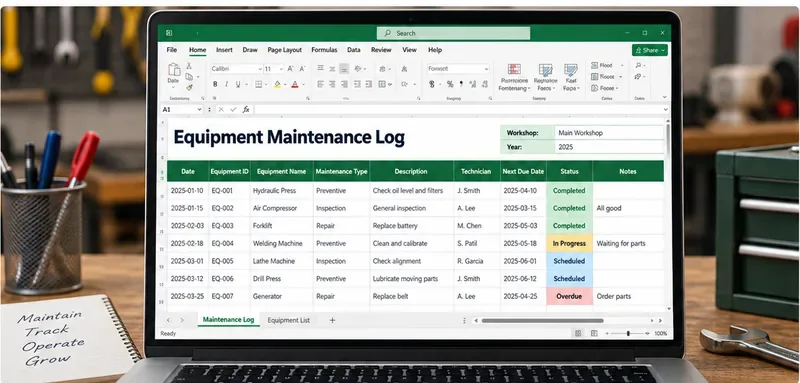
A workshop maintenance log is most useful when each service record links an equipment ID to the work performed, responsible person, next due date, and current status.
What should the Excel maintenance log contain?
Use one row per maintenance event rather than one row per machine with dozens of repeating “Service 1,” “Service 2,” and “Service 3” columns. Event-based records scale better because every repair, inspection, lubrication, adjustment, calibration, or preventive service becomes its own dated transaction.
Column
What to record
Why it helps
Work Order / Log ID
A unique record number
Makes the service event easy to reference in invoices, photos, or follow-up work
Equipment ID
Stable internal asset code
Prevents confusion between similar machines
Equipment Name
Plain-language machine name
Makes filtering and review faster
Serial / Model
Manufacturer identifiers where useful
Connects the record to manuals, parts, and equipment-specific requirements
Location
Bay, line, room, vehicle, or workshop area
Helps technicians find the asset and supports location-based planning
Maintenance Type
Preventive, inspection, corrective, calibration, lubrication, safety check, other
Separates routine work from failures and compliance-related activity
Date Performed
Actual completion date
Creates a reliable service history
Meter / Hours / Cycles
Reading at service time if relevant
Supports usage-based maintenance instead of calendar-only scheduling
Description / Findings
Work performed and condition found
Explains what actually happened, not just that a task was “done”
Parts Used
Part number and quantity where useful
Supports repeat repairs and inventory review
Technician / Inspector
Name or approved identifier
Provides accountability and a contact for follow-up
Downtime
Hours or minutes unavailable
Helps managers identify maintenance-related production loss
Cost
Labor, parts, contractor, or total cost
Supports lifecycle and repair-versus-replace decisions
Next Due Date
Calendar-based next service date when applicable
Supports forward planning
Next Due Meter
Next hours/cycles threshold when applicable
Supports usage-based servicing
Status
Completed, scheduled, due soon, overdue, waiting for parts, out of service
Makes open work visible
Evidence / Reference
Invoice, inspection form, photo, certificate, manual section, or work-order link
Connects the summary row to supporting documentation
Use separate sheets for assets, events, and planning
A compact workbook is easier to maintain if it separates relatively stable asset data from repeated maintenance events. A practical structure is:
This separation reduces duplicate typing and makes it easier to change a location or equipment description without rewriting historical maintenance records.
Turn the log range into an Excel Table
Select the log and use Home > Format as Table, or create the table with the standard Excel table command. Microsoft explains that tables visually group and analyze data and automatically expand with new entries.
Name the main table something meaningful, such as MaintenanceLog. Excel structured references can then use column names instead of fragile cell addresses. Microsoft notes that structured references adjust when rows or columns are added or removed. See Microsoft Support: Using structured references with Excel tables.
Use dropdowns to stop status names from drifting
Without validation, one technician may type “In Progress,” another “In progress,” and another “WIP.” They look similar to a person but behave like different values when filtered or counted.
Use Data > Data Validation > List for fields such as Maintenance Type, Status, Technician, and Location. Microsoft documents list validation as a way to restrict entries to approved values.
A simple status list might be:
Scheduled
In Progress
Completed
Due Soon
Overdue
Waiting for Parts
Out of Service
How should the sheet flag overdue maintenance?
Use formulas to support decisions, but do not let formulas decide the maintenance interval. The interval should come from the manufacturer, engineering decision, usage history, condition monitoring, or an applicable requirement.
For a calendar-based task, an Excel Table formula can calculate a simple status from the next due date:
=IF([@[Next Due Date]]="","",
IF([@[Next Due Date]]<TODAY(),"OVERDUE",
IF([@[Next Due Date]]<=TODAY()+7,"DUE SOON","OK")))
Then use conditional formatting to make OVERDUE visually prominent and DUE SOON easy to scan. Microsoft confirms that conditional formatting can apply rules to Excel tables based on cell values.
For equipment serviced by operating hours or cycles, use a separate meter-based calculation. Do not convert every hour-based maintenance requirement into an arbitrary number of calendar days.
Maintenance history is not the same as a safety procedure
This boundary matters in workshops. A maintenance log can show that work occurred, but it does not replace the procedures required to make the work safe.
For example, OSHA’s hazardous-energy standard, 29 CFR 1910.147, applies to servicing and maintenance where unexpected energization, startup, or release of stored energy could injure employees. The standard requires an energy-control program, procedures, training, and periodic inspections for covered work. OSHA also requires the employer to certify the periodic inspection of the energy-control procedure, identifying the machine or equipment, inspection date, employees included, and person performing the inspection. See OSHA 29 CFR 1910.147 — Control of Hazardous Energy.
That means a row saying “Changed belt — completed” is not a substitute for a required lockout/tagout procedure where the standard applies.
Why should the template include asset ID, date, and responsible person?
Those fields are useful operationally, and some equipment-specific rules require comparable information. One clear example is OSHA’s forging-machinery standard. For covered forge-shop equipment, OSHA requires periodic and regular maintenance safety checks and certification records that include the inspection date, signature of the person who performed the inspection, and serial number or other identifier of the machine. See OSHA 29 CFR 1910.218 — Forging Machines.
This does not mean every machine in every workshop follows the forging standard. It illustrates why a generic log should be designed with stable equipment identification, dates, and responsible-person fields so it can be adapted to the actual rule or inspection program.
Do not invent one preventive-maintenance interval for all equipment
A common spreadsheet mistake is assigning “every 30 days” or “every 90 days” to everything because the workbook needs a date. That is backwards. The workbook should reflect the maintenance program; it should not create one.
Build the Equipment Register with fields such as Service Basis, Interval Unit, and Interval Value. Examples might be calendar days, operating hours, cycles, condition-based, inspection before use, or manufacturer schedule. Then calculate or enter the next due threshold according to that basis.
Track downtime and repeat failures, not just completion
A log becomes a management tool when it helps answer more than “Was maintenance done?” Add enough data to identify bad actors:
Repeat repair count: how often the same asset returns for the same failure.
Downtime: how much operating time is lost to breakdowns and maintenance.
Cost: how much labor, parts, contractor service, and replacement components are being consumed.
Waiting status: whether equipment is sitting idle because of parts, authorization, specialist service, or scheduling.
These fields support repair-versus-replace conversations without pretending Excel itself can determine the economically correct replacement point.
What should managers review each week?
Review
Question
Action if the answer is a problem
Overdue maintenance
Which tasks are past the required date or meter threshold?
Reschedule work, evaluate continued operation, and escalate safety-critical items
Due soon
What must be completed before the next production window closes?
Reserve technician time, parts, and access
Out of service
Which assets cannot safely or reliably operate?
Confirm isolation, repair ownership, parts, and expected return date
Repeat failures
Which machines show the same fault repeatedly?
Escalate root-cause analysis instead of logging another identical repair
Missing evidence
Which completed rows lack technician, findings, or supporting reference?
Complete the record while the work is still recent
Costs and downtime
Which assets are absorbing disproportionate maintenance resources?
Review operating practice, PM strategy, rebuild, or replacement options
When is Excel no longer enough?
Excel is practical for a workshop that needs a transparent, editable log and does not require complex work-order routing. It becomes less comfortable when many technicians update records simultaneously, mobile scanning is essential, approvals must be enforced, spare-parts inventory is integrated, meter readings arrive automatically, or audit trails must be tightly controlled.
At that point, a computerized maintenance management system (CMMS) or asset-management platform may be more appropriate. The Excel workbook can still help define the fields and workflow you want before moving to a larger system.
Workshop maintenance log checklist
Every asset has a unique equipment ID.
The Equipment Register stores stable model, serial, location, and service-basis information.
Each maintenance event occupies its own row.
Maintenance Type and Status use controlled dropdown values.
Calendar and meter-based intervals are kept separate when necessary.
Next due dates come from the actual maintenance program, not an arbitrary spreadsheet default.
Technician or inspector identity is recorded where needed.
Findings describe the work and condition, not only “completed.”
Parts, cost, and downtime can be captured for management analysis.
Evidence or source documents can be traced from the row.
Overdue and due-soon work is visually flagged.
Applicable safety procedures and regulatory records remain separate and complete where required.
The file is backed up and access is controlled appropriately for the workshop.
Bottom line
An equipment maintenance log sheet in Excel should be simple enough for technicians to complete and structured enough for a manager to trust. The strongest template uses an equipment register, event-based maintenance history, controlled fields, clear due dates, and visible open statuses without pretending that one spreadsheet can define every machine’s service interval or replace required safety procedures.
Use Excel to make maintenance visible. Use the manufacturer’s guidance, actual machine condition, operating history, and applicable safety requirements to decide what maintenance must happen and when.