Home
» AI Agents
»
HubSpot Free CRM vs Zoho CRM for Solo Real Estate Agents: Which Fits Better in 2026?
HubSpot Free CRM vs Zoho CRM for Solo Real Estate Agents: Which Fits Better in 2026?
A solo real estate agent does not need the CRM with the longest feature list. You need a system that makes it hard to lose a lead, easy to remember the next follow-up, and practical to update from a phone between showings. That changes the answer to the HubSpot Free CRM vs Zoho CRM question.
As checked on September 13, 2026, the clearest split is this: HubSpot Free Tools is the easier choice for a marketing-led solo agent who values forms, meeting scheduling, a straightforward deal pipeline, and a broad ecosystem, while Zoho CRM Free gives you more free user capacity, a larger documented contact allowance, and limited workflow automation. Zoho's biggest free-plan drawback for a real estate workflow is equally important: its official documentation says custom fields are not available in the Free edition.
That last point matters because real estate CRMs often need fields such as preferred neighborhood, price range, financing status, property type, move-by date, listing address, and buyer-versus-seller intent. Before importing years of contacts into either product, test the exact fields and follow-up process you intend to use.
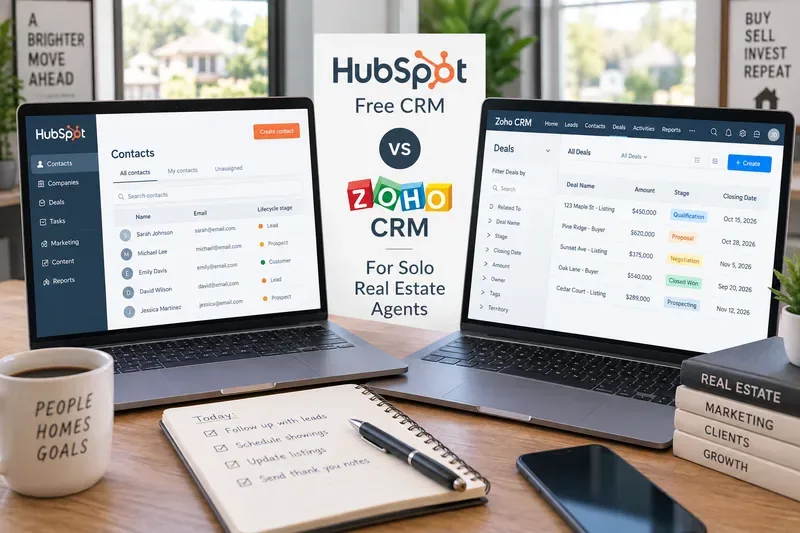
A side-by-side CRM workspace highlights the practical choice for a solo agent: contact follow-up, deal tracking, and daily real estate tasks matter more than an oversized feature checklist.
Quick verdict: which free CRM is better for a solo real estate agent?
Choose HubSpot Free if your business is primarily driven by online lead capture, email outreach, appointment booking, and a simple single-pipeline sales process. HubSpot's current product catalog documents a free deal pipeline, contact management, website activity, and free marketing tools, while HubSpot's free-tools overview includes meeting scheduling. The current catalog also sets the Free Tools edition at up to two users and 1,000 contacts. See the HubSpot Product & Services Catalog and HubSpot Free Tools overview.
Action: If you normally have fewer than 1,000 active and archived contacts combined, create a test pipeline for one buyer and one listing opportunity before importing your database.
Choose Zoho CRM Free if you want more breathing room for contacts, expect to add an assistant or partner without immediately paying, and value basic workflow rules. Zoho currently advertises a forever-free edition for up to three users, while its Free-edition guide documents 5,000 contact records and five active workflow rules. See Zoho CRM pricing and Zoho's guide to the Free edition.
Action: Before choosing Zoho Free, list every real-estate-specific data point you need. If you require new custom fields, plan on a paid edition or a different data model rather than discovering the limitation after migration.
HubSpot Free CRM vs Zoho CRM Free at a glance
Decision factor
HubSpot Free Tools
Zoho CRM Free
What it means for a solo agent
Free users
Up to 2
Up to 3
Zoho leaves room for an assistant or partner before a paid seat is needed.
Documented contact limit
Up to 1,000 contacts in free accounts
Zoho's Free-edition guide states 5,000 contact records
Zoho has the more generous documented free capacity.
Deals / pipeline
1 deal pipeline per free account
Lead, contact, and deal management included; multiple pipelines are not a Free feature
Either can handle one core buyer/seller process, but neither Free tier is designed for elaborate multi-pipeline operations.
Workflow automation
Free tools include limited automation across selected tools; advanced automation is tied to paid tiers
Five active workflow rules documented in the Free-edition guide
Zoho has the clearer documented advantage for basic free workflow rules.
Custom fields
HubSpot supports properties across plans, but current public documentation does not present a simple Free-tier allowance in the product catalog
Not available in Free edition
Test HubSpot's current account limit directly; do not assume either free plan will support an unlimited real-estate schema.
Email
Free 1-to-1 email tools and 2,000 marketing email sends/month, with HubSpot branding on free email tools
Custom email templates are included; full mailbox integration and mass email are listed for Standard and above
HubSpot is usually the cleaner free starting point when email and lead capture are central.
Mobile
HubSpot mobile app available
Zoho mobile apps included; Zoho documents offline record work on Android
Both support field work; Zoho explicitly documents offline editing on mobile.
Misconception: “Free CRM” means you can keep every lead forever
That is not verified for either product in the way many older comparison pages suggest. HubSpot's current official catalog states that free accounts can hold up to 1,000 contacts. This conflicts with older HubSpot marketing claims that still circulate online about dramatically larger free contact databases. For a current buying decision, the product catalog and live pricing documentation are the safer references.
Zoho's own Free-edition guide states 5,000 contact records. That is more generous, but it is still a limit. A solo agent who imports old portal leads, open-house sign-ins, sphere contacts, vendors, past clients, and cold prospects can reach thousands of records sooner than expected.
Action: Count your actual database before choosing. Include archived and low-priority leads, not just active clients. If you are already near 1,000 contacts, HubSpot Free is unlikely to be a long-term zero-cost home for the full database.
Misconception: Zoho Free is automatically more customizable because it has more free capacity
Capacity and customization are different. Zoho's current specifications explicitly show no custom fields in the Free edition, and its custom-field help page repeats that restriction. That can be a major constraint for real estate because a standard CRM record does not automatically know the fields that matter to your local practice.
Action: Write down the five to ten fields that actually drive your follow-up. If standard lead/contact/deal fields cannot represent them cleanly, price the upgrade before investing time in setup.
Where HubSpot Free is stronger for an inbound-focused agent
HubSpot's free suite is not just a contact database. Its official catalog includes contact management, website activity, a deal pipeline, landing pages, and email marketing. The free-tools overview also includes forms and meeting scheduling. That combination is useful if your lead flow comes from a personal website, neighborhood landing pages, home-valuation requests, downloadable guides, or links you send after an inquiry.
HubSpot's Sales pricing page also currently lists one-to-one email on Free Tools, with HubSpot branding, and up to three email templates per account. Its marketing pricing page lists 2,000 marketing email sends per calendar month on Free, also with HubSpot branding. See HubSpot Sales pricing and HubSpot Marketing pricing.
This does not mean HubSpot Free gives a solo agent a full automated nurture engine. Advanced workflows, branching sequences, and more sophisticated automation are paid capabilities. The practical free-tier advantage is that lead capture, communication, scheduling, and pipeline tracking live in the same broader platform.
Action: If most new business starts online, test one complete journey: website form → contact record → appointment link → deal → follow-up task. If that flow feels natural, HubSpot's 1,000-contact limit may be an acceptable tradeoff while you are small.
Where Zoho CRM Free is stronger for a follow-up-heavy solo workflow
Zoho's free plan is more explicit about basic operational CRM features. Its pricing page lists contact management, follow-up reminders, workflow automation, custom email templates, tasks, meetings and calls, data import/export, standard reports, APIs, and mobile apps. Zoho's 2026 edition guide states that Free has workflow automation with limited actions, while cadences are a paid capability.
That distinction is important. A basic workflow can help create a task or update a record when a condition is met, but a cadence is a structured sequence of repeated follow-ups. Zoho documents cadences starting above Free. See Zoho's 2026 edition and role guide.
Zoho also documents mobile access across editions and offline record changes on Android that sync later when connectivity returns. That can be useful when you are touring properties, working in buildings with weak reception, or taking notes immediately after a showing.
Action: If missed follow-ups are your main problem, prototype two or three workflow rules in Zoho before judging the product by its larger settings menu. The free edition's value depends on whether those limited rules cover your actual routine.
Email is a more complicated comparison than “both have email”
Both products can send email-related communications, but the free experience is not identical.
HubSpot documents free one-to-one email tools and free marketing email sends, with branding on free features. Zoho Free includes custom email templates and native email capability, but Zoho's pricing page places full email integration and mass emails in Standard. Zoho's email documentation explains that its native CRM email option can send messages without a fully integrated inbox, while deeper two-way mailbox integration uses IMAP/POP3 or supported providers.
Action: Do not choose based on a checkbox labeled “email.” Connect the mailbox you actually use, send a test message, receive a reply, and confirm what is logged to the contact timeline on the plan you intend to keep after any trial ends.
What about pipelines for buyers, sellers, rentals, and listings?
A solo agent may be tempted to build a separate pipeline for buyer representation, seller listings, rentals, referrals, and pending transactions. The free editions are not ideal for that design.
HubSpot's catalog states one deal pipeline per Free account. Zoho's onboarding documentation says multiple sales pipelines are not available once you move down to the Free edition. You can still use stages and naming conventions inside one core pipeline, but that is different from having several independent pipelines.
Action: Start with one revenue pipeline. Use a clear deal name such as “Buyer - Rivera - Northside” or “Listing - 123 Oak Street,” then decide whether separate pipelines are truly necessary after 30 days of real use.
Which free plan handles real-estate-specific data better?
This is where the answer is conditional rather than absolute.
Verified: Zoho Free does not allow custom fields. HubSpot's current knowledge base says custom properties exist across plans, but the current public catalog does not give a simple Free-tier custom-property number in the same way it states the 1,000-contact limit. Because limits and packaging have changed over time, an exact Free custom-property allowance should be checked inside a current free account rather than copied from older articles.
Not verified here: MLS connectivity, transaction-management integrations, local portal feeds, and brokerage-specific compliance workflows. Those vary by market, MLS, brokerage, and third-party connector. Neither general CRM should be assumed to replace your MLS, e-signature platform, transaction coordinator, or brokerage record-retention system without a separate integration review.
Action: Create a 10-field “must have” checklist and a five-app integration checklist before migration. If a CRM cannot represent your buyer/seller data or connect to a required brokerage tool, the free price does not make it a good fit.
Upgrade pressure: what happens when free stops being enough?
For Zoho, the most obvious upgrade trigger for a solo real estate agent is customization. Zoho's pricing calculator currently shows Standard at US$14 per user per month when billed annually, although prices can vary by region, billing cycle, and future packaging. Standard adds features such as email integration, multiple sales pipelines, and custom fields. Check the live Zoho CRM pricing calculator before purchasing.
HubSpot's paid pricing is more product-specific and frequently includes promotional pricing. Its current customer-platform page shows a limited new-customer Starter offer below the regular listed rate, while Smart CRM and individual Hubs have their own packaging. That makes a simplistic “HubSpot costs X” statement unreliable over time. Check the current HubSpot customer platform pricing for the feature bundle you actually need.
Action: Estimate the first paid feature you are likely to need, not just today's free cost. For many agents, that feature will be more contacts, custom fields, multiple pipelines, full email integration, or more automation.
Recommendation by real estate agent profile
Pick HubSpot Free if you are building an inbound lead machine
If you are publishing neighborhood pages, collecting website inquiries, offering lead magnets, sending appointment links, and tracking a modest number of prospects, HubSpot's free ecosystem is a strong starting point. The tradeoff is the 1,000-contact ceiling and limited free automation.
Action: Choose HubSpot if you can describe your workflow as “capture → book → follow up → move one deal through one pipeline.”
Pick Zoho CRM Free if database size and basic automation matter more
If you have more than 1,000 contacts, want up to three users, and can operate with Zoho's standard fields, the Free edition gives you more documented capacity plus limited workflow automation. The tradeoff is the absence of custom fields and the fact that full email integration and multiple pipelines sit above Free.
Action: Choose Zoho Free only after proving that its standard fields can represent your buyer and seller process without awkward workarounds.
Skip both free tiers if your business already depends on a custom real estate schema
If your CRM must model property preferences, listing data, financing milestones, transaction deadlines, referral partners, multiple deal types, and brokerage-specific compliance, the deciding question is no longer “Which free CRM is better?” It is “Which paid or real-estate-specific system reduces duplicate work enough to justify its cost?”
Action: Run a short pilot with 20 real contacts and five active deals before migrating the full database.
Bottom line
For most solo real estate agents starting from scratch, HubSpot Free is the better fit when marketing, lead capture, scheduling, and a clean one-pipeline workflow are the priority. Zoho CRM Free is the better fit when you need more free contact capacity, up to three users, and a small amount of workflow automation.
The strongest reason not to pick HubSpot Free is its current 1,000-contact cap. The strongest reason not to pick Zoho Free is the lack of custom fields. Neither limitation is theoretical for a working agent, so test the constraint most likely to affect you before importing your entire sphere.
Final action: Put 20 real leads into both systems, run your normal week of follow-ups, and keep the one that requires fewer manual workarounds. A CRM that fits your actual day is more valuable than a free plan with a longer feature list.