2026 update that changes how a freelancer expense tracker should handle mileage: the IRS raised the optional business standard mileage rate in the middle of the year. Business mileage is 72.5 cents per mile for January 1 through June 30, 2026, and 76 cents per mile for July 1 through December 31, 2026. The IRS says the midyear revision reflects increased fuel prices. See the IRS standard mileage rates.
That change is a useful reminder of what an independent contractor expense tracker should do: preserve facts first and calculate tax-sensitive amounts second. A good spreadsheet records the date, vendor, amount, business purpose, business-use percentage, receipt or other support, and any facts needed for a special rule. It should not assume that every purchase labeled “business” is deductible or that one formula can decide every tax question.
This guide is for U.S. freelancers and independent contractors who want a practical Excel tracker for federal tax organization. It is not tax advice, and state or local rules may differ. Where a tax result depends on facts that a spreadsheet cannot know, the template below marks the item for review instead of pretending the answer is certain.
Start with three labels: verified, depends, and review
Use the tracker to distinguish three kinds of information:
| Label | What it means | Useful action |
|---|
| Verified | A fact supported by your records or a current official rule, such as the transaction date or the applicable 2026 mileage period. | Record the source fact and keep the support. |
| Depends | The tax treatment changes with business purpose, business-use percentage, method choice, or another circumstance. | Capture the missing facts instead of forcing a yes/no deduction. |
| Review | The spreadsheet does not have enough information to determine the tax treatment safely. | Flag the row for your tax preparer or for review against current IRS instructions. |
The IRS says a deductible business expense generally must be both ordinary and necessary, and a mixed personal/business expense must be divided between the two uses. Review the IRS explanation in Publication 334, Tax Guide for Small Business. That principle is more important than the name you put in the Category column.
Step 1: create one transaction row for every expense
Build a sheet named Expenses. Use one row per transaction and keep the original amount separate from any calculated deductible amount. A practical column set is:
| Column | Why it belongs in the tracker |
|---|
| Date | Determines tax year and can determine which mileage rate or other time-sensitive rule applies. |
| Vendor | Identifies who was paid. |
| Description | Explains what was purchased. |
| Category | Groups expenses for Schedule C preparation and review. |
| Client/Project | Helps connect the expense to the freelance activity when relevant. |
| Payment Method | Helps reconcile bank and credit-card statements. |
| Amount | Stores the full transaction amount before tax adjustments. |
| Business Use % | Separates business and personal portions when the cost is mixed. |
| Deductible % | Handles limits such as a generally 50% business-meal rule when applicable. |
| Deductible Amount | A calculated working amount, not a final tax determination. |
| Receipt / Support | Records whether supporting documentation is stored and where to find it. |
| Business Purpose | Explains why the cost relates to the freelance business. |
| Tax Review | Marks equipment, mixed-use costs, home-office items, unusual meals, or other uncertain treatment. |
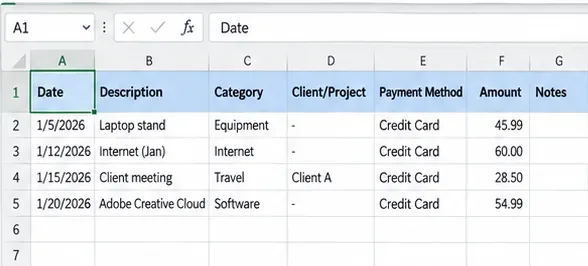
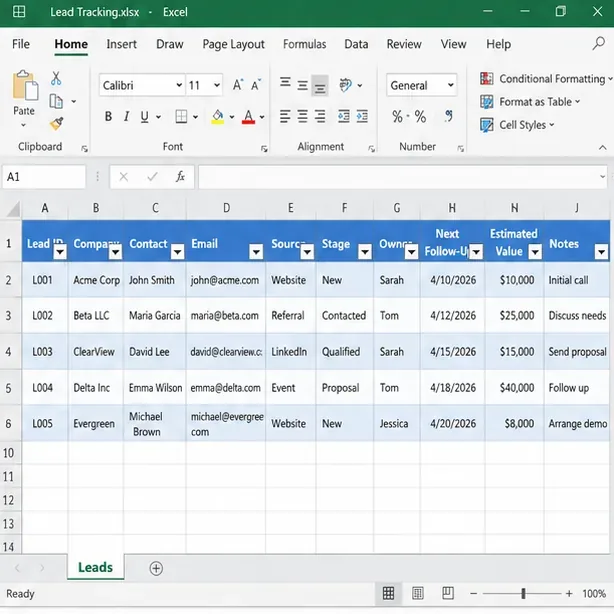
A clean transaction log starts with facts: date, description, category, project connection, payment method, and the amount actually paid.
Common misunderstanding: “If I paid it with my business credit card, it is a business deduction.” The IRS explicitly says personal, living, and family expenses are generally not deductible, even if paid from a business account. Mixed costs such as a vehicle may need to be divided between business and personal use. See the IRS income and expenses FAQ for sole proprietors.
Action: never let Payment Method determine deductibility. Use Business Use % and Business Purpose as separate fields.
Step 2: standardize categories, but do not confuse a category with a deduction
Create a small Lists sheet and use a dropdown for Category. Useful freelancer categories often include Advertising, Software, Office Expense, Supplies, Professional Services, Insurance, Rent/Lease, Utilities, Travel, Meals, Car and Truck, Contract Labor, Taxes and Licenses, and Other Expense. Your list should reflect the type of freelance business you actually operate.
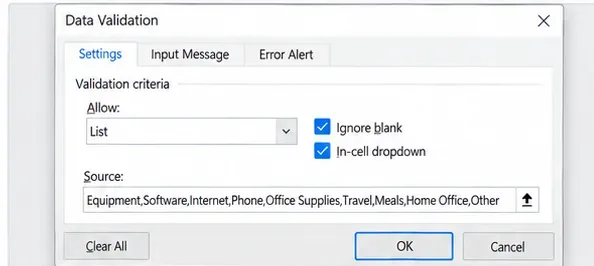
Data validation keeps recurring category names consistent so the same type of cost does not fragment across several spellings.
Microsoft documents the List option in Excel data validation for restricting cells to defined choices. See Microsoft Support: Apply data validation to cells.
Common misunderstanding: “If the tracker has a category called Home Office, Software, or Equipment, anything placed there is automatically deductible.” It is not. The category helps organize facts; federal deductibility still depends on applicable tax rules and the facts of the expense.
Action: add a second field called Tax Treatment with values such as Verified, Depends, and Review. That prevents the category list from masquerading as a tax decision.
Step 3: calculate a working deductible amount without overwriting the original cost
Keep the full amount untouched. Then calculate a working figure with separate percentages. In an Excel Table, a simple pattern is:
=[@Amount]*[@[Business Use %]]*[@[Deductible %]]
For a $120 phone bill used 70% for business, Business Use % would be 70%. If there is no additional limitation, Deductible % can be 100%, producing an $84 working amount. The formula is arithmetic only; it does not determine whether your 70% estimate is reasonable or properly supported.
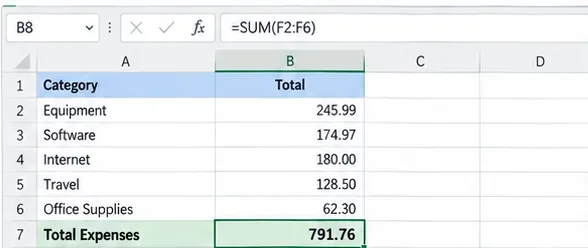
Category totals are useful for review, but the underlying transaction rows should preserve the original amounts and tax-adjustment assumptions.
The IRS states that personal portions of mixed expenses are generally not deductible. What depends on circumstances: the business-use percentage for a phone, internet plan, vehicle, or other shared asset depends on actual use and the records supporting it.
Action: never type only the net deductible amount into the ledger. Store Amount, Business Use %, Deductible %, and Deductible Amount separately so the calculation can be reviewed later.
Step 4: track receipts and business purpose as support, not as decoration
The IRS allows businesses to choose a recordkeeping system suited to the business as long as it clearly shows income and expenses. Supporting documents can include receipts, invoices, canceled checks, account statements, and credit-card records. The IRS also notes that a combination of documents may be needed to substantiate all elements of an expense. See What kind of records should I keep? and the broader IRS recordkeeping guidance.
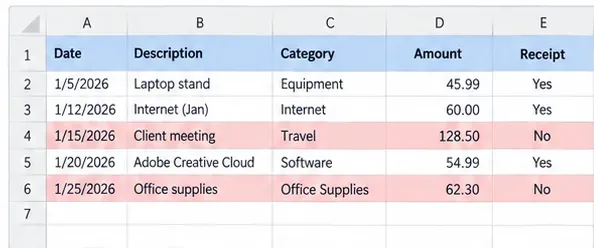
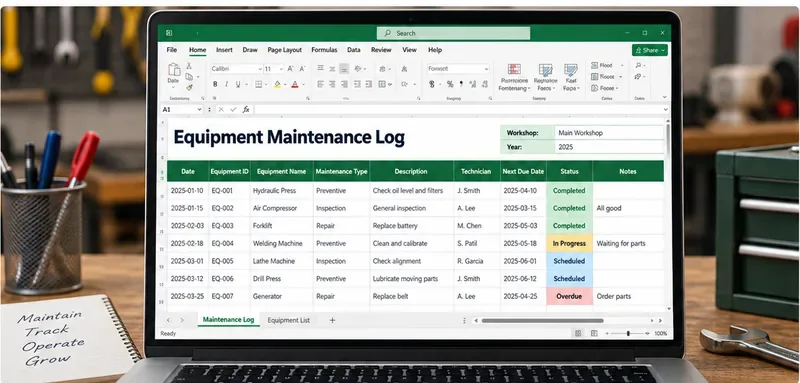
A receipt-status field and review highlighting make unsupported transactions visible before tax preparation.
Common misunderstanding: “A receipt proves the deduction.” A receipt can prove parts of a transaction, but it does not by itself establish that the expense was ordinary, necessary, business-related, or used at the percentage claimed. The IRS describes the taxpayer's responsibility to substantiate deductions as the burden of proof.
Action: store both a receipt reference and a short business-purpose note. For example, “Client A project planning lunch” is more useful than “restaurant.” For travel, gifts, and vehicle expenses, keep the additional records required for those categories.
Step 5: give mileage its own log because 2026 has two business rates
Create a separate Mileage sheet with Date, Starting Point, Destination, Business Purpose, Business Miles, Rate, and Working Deduction. For 2026, a date-aware formula can use 72.5 cents through June 30 and 76 cents beginning July 1:
=[@[Business Miles]]*IF([@Date]<DATE(2026,7,1),0.725,0.76)
That formula reflects the current IRS rates for 2026, but only for a taxpayer who is eligible and chooses the standard mileage method. The IRS explains the two vehicle methods and eligibility limits in Topic No. 510, Business Use of Car.
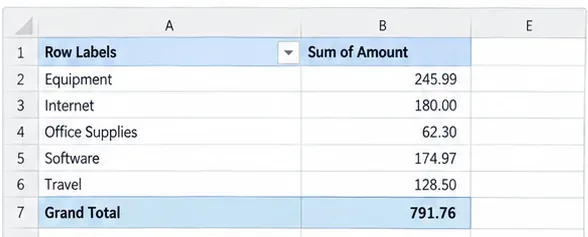
A summary view helps reconcile vehicle and other expense categories without replacing the detailed mileage or transaction records behind them.
Common misunderstanding: “I can use the standard mileage rate and also deduct all my gas, insurance, repairs, and depreciation for the same vehicle.” The IRS describes standard mileage and actual expenses as alternative methods subject to specific rules. Parking fees and tolls attributable to business use can be separately deductible even when using standard mileage, but ordinary vehicle operating costs are not simply added again on top of the standard rate.
Action: add a Vehicle Method field with Standard Mileage or Actual Expenses, and do not let the annual summary combine both methods for the same vehicle without a tax review. If you are unsure which method you are eligible to use, flag it Review rather than choosing based only on whichever total is larger.
Step 6: treat meals and home office as conditional categories
Business meals
The latest final IRS Publication 463 available when this article was prepared explains that business meals are generally subject to a 50% limit, while entertainment expenses are generally nondeductible. There are exceptions, so “50%” should be a default review assumption, not a permanent hard-coded truth for every meal. See IRS Publication 463, Travel, Gift, and Car Expenses.
Action: record the full meal cost, who or what business activity it related to, and a separate Deductible % field. If an exception may apply, set Tax Review to Review instead of forcing 50% or 100%.
Home office
The IRS simplified home-office option currently uses $5 per square foot of qualified business use, up to 300 square feet. However, the simplified method does not change the eligibility rules. The IRS generally describes qualified business use as exclusive and regular use for qualifying business purposes, subject to specific exceptions. See the IRS simplified home-office option.
Common misunderstanding: “I work from my kitchen table, so I can automatically claim a home-office deduction.” The deduction depends on the applicable qualification rules; working at home by itself does not settle the question.
Action: keep home-office data on a separate sheet: office square feet, total home square feet if relevant, method considered, months used, and an Eligibility Reviewed field. Do not calculate a final deduction until eligibility has been reviewed.
Step 7: filter and reconcile the ledger every month
Do not wait until tax season to find missing transactions. Once a month, filter the spreadsheet by date, payment method, category, or client and compare it with business bank and credit-card statements.
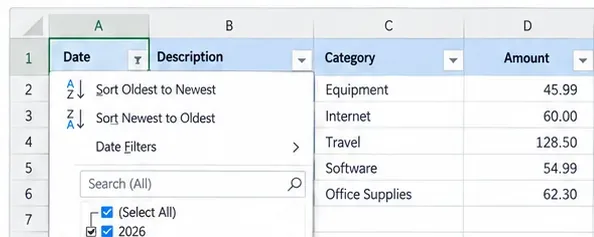
Date and category filters make it easier to reconcile one month or one tax period without changing the underlying transaction data.
Useful monthly checks include:
- Every business-bank or business-card transaction is either in the tracker or intentionally excluded as personal.
- Cash expenses have supporting documentation where available.
- Refunds and reimbursements are not left as unreconciled positive expenses.
- Mixed-use costs have a documented business-use percentage.
- Missing receipts or business-purpose notes are flagged.
- Vehicle entries use the correct 2026 mileage period.
- Equipment and other potentially capitalizable items are marked for tax review.
What is verified: the IRS says good records help identify income sources, track deductible expenses, prepare returns, and support items reported on returns. What is not known from the spreadsheet alone: whether an unusual transaction belongs in a current expense line, should be capitalized, or is limited by a special rule.
Action: resolve factual gaps monthly and leave tax-treatment uncertainty visibly flagged.
Step 8: turn the ledger into an Excel Table and build a tax-prep summary
Format the transaction range as an Excel Table so new rows inherit the same structure and filters. Microsoft documents the current steps in Create and format tables.
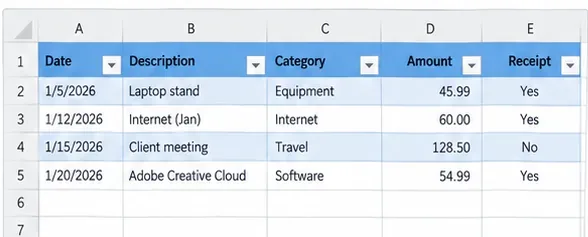
Formatting the ledger as an Excel Table keeps headers, filters, and expanding rows consistent throughout the year.
Then create a Summary sheet. A PivotTable is useful for viewing expenses by Category, Month, Client, or Tax Review status. Microsoft recommends clean column-based source data with one header row for PivotTables; see Create a PivotTable to analyze worksheet data.
If you prefer formulas, SUMIFS can total only rows meeting chosen conditions. For example, a monthly category total can use criteria for both date range and category. See Microsoft's SUMIFS guidance.
Action: make the summary answer review questions rather than hide detail. Include Total Recorded Expenses, Working Deductible Amount, Missing Support Count, Review Items Count, Mileage by Rate Period, and totals by category.
Save a year-specific file and preserve the original evidence
At the end of the setup, save a reusable blank template and a separate working file for the tax year. A naming pattern such as Freelancer_Expense_Tracker_2026.xlsx is clearer than repeatedly overwriting “expenses.xlsx.”
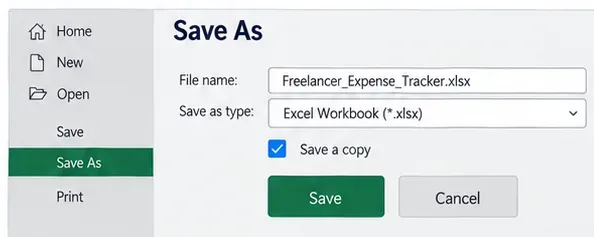
Save a year-specific working workbook separately from the reusable blank template so prior-year records are not overwritten.
The spreadsheet is a summary system, not a replacement for the supporting records. Keep invoices, receipts, statements, mileage details, contracts, and other evidence in an orderly location and link or reference them from the tracker where practical.
Recommended workbook structure
| Sheet | Main purpose | Key fields |
|---|
| Expenses | One row per cost | Date, vendor, description, category, amount, business-use %, deductible %, support, purpose, review |
| Mileage | Business driving log | Date, destination, purpose, miles, rate period, working deduction |
| Home Office | Preserve eligibility and calculation inputs | Method, square footage, period used, eligibility reviewed |
| Lists | Controlled dropdown values | Categories, tax-treatment flags, payment methods, clients |
| Summary | Tax-prep and management review | Category totals, monthly totals, missing support, review count, mileage periods |
Do estimated taxes belong in the same tracker?
They can be tracked in a separate Tax Payments sheet, but do not record federal estimated income-tax payments as ordinary Schedule C business expenses. The IRS uses Form 1040-ES to figure and pay estimated tax on income that is not subject to withholding, including self-employment income. For tax year 2026, the general estimated-tax due dates are April 15, June 15, September 15, 2026, and January 15, 2027. See About Form 1040-ES and Publication 505 (2026).
What depends on circumstances: whether you are required to make estimated payments and how much you should pay depends on your expected tax, withholding, credits, prior-year information, and other facts. A freelancer with a W-2 job may be able to increase withholding instead of making separate estimated payments.
Action: track payment dates and amounts for reference, but use current IRS worksheets or professional advice to calculate required payments.
What is still not final for the 2026 return?
As of September 2026, the IRS draft-forms page lists a 2026 Schedule C form, while the Schedule C instructions shown there are still the 2025 instructions. Draft forms can change before final release. You can verify current status at the IRS draft tax forms page.
Action: use the tracker to preserve facts throughout 2026, but map the final totals to the final 2026 Schedule C instructions when they are released. Do not hard-code line numbers that may still change.
Freelancer expense tracker review checklist
- Every row has a date, vendor or payee, description, and original amount.
- Categories are consistent, but tax treatment is stored separately.
- Mixed personal/business costs have a documented business-use percentage.
- Receipts or other supporting documents are referenced and business purpose is recorded.
- Mileage before July 1, 2026 uses 72.5 cents per business mile when the standard mileage method applies; mileage from July 1 uses 76 cents.
- The vehicle worksheet does not casually combine standard mileage with actual operating expenses for the same vehicle.
- Meals preserve the full cost and a separate deductible percentage.
- Home-office entries are not treated as automatically deductible merely because work was done at home.
- Equipment and unusual items can be flagged for depreciation, capitalization, Section 179, or other tax-treatment review instead of being automatically expensed.
- The monthly ledger reconciles to bank and credit-card activity.
- The Summary sheet shows both working totals and unresolved review items.
- The workbook and the underlying supporting records are retained safely.
The goal is an audit-friendly record, not an aggressive deduction total
An independent contractor expense tracker is most useful when it preserves what happened and makes uncertainty visible. The IRS does not require one special spreadsheet format for every business, but it does require records that support the income and deductions reported. A well-designed Excel template gives a U.S. freelancer a repeatable way to capture those facts, reconcile them during the year, and hand a much cleaner record set to tax software or a tax professional.
The most important 2026 design change is straightforward: do not store mileage as one undated annual total. Keep dates and business miles so the January-through-June 72.5-cent rate and July-through-December 76-cent rate can be applied correctly when the standard mileage method is appropriate. For everything else, preserve the same discipline: record facts, separate personal use, keep support, flag uncertain tax treatment, and verify the final rules before filing.