Home
» AI Agents
»
How to Stop CrewAI Agents from Executing Redundant Tasks: A Practical Deduplication Guide
How to Stop CrewAI Agents from Executing Redundant Tasks: A Practical Deduplication Guide
When CrewAI agents appear to execute the same work twice, the cause is usually not a single “duplicate task” setting. Repetition can come from overlapping task descriptions, hierarchical delegation, retry behavior, multiple Flow triggers, repeated crew kickoffs, or side-effecting tools that are not protected by an idempotency key.
This practical reference was checked against the official CrewAI documentation on September 13, 2026. The current docs resolved to CrewAI v1.15.14. The most important distinction is this: preventing redundant reasoning inside one run is different from preventing the same business action from happening twice across runs. CrewAI provides task context, conditional tasks, callbacks, Flow state, persistence, and tool caching, but you still need to design explicit skip conditions for work that must happen only once.
Quick diagnosis: why is the same work happening twice?
Symptom
Likely cause
First fix to try
Two agents research the same topic
Overlapping roles or task descriptions
Give each task one owner and pass prior output through context
A manager asks for work that another agent already did
Hierarchical delegation plus ambiguous responsibilities
Clarify manager instructions, agent roles, and tool ownership
The same task runs several times after validation fails
Guardrail retries
Inspect the guardrail error and reduce guardrail_max_retries while debugging
An agent repeatedly calls the same tool
High iteration budget, weak stop condition, or tool-call retries
Lower max_iter, tighten expected output, and inspect step logs
A Flow method fires more than once
Multiple @start() methods or multiple upstream events
Use a single entry point, a router, state flags, or and_ when appropriate
An email/payment/API mutation happens twice after restart
No cross-run idempotency guard
Use a deterministic operation key in persistent or external transactional storage
You enabled memory but tasks still rerun
Memory supplies context; it is not a scheduler-level deduplicator
Track completed work explicitly instead of relying on recall
You enabled cache but the whole task reruns
CrewAI cache is documented for tool execution results
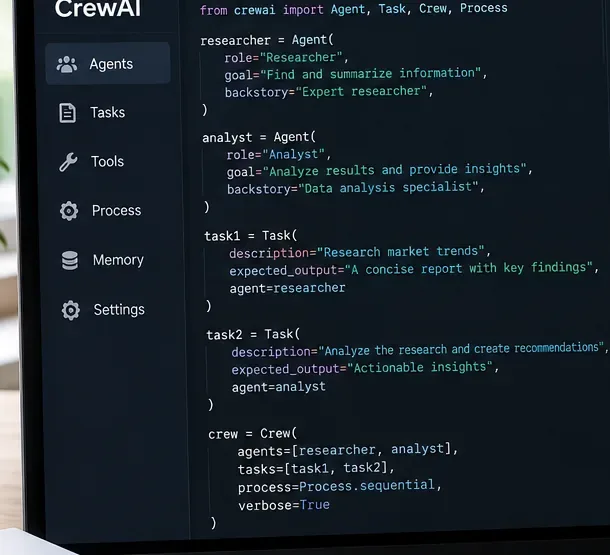
The simplest anti-duplication rule is also the most effective: each meaningful unit of work should have one task owner. In a sequential CrewAI process, tasks run in the order they are declared. The context attribute lets a later task consume the output of a prior task instead of independently rediscovering the same information.
Separate ownership is easier to reason about: one task researches, the next task analyzes the research instead of repeating it.
A common anti-pattern looks like this conceptually:
research_task: "Research the customer and summarize findings"
analysis_task: "Research the customer, analyze findings, and recommend actions"
writer_task:   "Review the customer, research missing details, and write the report"
All three tasks contain permission to research, so repeated search is predictable. Prefer a narrower chain:
from crewai import Agent, Crew, Process, Task

research_task = Task(
    description="Research the customer once and return verified facts and sources.",
    expected_output="Structured research notes with sources.",
    agent=researcher,
)

analysis_task = Task(
    description="Analyze only the research provided in context. Do not perform new research.",
    expected_output="Prioritized findings and recommendations.",
    agent=analyst,
    context=[research_task],
)

crew = Crew(
    agents=[researcher, analyst],
    tasks=[research_task, analysis_task],
    process=Process.sequential,
)
Give every task a verb that is different from the others: research, normalize, analyze, write, review.
Say what the task must not do when overlap is expensive.
Make the expected output concrete enough that the next task can consume it directly.
Pass prior results with context instead of telling later agents to “research if needed.”
Restrict tools at task or agent level when only one role should be allowed to search, write to a database, send messages, or call an external API.
2. Skip work that is already satisfied with ConditionalTask
If a task is only needed when a previous result is incomplete, do not make the agent decide informally whether to repeat the work. CrewAI provides ConditionalTask, whose condition receives the previous task output and can skip execution when the condition is false.
The official example uses a condition that checks whether enough event records were returned; if enough data already exists, the extra-fetch task is skipped. See CrewAI Conditional Tasks.
from typing import List
from pydantic import BaseModel
from crewai import Agent, Crew, Task
from crewai.tasks.conditional_task import ConditionalTask
from crewai.tasks.task_output import TaskOutput

class ResearchOutput(BaseModel):
    sources: List[str]
    summary: str

def needs_more_sources(output: TaskOutput) -> bool:
    return len(output.pydantic.sources) < 5

research = Task(
    description="Find up to five authoritative sources about the topic.",
    expected_output="A structured research result.",
    agent=researcher,
    output_pydantic=ResearchOutput,
)

enrich = ConditionalTask(
    description="Find only the missing sources needed to reach five total.",
    expected_output="Additional authoritative sources only.",
    condition=needs_more_sources,
    agent=researcher,
)
This pattern is stronger than prompting an agent with “avoid doing duplicate work” because the skip decision is deterministic Python logic rather than another language-model judgment.
3. Know when delegation is creating apparent duplication
CrewAI supports both sequential and hierarchical processes. In a hierarchical crew, a manager allocates tasks, delegates work, validates outputs, and determines whether task completion is satisfactory. That flexibility is useful when work allocation must be dynamic, but it also means responsibility is less explicit than in a sequential crew.
CrewAI's agent documentation currently states that allow_delegation defaults to False. Keep that default for specialists unless an agent truly needs to hand work to another agent. In a hierarchical process, the manager itself is responsible for delegation. See the hierarchical process guide.
A safe starting point for a crew that is producing redundant calls is:
researcher = Agent(
    role="Researcher",
    goal="Collect evidence once and return it in structured form.",
    backstory="You gather evidence; you do not write the final report.",
    allow_delegation=False,
    max_iter=8,
    max_retry_limit=1,
)

writer = Agent(
    role="Writer",
    goal="Write from supplied context without doing fresh research.",
    backstory="You synthesize existing evidence into a final answer.",
    allow_delegation=False,
    max_iter=6,
)
Then add delegation back only where it produces a measurable benefit. If hierarchical orchestration is not needed, Process.sequential is easier to debug because task order and ownership are explicit.
4. Do not confuse retries with duplicate scheduling
Some repeated work is expected retry behavior. CrewAI task guardrails can validate an output and send feedback back to the agent when validation fails. The current task documentation says guardrail_max_retries defaults to 3, and a failed guardrail retries the task up to that limit.
Agents also expose max_retry_limit for execution errors and max_iter for the maximum number of agent iterations before producing the best available answer. Current agent docs list a default max_iter of 20 and a default error retry limit of 2.
Those mechanisms solve different problems:
Setting
What it limits
Why it can look redundant
guardrail_max_retries
Retries after task-output validation fails
The same task is intentionally re-executed with guardrail feedback
max_retry_limit
Retries after execution errors
A failed attempt may repeat a tool call
max_iter
Agent reasoning/tool iterations
An uncertain agent can make several similar tool calls before finishing
During debugging, reduce these limits temporarily. If repetition disappears, inspect why the task was failing validation or why the agent believed another tool iteration was necessary. Do not simply set all retry values to zero in production; retries can be appropriate for transient failures.
5. Trace what really executed before rewriting prompts
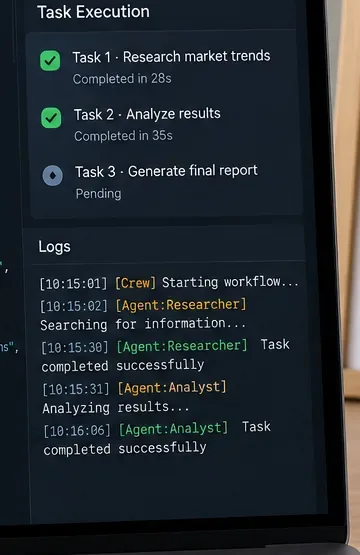
Execution logs help separate a true second task run from multiple steps, retries, or tool calls inside one task.
CrewAI exposes several observability hooks. At crew level, the current documentation includes verbose, step_callback, task_callback, output_log_file, and tracing controls. Agents also support step_callback. These are useful for answering four questions:
Did the scheduler start the same task twice?
Did one agent perform multiple iterations inside one task?
Did a guardrail reject the output and trigger a retry?
Did a tool call repeat even though the task itself ran once?
For an initial diagnostic run, turn on verbose output and a JSON log file:
Flows introduce another class of repetition. CrewAI's current Flow documentation says that all satisfied @start() methods execute when the Flow begins or resumes. If you define several unconditional starts and two of them eventually kick off the same crew, the duplication is in your graph, not inside the crew.
Likewise, or_ listeners can run when any upstream method emits output. CrewAI's own example shows the listener firing once for each upstream emission. Use and_ when the downstream operation should wait until multiple prerequisites have all completed, or use @router() when exactly one branch should proceed.
Before adding a second @start(), ask whether it really represents an independent entry point. If not, use one start method and explicit listeners.
7. Add a completion key for cross-run idempotency
This is the most important production pattern when a task performs an external side effect such as sending email, charging a payment method, creating a CRM record, posting a message, or starting a job.
CrewAI Flows support structured state and the @persist decorator. Persistence lets a flow recover state across restarts. However, persisted state alone does not decide whether a business action should be skipped. Store your own deterministic operation key and check it before doing the side effect.
Persistence and memory are useful building blocks, but a production workflow still needs an explicit “already completed?” rule for actions that must happen once.
from hashlib import sha256
import json
from pydantic import BaseModel
from crewai.flow.flow import Flow, start
from crewai.flow.persistence import persist

class JobState(BaseModel):
    completed_keys: list[str] = []
    report: str = ""

def operation_key(customer_id: str, period: str) -> str:
    payload = {"customer_id": customer_id, "period": period}
    raw = json.dumps(payload, sort_keys=True).encode()
    return sha256(raw).hexdigest()

@persist
class ReportFlow(Flow[JobState]):

    @start()
    def run_report(self):
        key = operation_key("customer-123", "2026-09")

        if key in self.state.completed_keys:
            return self.state.report

        result = reporting_crew.kickoff(
            inputs={"customer_id": "customer-123", "period": "2026-09"}
        )

        self.state.report = result.raw
        self.state.completed_keys.append(key)
        return self.state.report
CrewAI documents that @persist can store Flow state across restarts and that resuming with the same state ID reloads the latest snapshot. See CrewAI Flow persistence documentation.
Important production caveat: the example above is useful for ordinary workflow deduplication, but it is not enough for a financially or legally critical side effect. A process can crash after the external action succeeds but before the completion key is persisted. For strong exactly-once-like behavior, use an external transactional store or the target API's own idempotency key, and record the operation atomically where possible.
8. Cache repeated tool calls, but do not mistake cache for task idempotency
CrewAI agents and crews expose cache, and the official documentation describes it as caching tool execution results. The current agent docs show caching enabled by default, and the performance guidance recommends keeping it enabled for repetitive tool usage.
That helps when an agent makes the same expensive search or deterministic tool call more than once. It does not mean that calling crew.kickoff() twice will automatically skip the crew's tasks. The task still belongs to the execution graph.
Use cache for repeated reads. Use an idempotency key for repeated writes.
Operation
Preferred protection
Search the same documentation
Tool cache
Reuse prior knowledge across tasks
Memory or task context
Skip an optional task when enough data already exists
ConditionalTask
Prevent a Flow branch from firing incorrectly
Router, state condition, and_, or graph redesign
Prevent duplicate external writes across retries/restarts
Persistent idempotency key or external transactional store
9. Memory reduces repeated discovery, but it does not cancel tasks
CrewAI's unified memory system stores facts after tasks and recalls relevant context before tasks. The current docs state that, with crew memory enabled, discrete facts are extracted from task outputs and relevant memories are injected into later task prompts.
That can reduce unnecessary rediscovery, especially when a writer should know what a researcher already found. But memory is retrieval context, not a skip flag. An explicitly scheduled task still runs unless your Crew or Flow logic decides otherwise.
Use memory for “What do we already know?” Use state or a conditional task for “Should this operation run?” See CrewAI Memory.
10. Use structured outputs to make skip decisions reliable
Natural-language output is hard to use for deterministic workflow control. CrewAI tasks can return Pydantic or JSON outputs through output_pydantic and output_json. A structured result makes it straightforward to decide whether enrichment, review, escalation, or another task is necessary.
Then route based on fields rather than asking another agent to interpret a prose paragraph. This usually lowers both duplicate work and prompt ambiguity.
Recommended anti-redundancy configuration
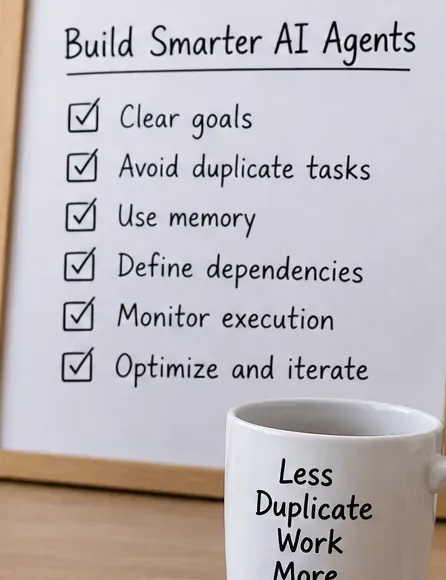
A compact review checklist is useful before increasing model complexity: most redundancy problems are easier to solve in task design and control flow first.
For a typical research-to-report pipeline, start conservatively:
Then add complexity only when a requirement demands it:
Add memory when facts should be reused across tasks or runs.
Add a ConditionalTask when a task should run only if prior output is incomplete.
Use hierarchical process when dynamic manager allocation is genuinely needed.
Enable delegation only for agents that need to hand work to peers.
Add guardrails for output quality, while accepting that a failed guardrail intentionally causes retries.
Add Flow persistence when state must survive restarts.
Add an external idempotency layer when duplicate side effects are unacceptable.
Final troubleshooting checklist
Is the same Task declared twice in the crew's task list?
Do two task descriptions authorize the same research or tool call?
Can a later task consume the earlier task through context instead?
Should the repeated task be a ConditionalTask?
Are you using hierarchical orchestration when sequential would be sufficient?
Is allow_delegation enabled on agents that do not need it?
Is a guardrail rejection causing a retry?
Is max_iter large enough that one task performs many similar tool calls?
Are multiple @start() methods or or_ listeners firing the same downstream crew?
Does a second kickoff() represent an intentional new run or an accidental duplicate invocation?
Are you relying on memory or cache as if they were task-level idempotency controls?
Do external writes have a deterministic idempotency key?
Can logs prove whether the duplicate occurred at the task, agent-step, tool, or Flow level?
Bottom line
Stopping redundant CrewAI work is mostly an orchestration problem. Make ownership explicit, chain tasks with context, conditionally skip work that is already satisfied, keep delegation narrow, understand when retries are intentional, and trace execution before changing prompts. For Flows and production side effects, go one step further: persist a deterministic completion key or use an external idempotency mechanism.
The useful mental model is simple: context prevents rediscovery, conditions prevent unnecessary tasks, cache prevents repeated tool computation, and idempotency prevents repeated side effects. They solve related problems, but they are not interchangeable.