Home
» AI Agents
»
Simple Bi-Weekly Payroll Tracker Excel Template for Small Teams
Simple Bi-Weekly Payroll Tracker Excel Template for Small Teams
A bi-weekly payroll tracker can be simple without being careless. For a small team, the most useful workbook is not a miniature payroll platform. It is a controlled reconciliation file that shows who is being paid, which pay period the payment covers, the approved hours or salary basis, gross pay, deductions, taxes, and the final net amount.
For 2026, the IRS treats a biweekly payroll period as 26 pay periods for federal withholding methods. That does not mean a bi-weekly pay schedule determines when federal employment tax deposits are due. IRS Publication 15 says the monthly or semiweekly deposit schedule is based on the employer's tax liability and lookback rules, not on how often employees are paid. See the current IRS Publication 15 (2026) and IRS Publication 15-T (2026).
This distinction matters when you build the workbook: use the tracker to organize pay runs and reconcile payroll amounts, but do not make the pay-period calendar double as a federal tax-deposit calendar.
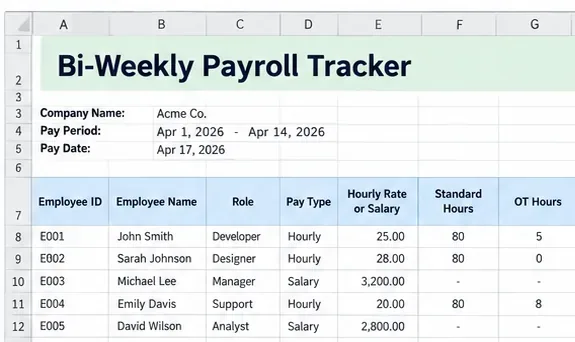
A compact payroll input sheet can keep pay-period information and employee-level pay inputs together while leaving tax calculations and sensitive master data to the appropriate payroll records.
What a small-team payroll tracker should do
The workbook should answer four practical questions quickly: which pay run is this, which employees are included, what amounts were approved, and do the totals reconcile to the payroll or banking output?
It should not be the only place where you store employment-tax logic, Social Security numbers, Form W-4 information, or legally required payroll records. The U.S. Department of Labor requires covered employers to keep specific wage-and-hour records, but it does not require a particular record format. Its FLSA recordkeeping guidance lists required information and retention periods. A lightweight Excel file can support your process, but your full recordkeeping system may need more information than the tracker contains.
Recommended workbook structure
For a small team, four sheets are usually enough. Keeping functions separate makes formulas easier to audit and reduces the chance that someone overwrites a control value.
Sheet
Purpose
Typical contents
Pay Runs
One row per employee per pay period
Dates, hours, gross pay, taxes, deductions, net pay, status
Employees
Stable reference data
Employee ID, name, department, pay type, default rate, active status
Settings
Controlled inputs
Company name, pay-period anchor date, approved deduction labels, status lists
Summary
Reconciliation and review
Gross payroll, taxes, deductions, net payroll, headcount, quarter-to-date totals
Turn the main data ranges into Excel Tables rather than leaving them as loose ranges. Microsoft notes that tables support structured references that adjust as rows are added or removed. This makes formulas such as totals and lookups easier to read and less fragile. See Microsoft's overview of Excel tables and its guidance on structured references.
Copy-ready columns for the Pay Runs sheet
The following layout is intentionally conservative. It separates time inputs from calculated or imported payroll amounts and avoids putting highly sensitive identifiers in the working file.
Column
What it stores
Input or formula?
Pay Period ID
Unique run label such as 2026-08
Input
Period Start
First day covered by the pay run
Input
Period End
Last day covered by the pay run
Input
Pay Date
Date wages are paid
Input
Employee ID
Internal identifier
Input/list
Employee Name
Display name
Lookup
Pay Type
Hourly, salary, or other approved category
Lookup
Week 1 Hours
Hours in the first workweek
Input
Week 2 Hours
Hours in the second workweek
Input
Approved Gross Pay
Gross amount from the approved calculation
Input or controlled formula
Federal Withholding
Actual federal income tax withholding
Import/input
Employee FICA
Employee Social Security and Medicare amounts
Import/input
State/Local Tax
Applicable withholding
Import/input
Benefits/Deductions
Employee deductions for the period
Input/import
Net Pay
Amount payable to employee
Formula or import
Status
Draft, Reviewed, Approved, Paid
Validated list
Notes
Exception or adjustment explanation
Input
Do not calculate bi-weekly overtime as “hours over 80”
This is one of the most important design choices in the workbook. For covered, nonexempt employees, the Fair Labor Standards Act generally requires overtime after 40 hours in a workweek, not after 80 hours across a two-week pay period. The workweek is a fixed, recurring seven-day period. The Department of Labor explains this in Fact Sheet #23 on FLSA overtime.
That is why the template should keep Week 1 Hours and Week 2 Hours separate. An employee who works 45 hours in week one and 35 hours in week two may still have overtime due even though the two-week total is 80 hours.
For a straightforward hourly employee whose regular rate equals the stated hourly rate, a review formula can flag weekly overtime:
Use that as a review aid, not as a universal legal payroll formula. Regular-rate calculations can be affected by bonuses, commissions, and other compensation, and exemptions can change the analysis. When the situation is not simple, calculate payroll in a compliant payroll system or have the result reviewed before using it as the amount to pay.
Use formulas for reconciliation, not for guessing tax rules
A good spreadsheet automates arithmetic that is stable and visible. For example, if the tax and deduction amounts have already been calculated correctly, net pay can be reconciled with a formula such as:
You can also summarize the current pay run with SUMIFS. Microsoft documents SUMIFS as a way to sum values that meet multiple criteria. A summary cell could total net pay for a selected Pay Period ID and Approved status rather than relying on manually selected ranges.
Avoid hardcoding a flat “federal tax percentage” into a generic template. Federal income tax withholding depends on current IRS methods and employee Form W-4 information. The current 2026 rules are in Publication 15-T. Likewise, state and local requirements vary. The tracker should either import calculated withholding from your payroll process or use a separately maintained calculation layer that is reviewed whenever tax rules change.
Bi-weekly pay frequency is not the same as semiweekly tax deposits
The terms sound similar, but they describe different things. “Bi-weekly payroll” means employees are normally paid every two weeks. IRS Publication 15-T uses 26 pay periods for biweekly withholding calculations. “Semiweekly schedule depositor,” by contrast, is an IRS employment-tax deposit classification based primarily on tax liability during a lookback period. IRS Publication 15 explicitly says the deposit schedule is not determined by how often you pay employees.
Keep these in different parts of your process. Put the employee pay schedule in the workbook. Track federal deposit deadlines in your payroll/tax calendar using the employer's actual IRS deposit status.
Make the workbook harder to break
Use data validation for controlled fields
Apply drop-down lists to Pay Type, Status, Department, and approved deduction categories. Microsoft says Excel data validation can restrict entries to a list, a numeric range, a date range, or other defined conditions. Its data validation guidance also notes that copied or filled values can bypass some validation behavior, so validation should be treated as an input aid rather than a complete control.
Lock formula cells after testing
Leave data-entry cells editable and lock formulas, totals, and reference tables. Microsoft's worksheet protection guidance explains how to unlock intended input ranges and then protect the sheet.
Worksheet protection is mainly an editing control, not a confidentiality system. Microsoft specifically warns that worksheet or workbook protection should not be assumed to secure sensitive personal information. For that reason, a practical payroll tracker should use internal employee IDs and avoid storing Social Security numbers or unnecessary banking data in the everyday reconciliation workbook.
Build a useful Summary sheet
The summary should make review fast. A small team usually needs only a handful of metrics for each pay run:
employees included in the run;
total approved gross pay;
total employee tax withholding;
total employee deductions;
total net pay;
count and dollar amount of manual adjustments;
count of rows still in Draft or Reviewed status;
quarter-to-date wages and tax totals for reconciliation.
Employers generally use Form 941 to report wages, federal income tax withheld, and Social Security and Medicare taxes for each quarter. The IRS describes the reporting purpose and current form on its Form 941 page. Your Summary sheet can help reconcile quarter-to-date internal totals, but it should not be treated as a substitute for the return or payroll tax records.
Small-team payroll review checklist
Confirm the period: start date, end date, and pay date are correct.
Confirm the roster: new hires, terminations, and employees on leave are handled intentionally.
Review weekly hours: do not combine two workweeks when evaluating overtime.
Check changes: rates, salaries, bonuses, reimbursements, benefits, and deductions have approval.
Reconcile gross pay: compare spreadsheet totals with the approved payroll calculation.
Reconcile withholding: use actual calculated tax amounts, not a generic percentage.
Review exceptions: filter Notes and adjustment columns for unusual items.
Approve before payment: keep a visible Draft/Reviewed/Approved/Paid status.
Reconcile payment: compare the final net-pay total with the bank or payroll funding amount.
Archive the run: preserve the final version under your record-retention policy.
Check state payday rules before adopting a bi-weekly schedule
A bi-weekly schedule is common, but it is not automatically appropriate for every employee in every state. State payday-frequency rules differ by jurisdiction and sometimes by occupation. The U.S. Department of Labor maintains a State Payday Requirements reference that shows those differences. Verify the rule that applies where your employees work, along with any state-specific overtime, deduction, pay-stub, final-pay, and recordkeeping requirements.
When this Excel template is enough—and when it is not
This approach works well when a small team already has a reliable source for approved hours, tax calculations, and payment processing and needs a clear workbook for review, reconciliation, and audit trail. It is also useful for planning payroll cash requirements or checking the output of a payroll provider.
It becomes risky when the workbook is expected to handle complex multi-state payroll, garnishments, retroactive corrections, variable regular-rate calculations, leave programs, benefits eligibility, tax filing, or direct deposit by itself. At that point, the spreadsheet should remain a reconciliation layer while a payroll system handles the calculation and compliance workflow.
The best simple bi-weekly payroll tracker is therefore intentionally limited: one clean table for pay-run data, one controlled employee reference sheet, one settings area, and one summary that tells you whether the payroll is ready to approve. That keeps Excel useful without asking it to become the payroll system.