Home
» AI Agents
»
How to Fix API Timeout Error When Running Multi-Agent Workflows
How to Fix API Timeout Error When Running Multi-Agent Workflows
An “API Timeout Error” in a multi-agent workflow is rarely fixed by changing one number. A planner may call three agents, each agent may call an LLM, search service, database, or tool API, and every layer can have its own timeout, retry policy, connection pool, and concurrency limit. The practical fix is to identify which layer times out first, then choose between longer waits, fewer concurrent calls, smarter retries, a shorter critical path, or an asynchronous job design.
The tradeoff matters: raising a timeout is simple but holds resources longer; aggressive retries can multiply load and cost; lowering concurrency improves stability but reduces peak throughput; parallel agents reduce wall-clock latency only when the downstream services can absorb the fan-out. There is no single best setting for every multi-agent system.
Which timeout are you actually hitting?
Start by classifying the failure instead of treating every timeout as the same event. HTTP clients can time out while connecting, reading, writing, or waiting for a connection from a pool. HTTPX, for example, documents four separate timeout types: connect, read, write, and pool. Its default behavior is to raise a timeout after five seconds of network inactivity, not necessarily five seconds of total request duration. See the official HTTPX timeout documentation.
If you use the OpenAI Python SDK, its current official README states that requests default to a 10-minute client timeout and that timeout failures are retried twice by default. The SDK also automatically retries connection errors plus HTTP 408, 409, 429, and 5xx responses with a short exponential backoff. Those are SDK defaults, not a guarantee that every proxy, load balancer, gateway, or orchestrator in front of the request will wait 10 minutes. See the official OpenAI Python SDK README.
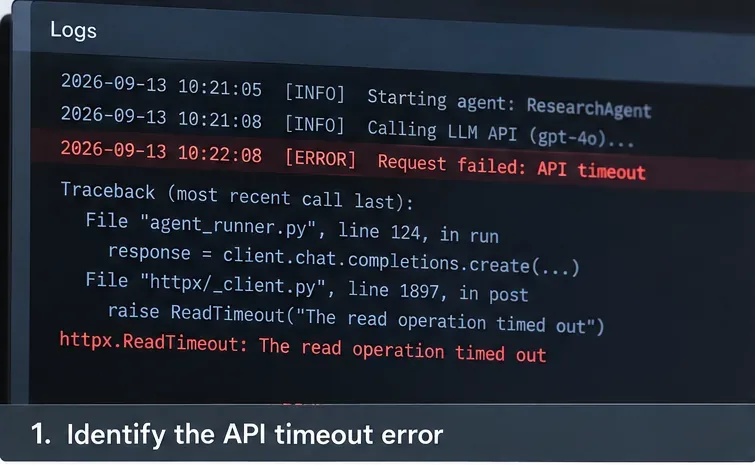
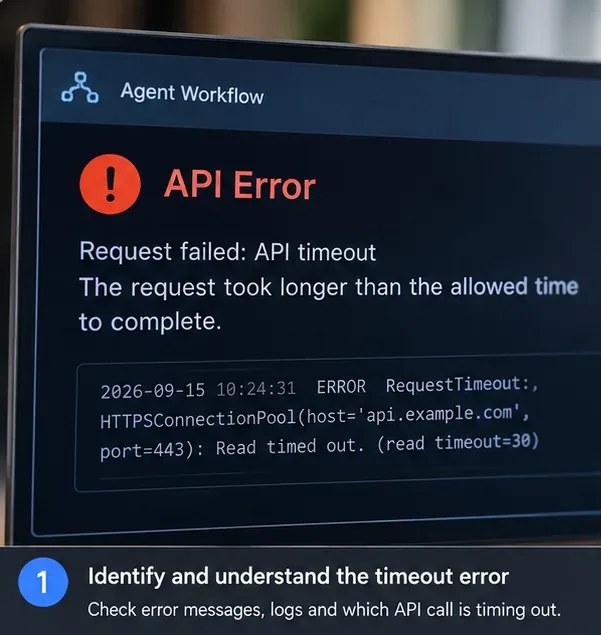
Step 1: capture the exact exception and the agent, endpoint, and transport layer that timed out instead of logging only a generic workflow failure.
What fix should you choose?
Option
Best fit
Main benefit
Main tradeoff
Increase the request timeout
Healthy but legitimately slow model/tool calls
Minimal code and architecture change
Workers and connections remain occupied longer; an upstream gateway may still terminate the request first
Can multiply traffic, latency, and cost; unsafe for non-idempotent actions unless designed carefully
Lower agent concurrency
429s, pool timeouts, downstream saturation
Reduces bursts and queue contention
Lower peak throughput and sometimes longer workflow completion time
Parallelize independent agents
Sequential workflows with independent branches
Shortens the critical path
Increases simultaneous requests and can trigger rate or connection limits
Stream partial output
Interactive UX where first-byte latency matters
Users see progress sooner
Does not automatically solve a hard integration timeout or overloaded downstream service
Move work to an async job/queue
Workflows that can take tens of seconds or minutes
Decouples HTTP request lifetime from workflow lifetime
Requires job state, polling/webhooks, idempotency, persistence, and operational monitoring
Step 1: Find the first layer that exceeds its deadline
Log a correlation ID for the full workflow and a span or child ID for each agent and tool call. Record start time, end time, endpoint, attempt number, exception type, response status when available, and whether cancellation came from the caller or the downstream service.
The important question is “who stopped waiting first?” If the LLM call finishes in 42 seconds but an API gateway gives up at 30 seconds, raising the LLM client timeout from 60 to 120 seconds changes nothing. Amazon’s current documentation for API Gateway HTTP APIs lists a maximum integration timeout of 30 seconds, which is a good example of why the shortest deadline in the chain often determines the result. See Amazon API Gateway HTTP API quotas.
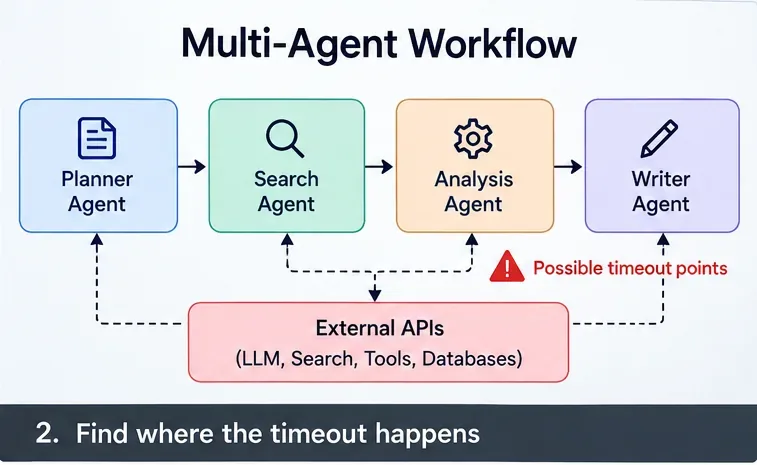
Step 2: map the request path and mark every place that can terminate or delay a call: orchestrator, agent, gateway, model API, search API, database, and tool service.
Step 2: Measure the critical path, not just average latency
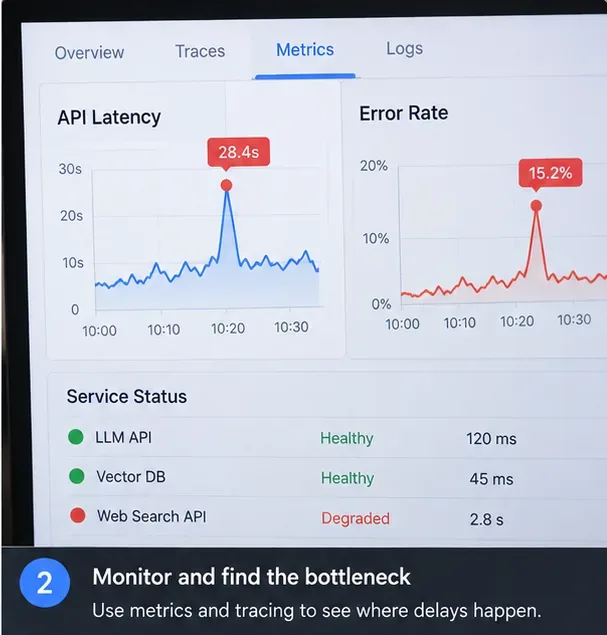
Average latency can look healthy while a small tail of slow calls causes most workflow failures. Track at least per-dependency success rate plus p50, p95, and p99 latency. In a fan-out stage, also record queue time and connection-pool wait time because a “slow API” may actually be an overloaded client waiting for a free connection.
Use traces to answer three practical questions: which dependency dominates the critical path, whether multiple slow agents run sequentially when they could run concurrently, and whether concurrency spikes line up with 429, pool-timeout, or 5xx errors.
Step 3: compare latency, errors, and dependency health together; a timeout spike that coincides with one degraded dependency suggests a different fix from a system-wide concurrency spike.
Step 3: Build a timeout budget from the outside in
Set an end-to-end workflow deadline first, then make inner deadlines shorter so lower layers fail early enough for the orchestrator to recover. For example, a 120-second user-facing deadline might reserve 10 seconds for orchestration and response handling, leaving 110 seconds for useful work. An individual tool call might receive 15 seconds, while a model call might receive 45 or 60 seconds depending on observed tail latency.
Do not copy those values blindly; they are an example budgeting method, not universal defaults. Choose values from your measured latency distribution and product SLO. The outer deadline should be long enough to contain the inner call, its allowed retries, backoff delays, and cleanup time.
Python 3.11 and later provide asyncio.timeout() for placing a deadline around asynchronous work. When the deadline expires, the task is cancelled and the context manager surfaces a TimeoutError. Review the official Python asyncio timeout documentation.
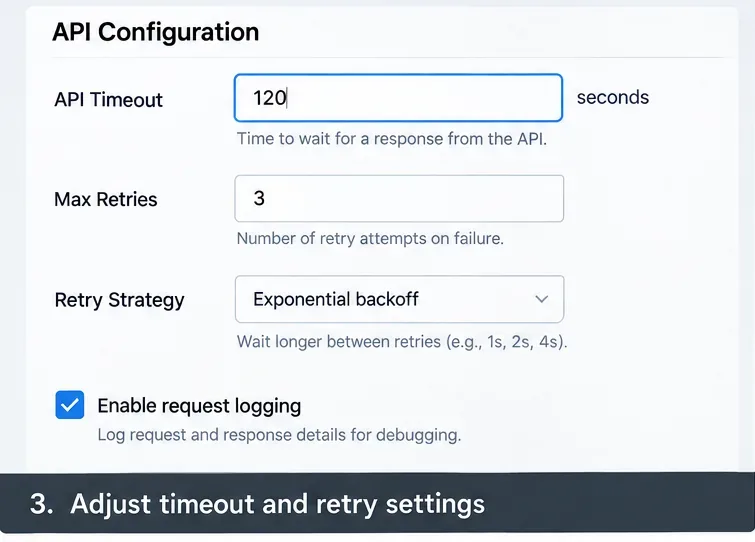
Step 4: configure timeout and retry values as a coordinated budget rather than increasing each value independently.
Step 4: Cap concurrency before you increase retries
Multi-agent systems often fail because fan-out grows faster than expected. If 20 user requests each launch five agents and every agent launches two tools, the system can create up to 200 downstream calls before retries. Adding retries first can turn congestion into a retry storm.
A concurrency limiter is often the better first move when you see 429 responses, pool timeouts, rising queue time, or a downstream dependency at saturation. Python’s asyncio.Semaphore provides a simple counter-based way to limit how many coroutines enter a protected section at once. See the official Python semaphore documentation.
import asyncio

sem = asyncio.Semaphore(8)

async def guarded_agent_call(agent, task):
    async with sem:
        return await agent.run(task)
The tradeoff is deliberate: a lower limit protects downstream services but can increase queueing inside your application. Tune it against throughput, p95 latency, rate limits, and connection-pool capacity instead of picking the largest number your machine can schedule.
Step 5: pair bounded concurrency with explicit transport settings so a full connection pool does not masquerade as a slow model or tool.
Step 5: Retry only failures that are likely to succeed later
Retries are valuable for transient connection failures, rate limits, selected server errors, and request timeouts when repeating the operation is safe. They are a poor default for validation errors, authentication failures, deterministic tool bugs, or side-effecting actions without idempotency protection.
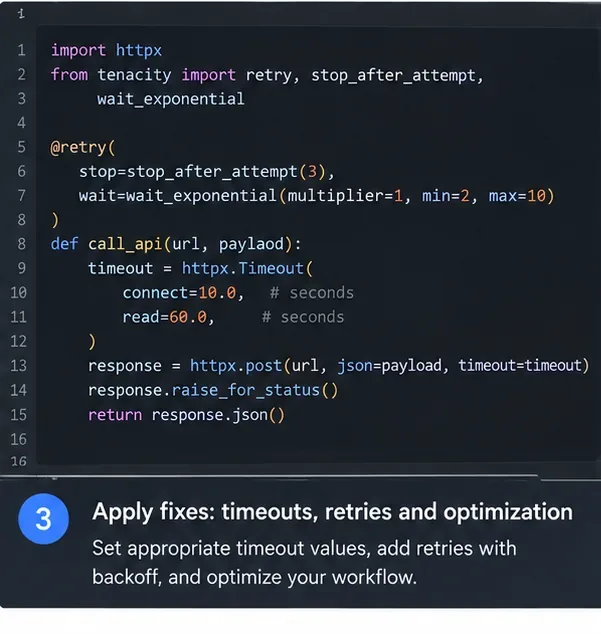
Watch for retry multiplication. If an SDK makes two retries, that means up to three attempts for one logical call. If your agent layer also retries the entire call twice, the theoretical maximum becomes nine attempts for that one logical operation: three outer attempts multiplied by three SDK attempts. If the orchestrator then retries an entire five-agent stage, the request volume can grow quickly.
Centralize retry ownership where possible. For LLM calls using the OpenAI Python SDK, remember that the current SDK already retries certain classes of failures twice by default. Add an outer retry only when you have a specific reason and can bound the total attempt budget. citeturn212133view0turn212133view1
Step 6: classify the error before retrying; a read timeout may justify a bounded retry, while a permanent configuration error usually does not.
Step 6: Shorten the critical path without creating a fan-out problem
If planner, researcher, evaluator, and writer agents run strictly one after another, total latency is approximately the sum of their durations. Independent branches can sometimes run concurrently, reducing wall-clock time toward the slowest branch rather than the sum of all branches.
Python’s asyncio.TaskGroup is a structured way to run related tasks concurrently. The current Python documentation notes that TaskGroup waits for tasks in the group and cancels the remaining tasks when one fails with a non-cancellation exception, giving stronger safety behavior than unstructured task spawning. See the official Python TaskGroup documentation.
Parallelization is not free. If the same provider enforces a tight requests-per-minute or concurrent-request limit, running four agents at once may turn a slow but successful workflow into a fast burst of 429 responses. Parallelize only truly independent work, and keep the global concurrency limiter in place.
Step 7: When should you stop using a synchronous HTTP request?
If normal workflows routinely outlive the shortest request timeout in your network path, moving to an asynchronous job model is usually cleaner than continually stretching every timeout. The initial HTTP request can validate input, create a durable job, and immediately return a job ID. Workers then execute the multi-agent graph outside the request lifecycle, while the client receives progress through polling, server-sent events, WebSockets, or a webhook.
Streaming is useful when the server can begin sending meaningful output early. The OpenAI Python SDK, for example, supports server-sent-event streaming for Responses API calls. Streaming improves perceived responsiveness and can keep an active connection producing data, but it does not automatically solve every proxy’s maximum request lifetime. See the official OpenAI streaming event reference.
Choose an async job when durability matters more than immediate simplicity: long research tasks, agent workflows with human approval, many tool calls, expensive operations you do not want to repeat, or workloads that must survive client disconnects. The cost is additional state management: job status, checkpoints, idempotency keys, cancellation, result storage, and retry ownership.
Step 7: for long workflows, track agent completion as durable workflow state instead of depending on one client connection to stay open until every agent finishes.
Step 8: Validate the fix under realistic load
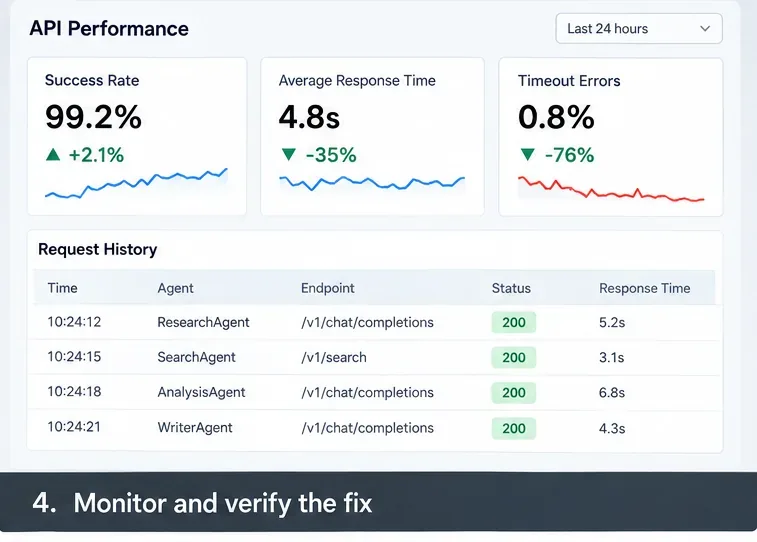
A fix is not proven because one request succeeds. Test at the concurrency you expect in production and measure success rate, timeout rate, retry attempts per logical task, p95 and p99 latency, queue delay, connection-pool wait, downstream 429/5xx rates, and cost per completed workflow.
If you run agents in Kubernetes, use readiness and liveness for different purposes. Kubernetes documents readiness probes as the mechanism that determines whether a Pod should receive traffic, while liveness probes determine when a container should be restarted. Its documentation explicitly warns that poorly implemented liveness checks can cause cascading failures under load. See the official Kubernetes probe documentation.
For temporary overload, becoming “not ready” is often safer than repeatedly killing healthy-but-busy workers. Reserve liveness failures for conditions where restarting the process is genuinely the right recovery action.
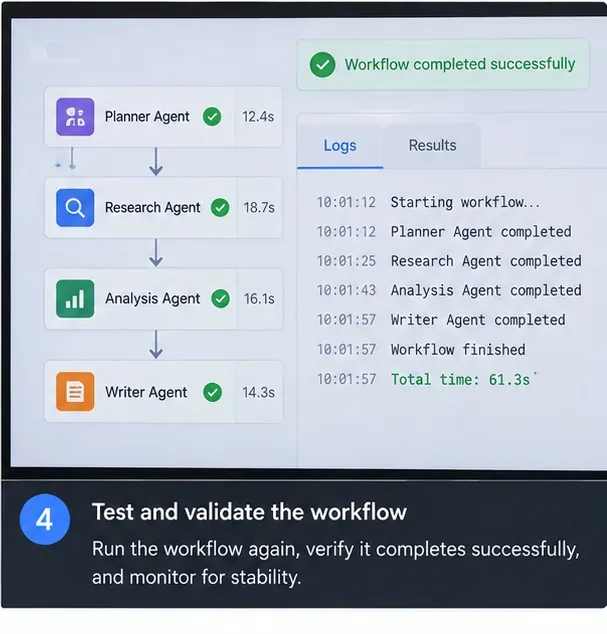
Step 8: verify the change with production-like traffic and tail-latency metrics, not only a single successful test run.
How do you tell which fix is right for your failure pattern?
Observed pattern
Most useful first change
What not to do first
Calls finish just after the client deadline; downstream is healthy
Increase the specific inner timeout and re-budget the outer deadline
Increase retries
429s and pool timeouts rise with concurrency
Lower concurrency and add queueing/backpressure
Launch more agents in parallel
Occasional 408/5xx or network failures
Use bounded exponential-backoff retries for idempotent operations
Retry every exception indefinitely
Workflow routinely takes longer than gateway limits
Use an async job architecture or supported streaming design
Keep raising only the SDK timeout
One slow dependency dominates p99 latency
Optimize, cache, replace, or isolate that dependency; consider a fallback
Tune unrelated agent timeouts
Failures appear only after adding parallel agents
Keep useful parallelism but add a global semaphore and per-provider limits
Assume parallel is always faster
A practical production baseline
For a typical multi-agent API, a robust baseline is to give every workflow a correlation ID, trace every agent and tool call, define one end-to-end deadline, assign shorter per-call deadlines inside it, enforce a global concurrency limit per downstream provider, keep retries bounded and idempotent, and persist enough state to resume or report partial completion.
Then tune from measurements. If the system is stable but too slow, selectively parallelize independent work. If it is fast at low load but fails at peak load, reduce fan-out and add backpressure. If successful workflows naturally take longer than the synchronous request path allows, switch architectures rather than trying to make every proxy wait longer.